Not authorized /Unable to claim server

For a couple of months now (maybe 4-5) I’m getting “not authorized” back from my server, this happens maybe once or twice a week and I have to follow https://support.plex.tv/articles/204281528-why-am-i-locked-out-of-server-settings-and-how-do-i-get-in/ to get access back.

At home I access the webinterface via LAN connection and get “Not authorized”, if I try via app.plex.tv I’m getting the unable to connect securely message. Even setting up a portforward to the server and trying via localhost I get “not authorized” if I’m signed in.

I stop the server, remove the Online* keys from Preferences.xml and start the server again. When claiming I often have to try many times before being able to claim, some with no error at all, and some with “unable to sign in at the moment” (or something similar)

I’ve even tried a completely new OS install and not importing anything, still get the same issue after a couple of days / a week.

Looking at the debug and error logs I get the following related to the claim process.

Jul 27, 2023 17:04:57.997 [140063592487736] DEBUG - Request: [127.0.0.1:48644 (Loopback)] POST /myplex/claim?token=xxxxxxxxxxxxxxxxxxxxCFyWDq (11 live) #2c5 GZIP / Accept => text/plain, */*; q=0.01 / Accept-Encoding => gzip, deflate, br / Accept-Language => en / Connection => keep-alive / Content-Length => 0 / Host => localhost:32400 / Origin => http://localhost:32400 / Referer => http://localhost:32400/web/index.html / sec-ch-ua => "Not/A)Brand";v="99", "Microsoft Edge";v="115", "Chromium";v="115" / sec-ch-ua-mobile => ?0 / sec-ch-ua-platform => "Windows" / Sec-Fetch-Dest => empty / Sec-Fetch-Mode => cors / Sec-Fetch-Site => same-origin / User-Agent => Mozilla/5.0 (Windows NT 10.0; Win64; x64) AppleWebKit/537.36 (KHTML, like Gecko) Chrome/115.0.0.0 Safari/537.36 Edg/115.0.1901.183 / X-Plex-Client-Identifier => qmn0ookfmtem8w01g26u3o46 / X-Plex-Device => Windows / X-Plex-Device-Name => Microsoft Edge / X-Plex-Device-Screen-Resolution => 2560x1321,2560x1440 / X-Plex-Features => external-media,indirect-media,hub-style-list / X-Plex-Language => en / X-Plex-Model => bundled / X-Plex-Platform => Microsoft Edge / X-Plex-Platform-Version => 115.0 / X-Plex-Product => Plex Web / X-Plex-Session-Id => 9ca6c7c9-0098-4d18-8dbc-94f83e5d5173 / X-Plex-Version => 4.108.0 / X-Requested-With => XMLHttpRequest
Jul 27, 2023 17:04:57.998 [140063592487736] DEBUG - [Req#2c5/HCl#82] HTTP requesting POST https://plex.tv/api/claim/exchange?token=xxxxxxxxxxxxxxxxxxxxCFyWDq
Jul 27, 2023 17:04:58.022 [140063681772344] WARN - [HttpClient/HCl#82] HTTP error requesting POST https://plex.tv/api/claim/exchange?token=xxxxxxxxxxxxxxxxxxxxCFyWDq (60, SSL peer certificate or SSH remote key was not OK) (SSL certificate problem: self-signed certificate)
Jul 27, 2023 17:04:58.023 [140063592487736] DEBUG - [Req#2c5] MyPlex: Did token exchange for claim (returnCode: -60)
Jul 27, 2023 17:04:58.023 [140063592487736] DEBUG - [Req#2c5] MyPlex: Got a token poked, let's act on it.
Jul 27, 2023 17:04:58.023 [140063592487736] DEBUG - [Req#2c5/HCl#83] HTTP requesting GET https://plex.tv/api/v2/features?X-Plex-Token=
Jul 27, 2023 17:04:58.050 [140063681772344] WARN - [HttpClient/HCl#83] HTTP error requesting GET https://plex.tv/api/v2/features?X-Plex-Token=xxxxxxxxxxxxxxxxxxxxficate or SSH remote key was not OK) (SSL certificate problem: self-signed certificate)
Jul 27, 2023 17:04:58.050 [140063592487736] WARN - [Req#2c5] FeatureManager: Couldn't get features. Trying again soon.
Jul 27, 2023 17:04:58.050 [140063592487736] DEBUG - [Req#2c5/HCl#85] HTTP requesting GET https://plex.tv/api/v2/user/privacy?X-Plex-Token=
Jul 27, 2023 17:04:58.077 [140063681772344] WARN - [HttpClient/HCl#85] HTTP error requesting GET https://plex.tv/api/v2/user/privacy?X-Plex-Token=xxxxxxxxxxxxxxxxxxxxficate or SSH remote key was not OK) (SSL certificate problem: self-signed certificate)
Jul 27, 2023 17:04:58.078 [140063592487736] DEBUG - [Req#2c5] [Analytics] Using cached data for privacy preferences
Jul 27, 2023 17:04:58.078 [140063592487736] DEBUG - [Req#2c5/HCl#86] HTTP requesting GET https://plex.tv/api/v2/release_channels?X-Plex-Token=
Jul 27, 2023 17:04:58.104 [140063681772344] WARN - [HttpClient/HCl#86] HTTP error requesting GET https://plex.tv/api/v2/release_channels?X-Plex-Token=xxxxxxxxxxxxxxxxxxxxficate or SSH remote key was not OK) (SSL certificate problem: self-signed certificate)
Jul 27, 2023 17:04:58.105 [140063592487736] DEBUG - [Req#2c5] [AutoUpdateRequestHandler] Using cached data for update channels
Jul 27, 2023 17:04:58.105 [140063696436024] DEBUG - Completed: [127.0.0.1:48644] 500 POST /myplex/claim?token=xxxxxxxxxxxxxxxxxxxxCFyWDq (11 live) #2c5 GZIP 107ms 533 bytes (pipelined: 1)

Trying the same URL with curl for example doesn’t give any SSL errors back

What is going on and what can I do to fix it, it’s getting really annoying.

I’m currently running 1.32.5.7349 on Ubuntu 22.04
Ports forwarded and always accessible from internet when trying.

And yesterday I got the “Not authorized” issue again.
And again, even re-claiming it is a PITA, clicking the “Claim Server” button doesn’t return any error in the browser, and the following in the logs.

Jul 31, 2023 18:03:11.684 [139644608830264] DEBUG - Request: [127.0.0.1:41022 (Loopback)] POST /myplex/claim?token=xxxxxxxxxxxxxxxxxxxx3xkLsv (5 live) #bd0 GZIP / Accept => text/plain, */*; q=0.01 / Accept-Encoding => gzip, deflate, br / Accept-Language => en / Connection => keep-alive / Content-Length => 0 / Host => localhost:32400 / Origin => http://localhost:32400 / Referer => http://localhost:32400/web/index.html / sec-ch-ua => "Not/A)Brand";v="99", "Microsoft Edge";v="115", "Chromium";v="115" / sec-ch-ua-mobile => ?0 / sec-ch-ua-platform => "Windows" / Sec-Fetch-Dest => empty / Sec-Fetch-Mode => cors / Sec-Fetch-Site => same-origin / User-Agent => Mozilla/5.0 (Windows NT 10.0; Win64; x64) AppleWebKit/537.36 (KHTML, like Gecko) Chrome/115.0.0.0 Safari/537.36 Edg/115.0.1901.188 / X-Plex-Client-Identifier => mvi149fx2bm6qevg196e9qit / X-Plex-Device => Windows / X-Plex-Device-Name => Microsoft Edge / X-Plex-Device-Screen-Resolution => 2505x1321,2560x1440 / X-Plex-Features => external-media,indirect-media,hub-style-list / X-Plex-Language => en / X-Plex-Model => bundled / X-Plex-Platform => Microsoft Edge / X-Plex-Platform-Version => 115.0 / X-Plex-Product => Plex Web / X-Plex-Session-Id => 686f23dd-ae4f-4c5f-8ba3-f9850cfaa6d5 / X-Plex-Version => 4.108.0 / X-Requested-With => XMLHttpRequest
Jul 31, 2023 18:03:11.684 [139644608830264] DEBUG - [Req#bd0/HCl#4f] HTTP requesting POST https://plex.tv/api/claim/exchange?token=xxxxxxxxxxxxxxxxxxxx3xkLsv
Jul 31, 2023 18:03:11.715 [139644625230648] WARN - [HttpClient/HCl#4f] HTTP error requesting POST https://plex.tv/api/claim/exchange?token=xxxxxxxxxxxxxxxxxxxx3xkLsv (60, SSL peer certificate or SSH remote key was not OK) (SSL certificate problem: self-signed certificate)
Jul 31, 2023 18:03:11.715 [139644608830264] DEBUG - [Req#bd0] MyPlex: Did token exchange for claim (returnCode: -60)
Jul 31, 2023 18:03:11.716 [139644608830264] DEBUG - [Req#bd0] MyPlex: Got a token poked, let's act on it.
Jul 31, 2023 18:03:11.716 [139644608830264] DEBUG - [Req#bd0/HCl#50] HTTP requesting GET https://plex.tv/api/v2/user/privacy?X-Plex-Token=
Jul 31, 2023 18:03:11.731 [139644641438520] VERBOSE - WebSocket: processed 1 frame(s)
Jul 31, 2023 18:03:11.746 [139644625230648] WARN - [HttpClient/HCl#50] HTTP error requesting GET https://plex.tv/api/v2/user/privacy?X-Plex-Token=xxxxxxxxxxxxxxxxxxxxficate or SSH remote key was not OK) (SSL certificate problem: self-signed certificate)
Jul 31, 2023 18:03:11.746 [139644608830264] DEBUG - [Req#bd0] [Analytics] Using cached data for privacy preferences
Jul 31, 2023 18:03:11.747 [139644608830264] DEBUG - [Req#bd0/HCl#52] HTTP requesting GET https://plex.tv/api/v2/release_channels?X-Plex-Token=
Jul 31, 2023 18:03:11.774 [139644625230648] WARN - [HttpClient/HCl#52] HTTP error requesting GET https://plex.tv/api/v2/release_channels?X-Plex-Token=xxxxxxxxxxxxxxxxxxxxficate or SSH remote key was not OK) (SSL certificate problem: self-signed certificate)
Jul 31, 2023 18:03:11.774 [139644608830264] DEBUG - [Req#bd0] [AutoUpdateRequestHandler] Using cached data for update channels
Jul 31, 2023 18:03:11.774 [139644608830264] DEBUG - [Req#bd0/HCl#53] HTTP requesting GET https://plex.tv/api/v2/features?X-Plex-Token=
Jul 31, 2023 18:03:11.800 [139644625230648] WARN - [HttpClient/HCl#53] HTTP error requesting GET https://plex.tv/api/v2/features?X-Plex-Token=xxxxxxxxxxxxxxxxxxxxficate or SSH remote key was not OK) (SSL certificate problem: self-signed certificate)
Jul 31, 2023 18:03:11.800 [139644608830264] WARN - [Req#bd0] FeatureManager: Couldn't get features. Trying again soon.
Jul 31, 2023 18:03:11.800 [139644641438520] DEBUG - Completed: [127.0.0.1:41022] 500 POST /myplex/claim?token=xxxxxxxxxxxxxxxxxxxx3xkLsv (5 live) #bd0 GZIP 116ms 533 bytes (pipelined: 1)
Jul 31, 2023 18:03:11.828 [139644598266680] DEBUG - [Req#bd0/MediaProviderManager] we had 0 cloud providers online, we now have 0

This time I’m not able to claim it at all, just get the error above

A quick search shows I’m not alone in this issue

(No I don’t have any DNS issues in the network)

After about an hour, and having to remove the key PlexOnlineToken (it comes back empty) a couple of times I was finally able to claim my server again, lets see how long it lasts this time…

And this time it lasted for about a day before getting “Not authorized” again, but just on some devices.
What’s even stranger is that different browsers on the same computer gives different results. A browser that was already logged in (the one I used to claim the server yesterday) works fine, but anothter browser or even a private session of the working browser doesn’t work.
So there is something really messed up with session handling and passing tokens between plex cloud and local servers.

@Xcorp

When it fails, please check Preferences.xml.

Look for PlexOnlineToken="value"

If value is null (empty), please grab the logs ZIP file
and let me know.

NULL token has been an annoying race condition we’ve not figured out.
If your logs manage to capture it happening then maybe we can finally fix it.

When it fails and I get Not authorized there has always been a value, but when trying to claim the server after removing all the keys, the PlexOnlineToken key is sometimes created with a null value.
Is it the claim race condition you want to catch?
Full verbose and debug logs?

This morning the devices that still had access 2 days ago also got Not authorized, but later in the evening they had access again without me doing anything at all, haven’t even logged out/in from the plex accout in the browser.

Same thing happened again now, lost access for a couple of days, and then got back in without doing anything. Now I’m locked out again…

@ChuckPa when do you want me to look for a null value and what logs do you want?

Look at Preferences.xml.

Does it contain PlexOnlineToken="" ?

@ChuckPa yes, but with a token, I backup the VM every night and the token stays the same comparing to when I have access and when I don’t.

If I delete all “Online” keys and try to claim the server, when it fails the Token key is created but empty.

Lost access AGAIN!!!

@ChuckPa, tried to claim it again, and now I have an emtpy token

The relevant logs are pasted here

Aug 19, 2023 14:33:51.249 [140650948057912] DEBUG - Request: [127.0.0.1:39612 (Loopback)] POST /myplex/claim?token=xxxxxxxxxxxxxxxxxxxxo8wXVM (6 live) #ab GZIP / Accept => text/plain, */*; q=0.01 / Accept-Encoding => gzip, deflate, br / Accept-Language => en / Connection => keep-alive / Content-Length => 0 / DNT => 1 / Host => localhost:32400 / Origin => http://localhost:32400 / Referer => http://localhost:32400/web/index.html / Sec-Fetch-Dest => empty / Sec-Fetch-Mode => cors / Sec-Fetch-Site => same-origin / Sec-GPC => 1 / User-Agent => Mozilla/5.0 (Windows NT 10.0; Win64; x64; rv:109.0) Gecko/20100101 Firefox/116.0 / X-Plex-Client-Identifier => jhp9gufdoisukct8gzskk59a / X-Plex-Device => Windows / X-Plex-Device-Name => Firefox / X-Plex-Device-Screen-Resolution => 1440x2427,1440x2560 / X-Plex-Features => external-media,indirect-media,hub-style-list / X-Plex-Language => en / X-Plex-Model => bundled / X-Plex-Platform => Firefox / X-Plex-Platform-Version => 116.0 / X-Plex-Product => Plex Web / X-Plex-Session-Id => 6548dcac-aba7-4f20-81ed-2c70a27b1217 / X-Plex-Version => 4.108.0 / X-Requested-With => XMLHttpRequest
Aug 19, 2023 14:33:51.249 [140650948057912] DEBUG - [Req#ab/HCl#24] HTTP requesting POST https://plex.tv/api/claim/exchange?token=xxxxxxxxxxxxxxxxxxxxo8wXVM
Aug 19, 2023 14:33:51.274 [140650940336952] WARN - [HttpClient/HCl#24] HTTP error requesting POST https://plex.tv/api/claim/exchange?token=xxxxxxxxxxxxxxxxxxxxo8wXVM (60, SSL peer certificate or SSH remote key was not OK) (SSL certificate problem: self-signed certificate)
Aug 19, 2023 14:33:51.274 [140650948057912] DEBUG - [Req#ab] MyPlex: Did token exchange for claim (returnCode: -60)
Aug 19, 2023 14:33:51.274 [140650948057912] DEBUG - [Req#ab] MyPlex: Got a token poked, let's act on it.
Aug 19, 2023 14:33:51.274 [140650948057912] DEBUG - [Req#ab/HCl#25] HTTP requesting GET https://plex.tv/api/v2/user/privacy?X-Plex-Token=
Aug 19, 2023 14:33:51.299 [140650940336952] WARN - [HttpClient/HCl#25] HTTP error requesting GET https://plex.tv/api/v2/user/privacy?X-Plex-Token=xxxxxxxxxxxxxxxxxxxxficate or SSH remote key was not OK) (SSL certificate problem: self-signed certificate)
Aug 19, 2023 14:33:51.299 [140650948057912] DEBUG - [Req#ab] [Analytics] Using cached data for privacy preferences
Aug 19, 2023 14:33:51.300 [140650948057912] DEBUG - [Req#ab/HCl#27] HTTP requesting GET https://plex.tv/api/v2/release_channels?X-Plex-Token=
Aug 19, 2023 14:33:51.325 [140650940336952] WARN - [HttpClient/HCl#27] HTTP error requesting GET https://plex.tv/api/v2/release_channels?X-Plex-Token=xxxxxxxxxxxxxxxxxxxxficate or SSH remote key was not OK) (SSL certificate problem: self-signed certificate)
Aug 19, 2023 14:33:51.325 [140650948057912] DEBUG - [Req#ab] [AutoUpdateRequestHandler] Using cached data for update channels
Aug 19, 2023 14:33:51.325 [140650948057912] DEBUG - [Req#ab/HCl#28] HTTP requesting GET https://plex.tv/api/v2/features?X-Plex-Token=
Aug 19, 2023 14:33:51.350 [140650940336952] WARN - [HttpClient/HCl#28] HTTP error requesting GET https://plex.tv/api/v2/features?X-Plex-Token=xxxxxxxxxxxxxxxxxxxxficate or SSH remote key was not OK) (SSL certificate problem: self-signed certificate)
Aug 19, 2023 14:33:51.350 [140650948057912] WARN - [Req#ab] FeatureManager: Couldn't get features. Trying again soon.
Aug 19, 2023 14:33:51.350 [140650957728568] DEBUG - Completed: [127.0.0.1:39612] 500 POST /myplex/claim?token=xxxxxxxxxxxxxxxxxxxxo8wXVM (6 live) #ab GZIP 101ms 533 bytes (pipelined: 1)

When clicking the claim button I just get that back right away, every single time.

Trying to cURL from the same server to the first URL (https://plex.tv/api/claim/exchange?token=xxxxxxxxxxxxxxxxxxxxxx-g_3) gives a 404 back, so there is nothing wrong with SSL from the OS perspective. Is there a separate trust store baked in to the application or am I hitting different servers?

Looking at Plex.tv, your server is asking for a new certificate FAR too frequently.
It should request one only once each 3 months.

At this point, Plex.tv has stopped generating certificates – which is why you are getting the error above.

You need to look in /var/lib/plexmediaserver/Library/Application Support/Plex Media Server/Cache.

  1. Confirm plex:plex owns the directory and has RW to all files (RWX to directories)
  2. Pay specific attention to cert-v2.p12. This is the local copy of your certificate.

I have reset your certificate.

Delete the cert-v2.p12 and then start PMS.
Allow an extra minute for the certificate to generate and be installed.

Thank you @ChuckPa ,

I got access maybe 5 minutes after I wrote my last post though.
Could this be related to the “not authorized” issue as well? When I’m not authorized I’m also getting “unable to connect securely” when trying via app.plex.tv

When I’m not authorized I’m also getting “unable to connect securely” when trying via app.plex.tv

Yes, the two are 100% related. Both are dependent on PMS having a valid certificate.

Your logs showing “CURL error 60”

Error “curl: (60) SSL certificate problem: unable to get local issuer certificate” can be seen when the SSL certificate on the server is not verified or properly configured.

Another reference:

@ChuckPa
Again I’m locked out and with the following in the log

root@plex:~# grep SSL /var/lib/plexmediaserver/Library/Application\ Support/Plex\ Media\ Server/Logs/Plex\ Media\ Server.log
Aug 25, 2023 21:41:21.356 [140650940336952] WARN - [HttpClient/HCl#2245] HTTP error requesting GET https://plex.tv/api/v2/server/users/services?auth_token=xxxxxxxxxxxxxxxxxxxx (60, SSL peer certificate or SSH remote key was not OK) (SSL certificate problem: self-signed certificate)
Aug 25, 2023 21:41:21.405 [140650940336952] WARN - [HttpClient/HCl#2246] HTTP error requesting GET https://scrobbles.plex.tv/state/2167640?after=MTY5MjE0NzQzNjY3NS02MmViYTVhM2RjYjUwNjhhYjE1NmVjNjk%3D&count=100 (60, SSL peer certificate or SSH remote key was not OK) (SSL certificate problem: self-signed certificate)
Aug 25, 2023 21:43:34.535 [140650940336952] WARN - [HttpClient/HCl#2247] HTTP error requesting GET https://plex.tv/media/providers?X-Plex-Token=xxxxxxxxxxxxxxxxxxxx (60, SSL peer certificate or SSH remote key was not OK) (SSL certificate problem: self-signed certificate)
Aug 25, 2023 21:48:34.568 [140650940336952] WARN - [HttpClient/HCl#2248] HTTP error requesting GET https://plex.tv/media/providers?X-Plex-Token=xxxxxxxxxxxxxxxxxxxx (60, SSL peer certificate or SSH remote key was not OK) (SSL certificate problem: self-signed certificate)
Aug 25, 2023 21:53:34.599 [140650940336952] WARN - [HttpClient/HCl#2249] HTTP error requesting GET https://plex.tv/media/providers?X-Plex-Token=xxxxxxxxxxxxxxxxxxxx (60, SSL peer certificate or SSH remote key was not OK) (SSL certificate problem: self-signed certificate)
Aug 25, 2023 21:56:42.385 [140650940336952] WARN - [HttpClient/HCl#224a] HTTP error requesting GET https://plex.tv/api/v2/server/users/services?auth_token=xxxxxxxxxxxxxxxxxxxx (60, SSL peer certificate or SSH remote key was not OK) (SSL certificate problem: self-signed certificate)
Aug 25, 2023 21:56:42.530 [140650940336952] WARN - [HttpClient/HCl#224b] HTTP error requesting GET https://scrobbles.plex.tv/state/2167640?after=MTY5MjE0NzQzNjY3NS02MmViYTVhM2RjYjUwNjhhYjE1NmVjNjk%3D&count=100 (60, SSL peer certificate or SSH remote key was not OK) (SSL certificate problem: self-signed certificate)
Aug 25, 2023 21:58:34.633 [140650940336952] WARN - [HttpClient/HCl#224c] HTTP error requesting GET https://plex.tv/media/providers?X-Plex-Token=xxxxxxxxxxxxxxxxxxxx (60, SSL peer certificate or SSH remote key was not OK) (SSL certificate problem: self-signed certificate)
Aug 25, 2023 22:03:34.665 [140650940336952] WARN - [HttpClient/HCl#2253] HTTP error requesting GET https://plex.tv/media/providers?X-Plex-Token=xxxxxxxxxxxxxxxxxxxx (60, SSL peer certificate or SSH remote key was not OK) (SSL certificate problem: self-signed certificate)
root@plex:~# grep -c SSL /var/lib/plexmediaserver/Library/Application\ Support/Plex\ Media\ Server/Logs/Plex\ Media\ Server.*
/var/lib/plexmediaserver/Library/Application Support/Plex Media Server/Logs/Plex Media Server.1.log:12
/var/lib/plexmediaserver/Library/Application Support/Plex Media Server/Logs/Plex Media Server.2.log:227
/var/lib/plexmediaserver/Library/Application Support/Plex Media Server/Logs/Plex Media Server.3.log:363
/var/lib/plexmediaserver/Library/Application Support/Plex Media Server/Logs/Plex Media Server.4.log:24
/var/lib/plexmediaserver/Library/Application Support/Plex Media Server/Logs/Plex Media Server.5.log:30
/var/lib/plexmediaserver/Library/Application Support/Plex Media Server/Logs/Plex Media Server.log:9

The certificate hasn’t been written to since 2023-08-19

root@plex:/var/lib/plexmediaserver/Library/Application Support/Plex Media Server/Cache# ls -l /var/lib/plexmediaserver/Library/Application\ Support/Plex\ Media\ Server/Cache/cert-v2.p12
-rw------- 1 plex plex 5843 Aug 19 14:41 '/var/lib/plexmediaserver/Library/Application Support/Plex Media Server/Cache/cert-v2.p12'

I also checked the md5sum and compared to a backup from the night between 19th and 20th.
md5sums match and I know I had access after that backup.

I tried to extract the public cert from the p12 to check expiry date but don’t have the password

root@plex:/var/lib/plexmediaserver/Library/Application Support/Plex Media Server/Cache# openssl pkcs12 -in cert-v2.p12 -clcerts -nokeys -out publicCert.pem
Enter Import Password:

Do you want the certificate or anything else from my local install?

The certificate hasn’t been written to since 2023-08-19

Certificates should be updated approximately once each 90 days.

Are you using your own “Self-Signed” certificate or one from Let’s Encrypt / Comodo / others ?

The log tells me you’re using your own certificate (as does one part of your post)

Aug 25, 2023 21:43:34.535 [140650940336952] WARN - [HttpClient/HCl#2247] HTTP error requesting GET https://plex.tv/media/providers?X-Plex-Token=xxxxxxxxxxxxxxxxxxxx (60, SSL peer certificate or SSH remote key was not OK) (SSL certificate problem: self-signed certificate)

PMS will not accept a self-signed certificate to identify a host.

May I have the entire ZIP? Looking at your grep output tells me very little.

An acceptable P12 is created this way:

  1. CRT
  2. KEY
  3. CA

using

openssl pkcs12 -export -out my-domain.p12 -inkey my-domain.key -in my-domain.crt -certfile "Acmecert_+O=Let's+Encrypt,+CN=R3,+C=US.crt"

my-domain cert and key were issued by Let’s Encrypt so I must include their CA to complete the identification chain.

PS: Except for me hiding my domain name, the above command is what generates my certificate for my server. It runs automatically to fetch updated cert and key from my pfsense box (which talks to Let’s Encrypt - ACME mechanism)

@ChuckPa
Nope, no self-signed certificate, only what comes with PMS. Since I’m locked out I can’t grab any screenshots but here is my Preferences.xml if it would show in there

<?xml version="1.0" encoding="utf-8"?>
<Preferences OldestPreviousVersion="1.32.4.7195-7c8f9d3b6"
MachineIdentifier="_REDACTED_" 
ProcessedMachineIdentifier="_REDACTED_" 
AnonymousMachineIdentifier="_REDACTED_" 
MetricsEpoch="1" 
GlobalMusicVideoPathMigrated="1" 
AcceptedEULA="1" 
FriendlyName="_REDACTED_" 
PublishServerOnPlexOnlineKey="1" 
DvrIncrementalEpgLoader="0" 
PubSubServer="139.162.134.123" 
PubSubServerRegion="fra" 
PubSubServerPing="125" 
CertificateVersion="3" 
LogVerbose="1" 
logDebug="1" 
ManualPortMappingMode="1" 
ManualPortMappingPort="14833" 
FSEventLibraryPartialScanEnabled="1" 
FSEventLibraryUpdatesEnabled="1" 
ScannerLowPriority="1" S
cheduledLibraryUpdateInterval="43200" 
ScheduledLibraryUpdatesEnabled="1" 
LanguageInCloud="1" 
EnableIPv6="0" 
HardwareAcceleratedCodecs="1" 
PlexOnlineToken="_REDACTED_" 
PlexOnlineUsername="_REDACTED_" 
PlexOnlineMail="_REDACTED_" 
CertificateUUID="_REDACTED_"/>

Can’t get a log zip from the web GUI since I’m not authorized, but created a tgz of the entire Logs folder, hope that’s what you need.
Logs.tar.gz (2.3 MB)

Let’s try this one last way.

  1. Stop PMS
  2. sudo rm "/var/lib/plxmediaserver/Library/Application Support/Plex Media Server/Cache/cert-v2.p12"
  3. sudo chown -R plex:plex /var/lib/plexmediaserver (if PMS runs as ‘plex:plex’)
  4. Start PMS

this deletes your local certificate (whatever is there)
Plex.tv does not have a certificate on record for you.
By deleting your local certificate, this should force Plex.tv to create a new one

Give it a moment to generate that cert (about 2 minutes) and then try to access it

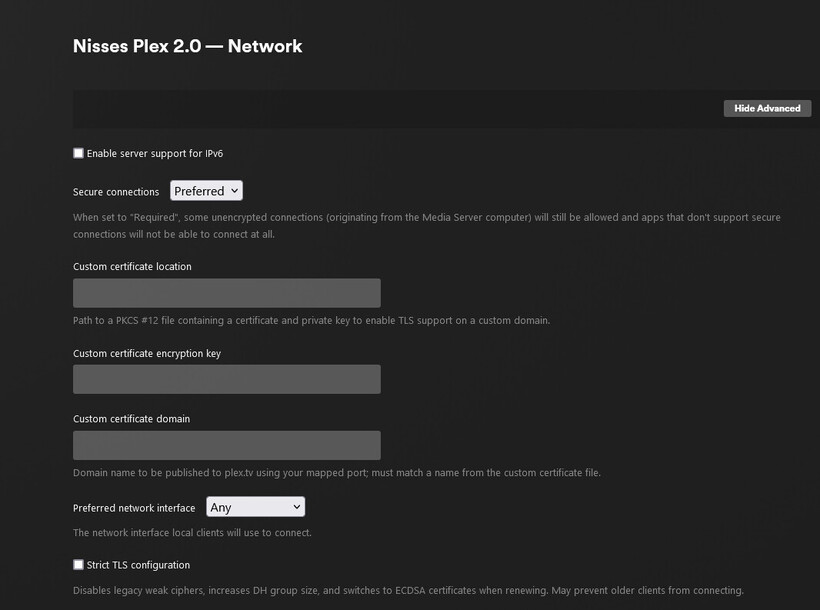
Thanks @ChuckPa, that did the trick this time.
Here is a screenshot of the certificate settings just after I got access, as you can see no custom certificate.

@ChuckPa getting SSL issues again, haven’t touched anything since last week.

root@plex:~# grep SSL /var/lib/plexmediaserver/Library/Application\ Support/Plex\ Media\ Server/Logs/Plex\ Media\ Server.log
Sep 02, 2023 17:37:25.024 [140387391691576] WARN - [HttpClient/HCl#3075] HTTP error requesting GET https://plex.tv/media/providers?X-Plex-Token=xxxxxxxxxxxxxxxxxxxx (60, SSL peer certificate or SSH remote key was not OK) (SSL certificate problem: self-signed certificate)
Sep 02, 2023 17:42:25.088 [140387391691576] WARN - [HttpClient/HCl#3076] HTTP error requesting GET https://plex.tv/media/providers?X-Plex-Token=xxxxxxxxxxxxxxxxxxxx (60, SSL peer certificate or SSH remote key was not OK) (SSL certificate problem: self-signed certificate)
Sep 02, 2023 17:47:14.311 [140387391691576] WARN - [HttpClient/HCl#3077] HTTP error requesting GET https://plex.tv/api/v2/server/users/services?auth_token=xxxxxxxxxxxxxxxxxxxx (60, SSL peer certificate or SSH remote key was not OK) (SSL certificate problem: self-signed certificate)

Something must be really of with the certificate generation. Do you want me to attach the cert bundle to check validity. Since it password protected I can’t check myself…