Server Version#: Version 1.14.1.5488
Player Version#: Version 3.77.4
Plex Server installed on WD pr4100 NAS. Transcoder folder is located here \MYCLOUDPR4100\Transcoder
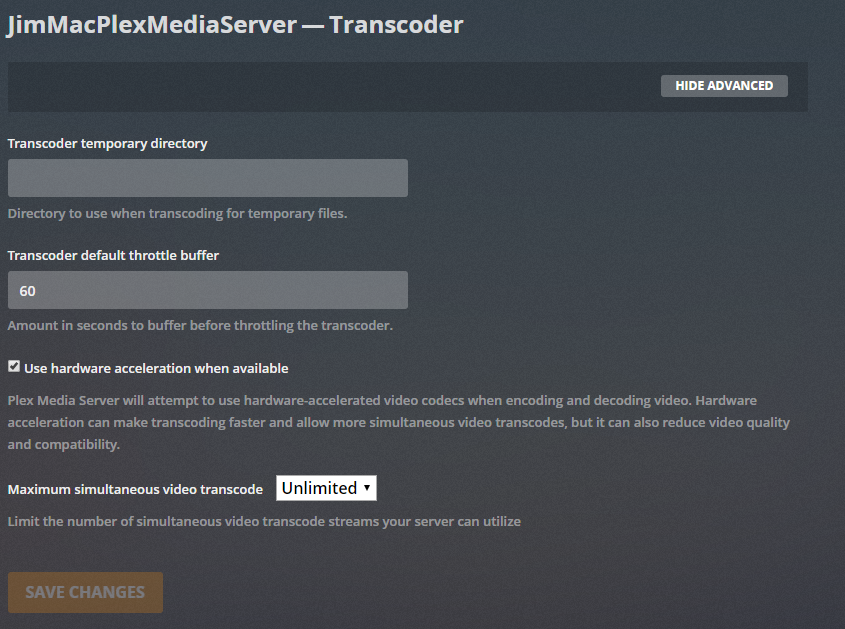
But no matter where I point the transcoder directory, I still get the error code s1001 (network) THEN > Not enough disk space to convert this item.
Everything has been updated and rebooted several times. This system has worked for over a month with no issues. Thank you.
Jan 20, 2019 15:06:17.040 [0x7fa2a7623700] Debug — WebSocket: Performing handshake from origin http://192.168.1.33:32400
Jan 20, 2019 15:06:17.041 [0x7fa2a7623700] Debug — Beginning read from WebSocket
Jan 20, 2019 15:06:17.092 [0x7fa2af511700] Verbose — Auth: We found auth token (g9aZJjVzqYfsJyhNf7Dc), enabling token-based authentication.
Jan 20, 2019 15:06:17.092 [0x7fa2af511700] Debug — Auth: authenticated user 1 as iamjimmymac
Jan 20, 2019 15:06:17.092 [0x7fa2af511700] Verbose — Auth: Came in with a super-token, authorization succeeded.
Jan 20, 2019 15:06:17.092 [0x7fa2a7047700] Debug — Request: [::ffff:192.168.1.18:59071 (Subnet)] GET /activities (10 live) TLS GZIP Signed-in Token (iamjimmymac)
Well… you implied you had been tested to move the transcoder directory to different folders.
If your Plex Media Server is installed on the MyCloud, you’ll need to check things there.
If it’s installed somewhere else, check out if the mount/mapped drive has sufficient permissions and Plex can use it on that machine.
It’s currently set to transcode on the NAS unit too and I’m still getting that error. Every other player works great including Emby which is also installed on the NAS unit.
Can you restart PMS or just restart the NAS, then provide the PMS log after waiting 3 minutes after the NAS and PMS is ready.
What do you mean too? Do you have another PMS server? Are you trying to move the transcoder folder from this other PMS to your NAS? If so, you need to make sure you give permission for that other PMS machine to access that location.
I’m sorry, I’m fairly new to this, hope this is the info you need to help.
No, I am saying that no matter where I point the Transcoder folder, I get the same errors. Right now, PMS is installed on the NAS (WD pr4100).
I started watching some random “How to install Plex on NAS” vids and saw that someone had left the “Transcoder temporary directory” section blank. I did the same thing, rebooted and now it works like a champ again.