Server Version#: 1.41.6.9685
Player Version#: 2025.15.0
My Plex Server#: QNAP TS-h3087XU-RP (96GB ram) + Nvidia GA106 geforce RTX 3060 lite hash rate (12GB ram) + internet speed >320Mbps.
Hello,
Recently, my Plex Server has stopped transcoding, preventing me from streaming multimedia files both on the same network and remotely. I am consistently receiving the error message: “Error Occurred - Not enough disk space to convert this item.”
I have verified that there is enough disk space available on my server, and no changes have been made to the configuration of the Plex Server. This issue coincided with the release of the new Plex app a few days ago.
As I am not an IT specialist, I would greatly appreciate any help or guidance to resolve this issue.
Thank you in advance.
Plex Media Server Logs_2025-05-07_23-16-14.zip (3.9 MB)
Where is your transcode directory?
Can you test on the web version and not the app version to isolate the problem? Coz this sounds like a server issue, not a client issue.
Hello,
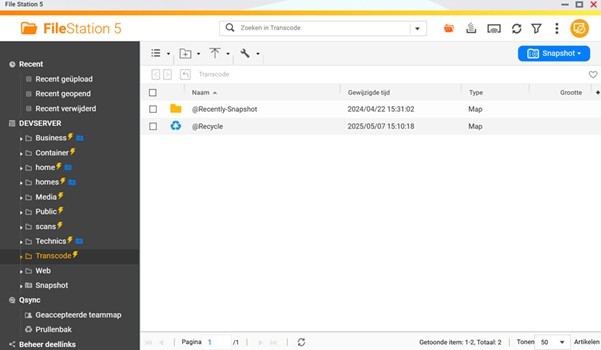
Thank you for reaching out. I’ve made a screenshot of my server. Transcoding is happening in the folder \Transcode. The second screenshot is from the transcode menu of the Plex Media Server. (Language is Dutch) I’m facing also the same problems on the web version.
Thank you
You cannot use the root directory /Transcode on a QNAP.
QNAP’s partitioning only allocates 512 MB for the root
The default location is wherever PMS is installed . On QuTS that’s /share/ZFS530_DATA/.qpkg/PlexMediaServer
May 07, 2025 17:47:42.889 [140616036756280] DEBUG - [Req#2a7/Transcode/dqrmr8bqlcit01l2nfky2de9/JobRunner] In directory: "/share/ZFS530_DATA/.qpkg/PlexMediaServer/Library/tmp/pms-f963c725-3101-4506-8b4d-680c66f95a18/EasyAudioEncoder"
May 07, 2025 17:47:42.890 [140616036756280] DEBUG - [Req#2a7/Transcode/dqrmr8bqlcit01l2nfky2de9/JobRunner] Jobs: Starting child process with pid 10136
May 07, 2025 17:47:42.890 [140616036756280] DEBUG - [Req#2a7/Transcode/dqrmr8bqlcit01l2nfky2de9] [Universal] Using local file path instead of URL: /share/Media/Series/S/Seal Team (2017- )/Season 05/SEAL Team - S05E10 Head On.mkv
May 07, 2025 17:47:42.891 [140616036756280] DEBUG - [Req#2a7/Transcode/dqrmr8bqlcit01l2nfky2de9] TPU: hardware transcoding: final decoder: , final encoder:
May 07, 2025 17:47:42.891 [140616036756280] WARN - [Req#2a7/Transcode/dqrmr8bqlcit01l2nfky2de9] Low disk space: 404.94MB source file, 432MB capacity, 94.11MB available on "/Transcode/Transcode/Sessions"
May 07, 2025 17:47:42.891 [140616036756280] WARN - [Req#2a7/Transcode/dqrmr8bqlcit01l2nfky2de9] TranscodeSession: inadequate disk space for transcode
May 07, 2025 17:47:42.891 [140616036756280] DEBUG - [Req#2a7/Transcode/dqrmr8bqlcit01l2nfky2de9] Streaming Resource: Terminated session 0x7fe3bce9c9c8:1s8tboogrki1wdx5nusojp19 with reason Not enough disk space to convert this item.
May 07, 2025 17:47:42.891 [140616036756280] ERROR - [Req#2a7/Transcode/dqrmr8bqlcit01l2nfky2de9] Failed to start session.
What are you trying to accomplish ?
If you want a Transcode shared folder then you need to use the path /share/Transcode so it resolves to the correct storage location.
Ok, thank you. I’ve corrected my mistake and it’s working now.
Again sorry for my perhaps stupid question.
Best regards,
Qnap has their way of doing things.  lol
lol
There are no stupid questions … unless you already know the answer