Hi, I’m new here. But I could really use some help with sharing my server.
Everyone I invite as a friend, including myself as a test, leads to an error message.
Does anyone have some helpful tips on how to share? Have any of you guys run into this problem before?
I have tried this from an iOS device as well as a computer with no success. I could really use some help.
Thanks
You cannot invite yourself.
Let your friends do the procedure “Accept invitation per website”
as described here
https://support.plex.tv/hc/en-us/articles/201161077-Accept-an-Invitation
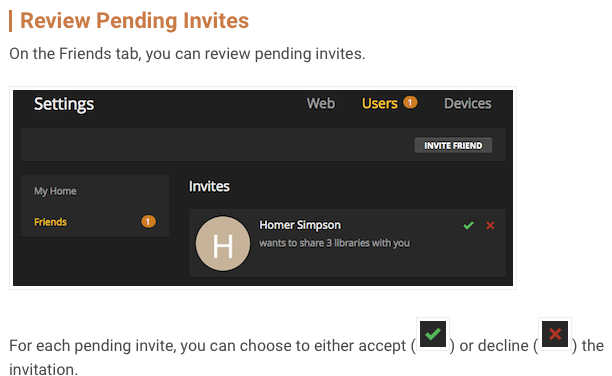
Hey Otto, thanks for your speedy reply. I read over the directions from the link you sent. Under users and friends the Pending invitations do not have the green check mark option. Only the red x. what suggestions do you have from this point?
Your friends must ‘accept’ your invitation first. (see above)
@lalecture@me.com said:
Under users and friends the Pending invitations do not have the green check mark option. Only the red x. what suggestions do you have from this point?
Please make a screenshot. I am not sure what you are referring to.

I am one of these users under a different email.
the error message i got when accepting the invitation is

does this info help you to answer my question?
@lalecture@me.com said:
I am one of these users under a different email.
the error message i got when accepting the invitation is
How do you accept the invitation?
By clicking the link in the email or by following the procedure I linked to above?
i clicked the link from my email. This produced the error message. Which gave the error msg. From your link it shows a place for either accepting or declining the invite as shown here
@lalecture@me.com said:
i clicked the link from my email. This produced the error message.
You cannot use the link from the email, if you are still logged into plex.tv with your main account (in your web browser).
Hence why I mentioned “Accept invitation per website” above.
