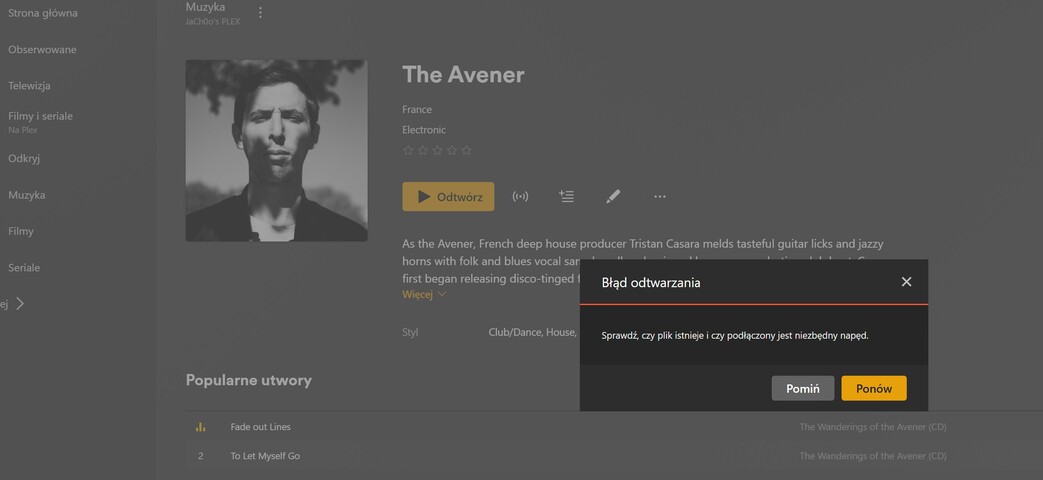
Server Version#: 1.41.6.9606-aa6577194 (currently, bug existed also under 1.41.5.9522-a96edc606)
Player Version#: Web version (locally and from internet) and plex from android tv, plex/plexamp from ios (PLAYER info not related to issue, all up to date)
NAS Version#: Synology DS720+ (Procesor INTEL Celeron J4125)
DSM Version#: DSM 7.2.2-72806 Update 3 (Up to date)
Hello,
So this is my first time with Plex. I have already read threads here and also in internet about how to run it and other stuff (how to name media files for sorting etc). Plex was working proeprly - full r/w access to stuff working from phone remotly out of home, working locally from plex app on android tv, generally no issue. (Internal system user PlexMediaServer has granted r/w access to “video” and “music” folder)
Currently i had to reboot whole networking in my home including my NAS. After everything successfully rebooted plex didn’t came up properly - all media are unavailible.
I got access thru https://mylocalip.myname.direct.quickconnect.to:32400/web and from android and ios apps and i see media files as they are in folders but when i try to play i got message Error “Please check that the file exists and the necessary drive is mounted”.
On DSM 7, you need to grant user PlexMediaServer permission to read the files.
ALSO, as caution, Synology provides a videos shared folder.
Use of video is not stable.
If you create a new shared folder, example Media and move everything from video → Media/movies, and also have a Media/music and Media/tv (anything you like), it will be more stable.
Synology’s predefined video folder has always conflicted with Plex.
If you did the following:
Rename video → video-temp
Create new shared folder Video
Move everything from video-temp → Video
Edit your library definition settings to point to Video (edit each folder entry) - SAVE
Delete video-temp
This would also work. DSM built in software is looking for the name video. Video does not match video (Linux is case sensitive)
As i understand as user ‘PlexMediaServer’ you are reffering to ‘Internal System User’ as regular user with this name does not exist.
All files are in ‘video’ currently as it was/is default folder for such media type. There is no was it get this working in this way?
Both provided methods moves files from default one.
Ok moving files as you told me to.
Another conflict I’ve found is with local Synology QuckConnect Certificate provided by R11 with appears to work in every cas besides Plex local web access - net::ERR_CERT_COMMON_NAME_INVALID while name as smae as everywhere - https://myip.myname.direct.quickconnect.to:32400/web
it should work since:
Error messaage in chrome:
This server could not prove it belongs to myip.myname.direct.quickconnect.to. Its certificate is from *.SOMELONGSTRING.plex.direct. This may be due to a misconfiguration or an attacker intercepting the connection.
Another thing does port 32400 should be opened in firewalla to inbound access from internet or its not needed?
Synology’s QuickConnect can only be reliably used to get you to the desktop
If you’re away from home, trying to play through QuickConnect will be full of problems. (it’s a tunnel to Synology which is bit-rate limited).
Before you’re away from home, the better solution is to:
Enable Remote Access
Confirm it’s working by:
– turn off wifi on your phone
– Open https://app.plex.tv
– Sign in if required
– Click on your server name
– Confirm your libraries are present and all content visible.
Once you do this, you won’t need QuickConnect.
You’ll be able to open Plex directly.
The plex.direct address you see is for PMS & Player internal communication.
That ‘big long string’ is the certificate UUID added to the DDNS name.
All this will change every time your PMS certificate renews so it’s best to never use it.
Even when you are on your home network. opening https://app.plex.tv will switch automatically to LAN-local communication when it sees your server nearby
You can use ANY external port you want for Remote Access if you setup the port forwarding manually. 32400 is very well known. I use a completely non-standard port number for increased security.
Yes, as i stated before remote access is enabled and working since beginning with green marks in PMS settings.
OK this was my question so app.plex.tv and ios/android app will discover when ill be at home and switch to local transmision ?
So i can while my router got upnp enabled i can remove rule according to PMS default port farwarding am i right?
OK fiorst medias while moving to new directory are working properly so thrad can me marked as solved