Server is on a Win 10 x64 PC, and the Movies path also points to a folder on a different Windows drive (not SMB share).
Out of nowhere I’ve been getting these errors and can’t play anything NEW that I’ve added. I can still play older movies and TV shows.
When attempting to play one of them, whether on my Roku Ultra, or the built-in PMS player, I get the error codes in the title.
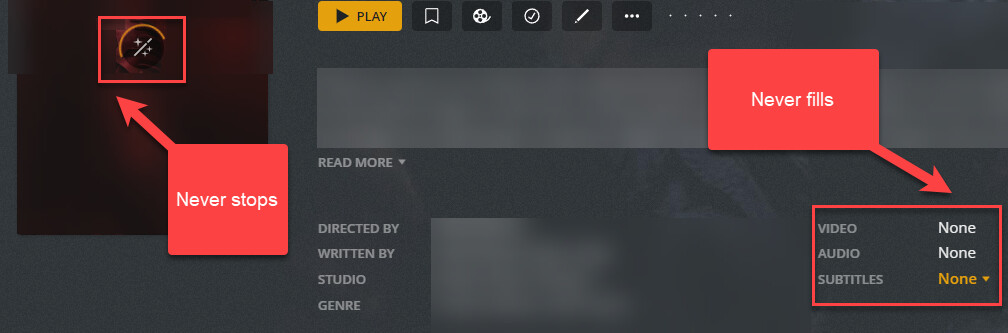
Another thing I’ve noticed when looking at one of the new movies is that all of the metadata pulls just fine, but the actual file data seems to not be able to be retrieved. (see screenshot). Also, when clicking the “analyze” option, the “working indicator” just goes on perpetually; I’ve even left it running overnight to wake up and see the same indicator “working”.
Do you think it could have something to do with the cloud icon, and/or the pipe in the name?
I’ve been using those icons for years w/plex w/out issue (they make it easier at a glance to discern it from other PMS’ on my LAN), but who knows, maybe something in newer code changes choke on it?
I also add those icons to categories, like Movies and TV. Been doing it since day 1 with plex, maybe 10 years ago or something like that. Cool thing is the icons carry over to all devices.
Ok then likely not related to the issues with analyzing/playback. I don’t think anything would have changed in that regard but maybe. I asked some other folks to take a look at logs but would be best to get all of them.
Regarding that one error, it doesn’t seem to have any visible effect on the front end (icons still show as usual), it’s just showing that error in the log, so was wondering if behind the scenes it was causing some issue/error. in the back end.
I just don’t know off hand. Though I have seen a few folks do it before this is the first time I am aware of anyone mentioning an error appearing. there may have always been an error an no one mentioned because it was not causing any real problems.
I am having the exact same problem as you. It started in late december/early January.
I can say with certainty that the problem isn’t the newly added files.
I tried the following which was presented in a reddit post:
Stop Plex Server
remove “%LOCALAPPDATA%\Plex Media Server\Plug-in Support\Databases\com.plexapp.plugins.library.db”
start plex server. A new “%LOCALAPPDATA%\Plex Media Server\Plug-in Support\Databases\com.plexapp.plugins.library.db” will be autocreated.
Re-add libraries.
The newly created library was unable to analyze ANY of my files, even the ones that were working previously.
Luckily I renamed the old file instead of deleting it. because after trying this and finding every single file had the problem, I stopped the server, put the old .db file back and restarted it.
Problem still unsolved, but at least my older files are still watchable.
Dunno what it is, but something has definitely been changed in the latest version that is apparently causing a plethora of various, breaking issues. ex: link

 Plex | Cloud)