I use plexamp on a dedicated device to act as a remote for the plex client on my computer.
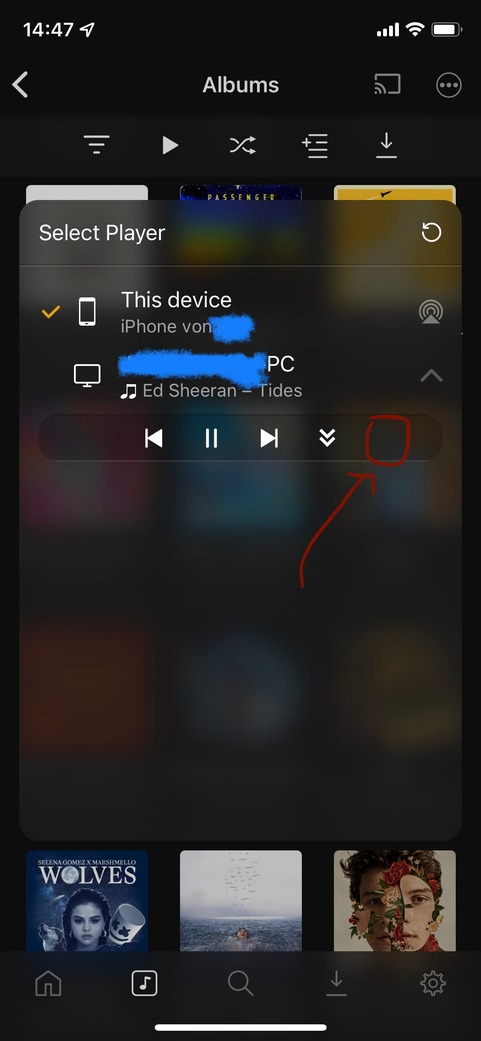
In the “Select Player” Menu when you open the dropdown under your player of choice, I would love to see an option where you could just connect the current device as a remote without overriding what’s currently playing on my player.
Currently, I have to use said dropdown to pull the content to my remote and then cast it onto the player as to not change the playing queue.
what sort of players? with plex players at least, you can do some basic control of them from the cast menu. unfortunately google cast only allows a single device to be connected at once.
I’m using a Windows 10 Plex Media Player and Plexamp on iOS to cast to it.
When nothing is playing on my phone I can basically already use the feature I am talking about. I can connect to my Windows player without changing the queue on my PC. For when there is something playing on Plexamp iOS, I would love to see an additional button in the cast menu to connect to my PC while still keeping the current queue on the PC going.
Hmm, I understand why that might be a problem.
But in my case I’m usually not actively “playing something locally”, more like, I was playing something maybe an hour ago but since Plexamp doesn’t let you “clear” currently playing on your iOS device, my problem persists. If Plexamp had the option to “clear” currently playing on iOS I could also evade my problem point. (By clearing currently playing and then connecting to my PC and thus not changing the current queue on my PC)
Interesting, that certainly gives me an option to evade my issue. While I am still persuaded that a “hook up to player” button in the cast menu wouldn’t hurt and add usability to your already great app, this works for me.
Thanks for your help but please do consider adding this feature in a future update.
I took the liberty of visualizing my proposition.
I do believe that this could be implemented without confusing the user, all the while adding usability.