Plex is showing some TV episodes that I have added to my Synology NAS in the wrong library, For example I put the TV shows in the following folder in File Station.
/volume1/homes/PSP/Home/Movies/VIDEO/TV/Phoenix Nights Series 1/C1_t07.mkv
This is where my TV programmes on Plex is directed to. I have other TV shows that show up in the TV programmes library that are in that folder in File station, but these TV show files show up in my Film folder on Plex and not the TV programmes.
My Film folder on Plex is directed to /volume1/homes/PSP/Home/Movies/VIDEO/ which is the same as the path to my TV shows but without the TV on the end.
Any ideas why these files are showing in my Film library on Plex and not in the TV Programmes library?
Thanks in advance
You cannot nest TV underneath Movies and expect it to work correctly.
At best:
/volume1/homes/MOVIES – Movies
/volume1/homes/TV – TV series
It is urged to create regular shared folders for this and not use the ‘homes’ service.
If you ever turn “Homes Service” off, you can lose your media files
If you want them together under a single location, I suggest
Shared folder – Media
Subfolders – Movies, TV, etc, etc
Now point Plex at /volume1/Media/Movies (for movies) and /volume1/Media/TV (for series)
I presume you’re using Windows and have a drive letter mapped ?
All you need to do is change which shared folder is mapped .
(You can map two if it’s easier)
Also, As a major requirement. You need to name your TV series correctly.
Still not working. I haven’t renamed the files yet, but they are fine as they are for time being as they show in my Film folder in Plex. No matter where I add a new TV series folder in File Station software for my NAS the files are not showing in Plex even though I’m directing Plex to the correct folder. This really is doing my head in!!
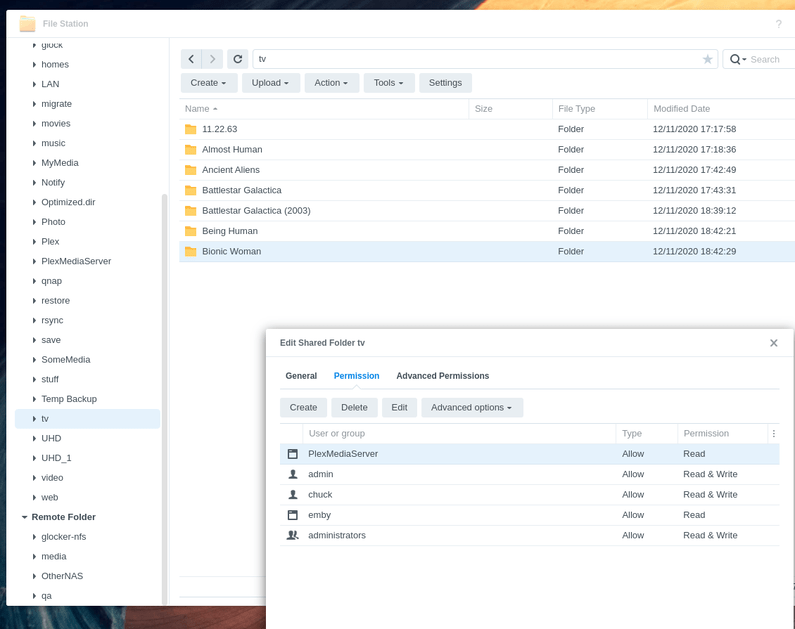
There should be a top-level “TV” shared folder where you point Plex.
– TV Series are placed under that TV shared folder
– “System Internal User” PlexMediaServer must be given permission to read the shared folder.
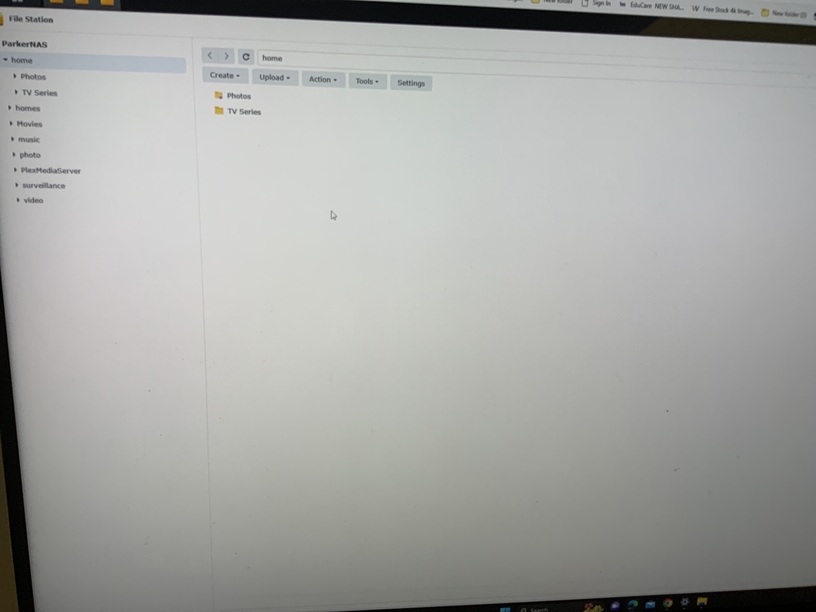
Thanks for the reply, I’ll try this when I get home. How do you create folders in the left pane? I’m sure I’ve tried creating a folder in there, but can’t.
Edit just re-read your post again and I create that folder through control-panel - shared folder. Hopefully that’s where I’m going wrong.
Should I be doing this for my Movies? If so can I create another shared folder and just copy the movies over to there?
Also slightly of topic, I have two Hard Drives in volume 1. One of the drives is nearly full which I’m getting a notification warning about. How do I utilise the second drive in volume 1 to add files to that? Both drivers are showing in storage, but it seems that I can only add files to one of the drivers.
Success!!
Thanks for explaining this, not creating a shared folder was my problem, but even then Plex wasn’t finding the files, so I renamed them as you suggested then they appeared. I’ve learnt a little bit more now.
Just to reiterate what I mentioned earlier, should I do another shared folder for my movies and transfer them over, rather than having my movies through the Home services?
Just one final question that I hope you can help me with. As you can see from the screenshot I have two hard drives in the NAS and it’s showing that Drive 1 is nearly full. Will all my other files automatically go onto Drive 2 when Drive 1 is full?
Ok so after thinking I’ve cracked it I’m struggling again. I’m trying to upload an old show called Scully. I’ve created folders and given permissions for the folders. Now the uploaded files aren’t showing as TV Shows, but if I choose folders the Scully folder is there, when I open the Scully folder, the thumbnails for the files are showing Phoenix Nights season one, but when you play the thumbnails it is Scully.
So basically I’m getting no thumbnails for Scully in TV Shows, but the Scully folder is showing, but inside that folder I have thumbnails for Phoenix Nights, but those thumbnails play Scully!! Help!!
The final screenshot are the files in the Scully folder, showing Phoenix Nights season 1 thumbnails, but they play the Scully files.
Edit the TV Show Library
Click Add Folders, to show folder(s) added to library
Take a screenshot
Attach to thread
Hint: Given the structure in your screenshot, it should be TV Shows.
As @dbirch mentions, your TV shows are incorrectly named and organized.
See my prior post showing how to organize Phoenix Nights (updated to include season 2).
Also read the Plex documentation on naming and organizing TV show files (linked in same post).
Example of how your shows should be named and structured
[chuck@lizum tv.2012]$ ls
Alaska Animal Rescue/         Ghosts (US)/                  SEAL Team/
Ancient Aliens/               Good Omens/                   seaQuest DSV/
Anne Rice's Mayfair Witches/  Grey's Anatomy/               Secrets of the Earth/
Baby Chimp Rescue/            Hogan's Heroes/               Secrets of the Universe (2022)/
Babylon 5/                    Hollywood (2020)/             Sense8/
BBC Documentaries/            Hotel Secrets & Legends/      Silo/
BBC Documentaries (1936)/     Interview with the Vampire/   Star Trek Picard/
Black Mirror/                 Life After People/            The Da Vinci Detective (2006) [480p]/
[chuck@lizum tv.2012]$ ls Babylon\ 5/
Season 01/  Season 02/  Season 03/  Season 04/  Season 05/
[chuck@lizum tv.2013]$ ls Babylon\ 5/Season*01
Babylon 5 - S01E01 - Midnight on the Firing Line.mkv  Babylon 5 - S01E12 - By Any Means Necessary.mkv
Babylon 5 - S01E02 - Soul Hunter.mkv                  Babylon 5 - S01E13 - Signs and Portents.mkv
Babylon 5 - S01E03 - Born to the Purple.mkv           Babylon 5 - S01E14 - TKO.mkv
Babylon 5 - S01E04 - Infection.mkv                    Babylon 5 - S01E15 - Grail.mkv
Babylon 5 - S01E05 - The Parliament of Dreams.mkv     Babylon 5 - S01E16 - Eyes.mkv
Babylon 5 - S01E06 - Mind War.mkv                     Babylon 5 - S01E17 - Legacies.mkv
Babylon 5 - S01E07 - The War Prayer.mkv               Babylon 5 - S01E18 - A Voice in the Wilderness (1).mkv
Babylon 5 - S01E08 - And the Sky Full of Stars.mkv    Babylon 5 - S01E19 - A Voice in the Wilderness (2).mkv
Babylon 5 - S01E09 - Deathwalker.mkv                  Babylon 5 - S01E20 - Babylon Squared.mkv
Babylon 5 - S01E10 - Believers.mkv                    Babylon 5 - S01E21 - The Quality of Mercy.mkv
Babylon 5 - S01E11 - Survivors.mkv                    Babylon 5 - S01E22 - Chrysalis.mkv
[chuck@lizum tv.2014]$
There are several tools which automate this for you.
You do the Drag & Drop.
It performs the lookup.
You confirm the new naming and structure.
Click “Rename” and it does the work.
Finally sussed it, my folders and files were named correctly (thanks everyone for helping me out with that) the problem was the Window pane on the left, I wasn’t closing some of the branches and was adding wrong files to wrong folders. It’s been a headache but I’m finally there. Thanks again everyone for taking time out to help me. Couldn’t have done it without you all!!