I like the fact that the Collections feature allows me to include films in a collection and NOT display those films in my general library (e.g., Christmas films). I also created several collections by film director and would like these films to appear in the general library, too. Here’s the rub–When I include a Christmas film in the director’s collection, the film also appears in the general library, which I don’t want. I suppose I can maintain playlists for each director to jog my memory of a director’s film history, but is there another fix? Thank you.
You should use a smart collections for items that shouldn’t be impacted by the display settings.
Hi. I ran into a snag while trying to follow your advice. Under “All” near the top of the library screen, I’m supposed to have a setting for “advanced filters,” but my version of Plex has “custom filter” instead. Also, when I click on that symbol on the right-hand side of the screen, I get Playlist options instead of Collection options. FYI, my version of Plex is 1.23.5.4862, which is supposed to be the latest version.
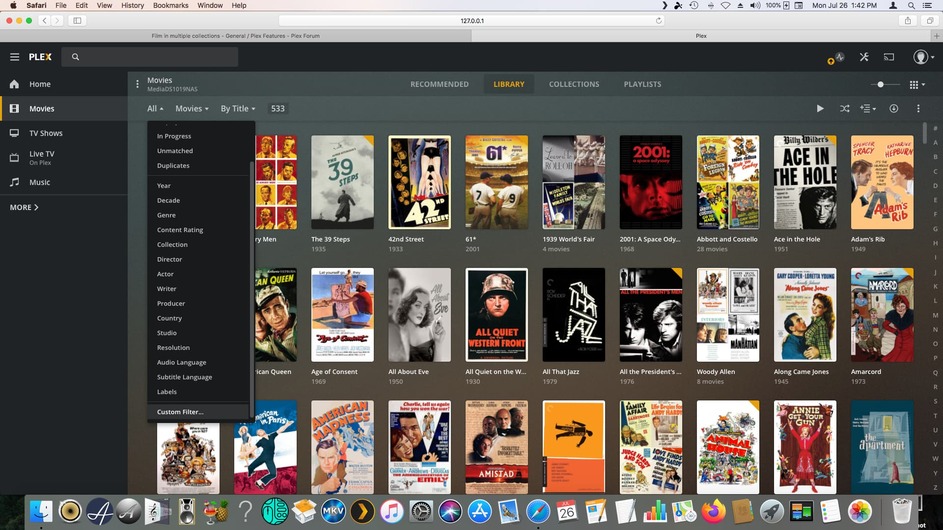
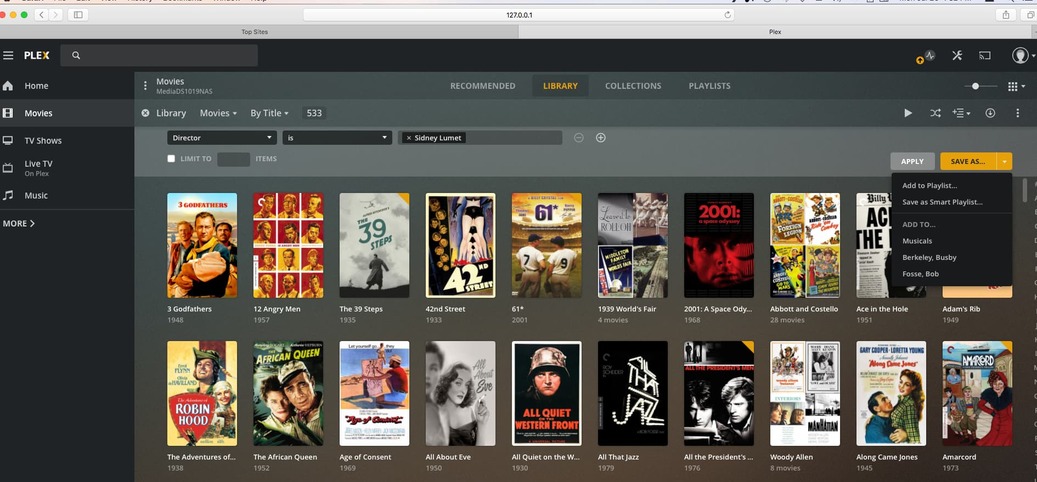
That means you should update your server occasionally 
The advanced filter and smart collections feature was only added in March.
I generally check for updates every time I add movies to my library and backup my NAS. By the way, when I tried using the Hide Collections command for a collection of a director’s films, I still got an extra copy of the dual-collection film in my library.


If an item is in multiple (classic/regular) collections, the display mode setting to show the items in one of them overrules any hide option of the others.
There’s a feature suggestion to change this behavior (giving priority to hiding the content of a collection). However, the addition of smart collections has obsoleted that for most use cases.
old approach
- collections for the different Marvel Franchises (Thor, Iron Man, Guardians of the Galaxy…) → set to hide their items
- collection for the entire Marvel Cinematic Universe containing all the franchises + single movies (e.g. Doctor Strange, Captain Marvel…) → set to display their items
=> all items of every marvel related movie will be displayed
new approach
- classic/regular collections for the different Marvel Franchises (Thor, Iron Man, Guardians of the Galaxy…) → set to hide their items
- smart collection for the entire Marvel Cinematic Universe (e.g. based on all movies where
StudioisMarvel Studios) → display mode configuration can be set to hide the collection or to display it (doesn’t matter)
=> the different franchise collections are displayed (with their items hidden), the individual movies are displayed regularly in the library
Thanks. Perhaps the next version of Plex for Macs will have all these new features.
The latest version of Plex for Mac already supports all that.
The prerequisites are:
- PMS 1.22.3 or newer
- Plex Web 4.56.3 or newer → this is included in Plex for Mac 1.31.0 or newer
We’re going in circles. I included those screenshots to show you what the latest version of Plex has given me. Unless I am required to click on a switch somewhere else in the Plex ecosystem to turn on those new features, I’m stuck with not having those new features.
No additional switches needed.
Not sure what version of Plex for Mac you have installed.
As for the server version… what’s the version of Plex Web you see when going to Settings > Plex Web >General? PMS 1.23.5 should come with a version of Plex Web built in that’s no longer showing the Custom Filter option.
What’s confusing me is that this is about your Synology server but you’re accessing it through http://127.0.0.1:32400/web – that implies you’re accessing it from the same machine that’s running the server. Could it be you’re running different servers and the one you’re accessing here is not up-to-date?
As a new Plex user, I installed PMS on my Mac mini and stored files on external hard drives. Later, I installed PMS on a NAS and transferred the files to that NAS.
Moments ago, I followed your directions to Plex Web and found it needed updating. After doing so, I exited and restarted Plex. Now, I have the new Collection features.
When I manually update Plex, why doesn’t Plex Web get updated as well? Thanks for your help.
P.S. The Smart Collections approach works fine. I hope users eventually will have the option to reorder the films based on date of release.
The version of Plex Web that’s bundled with your Plex Media Server is updated as part of regular server updates. Due to that and certain dependencies, the bundled version is always a bit behind.
For the latest / newest / shiniest Plex Web experience, best use the hosted version of Plex Web (https://app.plex.tv/desktop)
Thanks again for your help. Using Smart Collections is much faster than using manual collections.
Even the regular collections are much easier to maintain with those recent updates. Instead of manually assigning collection tags you can now directly assign a movie to a collection from its context menu (… > Add to)
This topic was automatically closed 90 days after the last reply. New replies are no longer allowed.
