Film not recorded with no explanation

Server Version#: 1.23.5.4862-0f739d462
Player Version#: N/A
Tuner Make/Model: [HDHomeRun CONNECT QUATRO
Guide/Lineup name: UK Freeview (Plex provided)
Using XMLTV?: NO
Channel number/Name: UK ITV1 HD (channel 103)

Hello,

Last evening I tried to record a film, and after setting up it was shown in the program guide with a red circle, and “Recoding sheduled” on closer examination. The film was listed as HD,

However when I looked in the DVR schedule it was not listed there, and was not shown in “Calendar View”, or in “Angenda View”. I had an older version of this film in standard definition, but had set up the recording to replace lower resolutions. and allow recordings of repeated airings.

Despite several attempts to set up the recording I could never get it to show up in the DVR schedule list, but it was always shown as scheduled in the guide, even after a guide refresh. That is really really confusing.

Can anyone tell me what was I doing wrong please?

The time of the recording’s start was 23:10 (11.20 PM) and was for about 2 hours.

As expected, because it wasn’t listed in the schedule, the film did not record, and no error was shown when it was set up to record. I felt powerless to try and get it to work, before it was too late to record the broadcast.

Could anyone please advise me why this happened, and why no errors are shown when setting up the recording ?

This thing really seems rather unfriendly at times, especially for other members of our household who just want to record things like they would on a dedicated box.

Your advice is appreciated, with my thanks in advance.

Regards,
Shaun. From the UK.

Update -
I just tried to set up the recording to the sequel of the film on next Friday, on ITV HD (the DieHard series) and at the same time as the one which failed. I already had an SD copy of this film as well in my films library, recorded from a different broadcast channel.

Again the “replace lower resolution items” was checked so should have worked.

The same problem was seen. No entry added to the DVR schedule for the date and time in question, and no reason or error given for this. The film was STILL shown as scheduled in the program guide, but would not have been recorded/over-written/updated.

So I backed up the SD version of the film, and then deleted it from the films library. The record entry was still showing as “Scheduled” in the program guide, but not shown in the schedule list. So I cancelled the recording, in the guide and then scheduled the recording again in the guide. This time it showed up in the schedule as expected.

This is a very poor way of doing things.

1: The “replace lower resolution” option clearly does not work.

2: No error is given, when the recording isn’t added to the schedule for whatever reason.

3: When the recording fails to be added to the schedule it still shows up as scheduled in the TV guide but of course the recording does not take place.

I suggest that some new defaults are introduced, making it easier for the average users.

1: Fix the “replace lower resolution” option for films. It seems it is broken.

2: Allow a settable default so that the recording ALWAYS take place regardless of existing items and repeat showings etc. That’s what happens on all the REAL DVRs I’ve ever seen. They just record whatever they are told to record. If the name of the recording has to be modified so both are present, then so be it, or if the old recording will be over-written then warn the user. List the channel it was recorded from, and a timestamp and have it as part of the filenames or relevant data.

Even if the definition is the same, here in the UK, if the film is later shown on a BBC channel, an opportunity then arises to record it without any adverts, so it should be easily possible to replace an older copy which has been recorded with adverts.

3: If the recording is not added to the schedule, then also remove the entry from the programme guide, and report the error and reason for it to the user who has scheduled the recording.

Anything less than the behaviour expected from a dedicated DVR box isn’t really good enough in my opinion.

One other useful option to add, would be an entry to manually record a particular channel, at a certain time and date, regardless of the content. I wanted to record the 1966 world cup match but the program guide wasn’t updated to reflect a last minute change to this, by the broadcaster, even after a refresh.

Kind regards to all,
Shaun.

2 Likes

Update 2 - I just tried setting up to record the Emmerdale soap series for my partner, on ITV 1 HD as she watched/recorded this on Sky Q which we now don’t have. Previously I had recorded an old episode of this from 1972 on a different channel. Again the SAME problem. I had to remove this old 1972 episode from the “recorded programmes” library before it would get added to the DVR schedule. Again it was still shown as scheduled in the programme guide,. so I had to cancel a none existent recording setup and reshedule it again.

This is fundamentally flawed, and I wish someone would fix it. I am looking round for a new solution, as Plex DVR seems to be complete rubbish for an average user.
Kind regards,
Shaun.

@shaun_shardina_com I disagree about Plex DVR being complete rubbish, but I understand your frustrations. In my opinion, there are too many issues with what is available as a DVR service. Most DVR systems allow us to record specific recordings, regardless of whether we have duplicates of those recordings. I believe that is the issue that is most frustrating to you right now, and I agree that Plex developers need to provide that capability.

In NextPVR, the system I have switched to while I wait for Plex developers to hopefully iron out these issues and other issues that frustrate me, a duplicate recording merely appends the date/time of the recording to specify that it is a unique recording of the same episode/movie. I do not see why Plex could not do something similar, especially since I know their system is capable due to some of my recordings splitting when signal disruptions occur, and the file names of each instance have (copy #) appended to the end.

1 Like

Currently, the best way to guarantee that it records it regardless of whether you already have it, is to set up a separate library for just recorded items (with its own folder) and configure the schedule to record to that library.

Since Plex only checks the library you are recording to to check if the item already exists, it will only skip recording it if you have already recorded it.

Server Version#: 1.24.2.5000
Player Version#: 1.34.1.2601-ff212e16
Tuner Make/Model: HDHomeRun CONNECT QUATRO

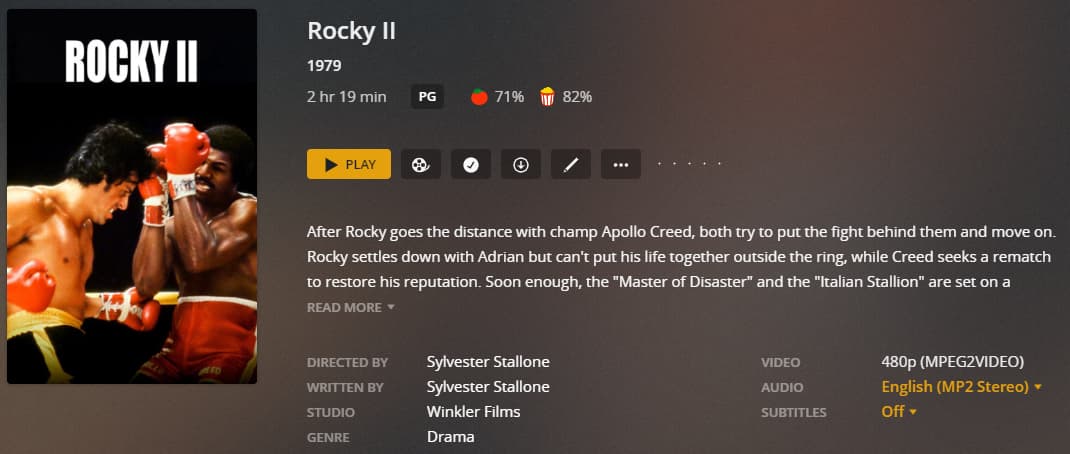
I just had the same problem with the upcoming showing of “Rocky II” on the 24th September. It is showing on ITV1 HD (Channel 103) and whilst I have an existing SD recording from April, which aired on ITV4 (Channel 025), the Replace lower resolution items option doesn’t appear to schedule a recording:

Scheduled:

Existing Recording:

DVR Schedule:

Schedule - 210924

I also found this thread, where someone from Plex briefly responded so I don’t know if the issue has been raised internally or not.

The only option appears to be to delete the existing recording :frowning:

This topic was automatically closed 90 days after the last reply. New replies are no longer allowed.