Server Version#: 1.18.7.2457
Player Version#: N/A
Tuner Make/Model: HDHomeRun CONNECT QUATRO
Guide/Lineup name: Broadcast TV Cdr Rpds-Wtrlo-Iwc OTA Broadcast
Using XMLTV?: No
Channel number/Name: 20.2
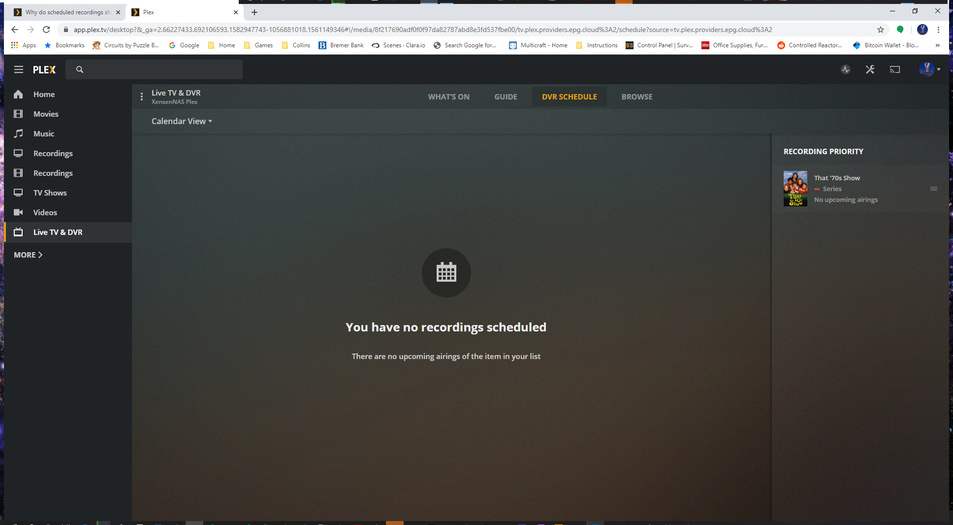
I was just trying to set up and test my new Tuner, it all seemed to be going well (watching live TV worked), till I set a test series to be recorded, and it seems to show it will be recorded in the guide (I assume that is what the little red icon on it means), but the DVR schedule says no recordings and the note on the right says no upcoming airings. Its now 5 past the hour, and no recording as shown up.
Yes, I did. Also its been another hour and another one that failed to record. I did a quick check, and single show recording seems to work, at least it actually showed that it would record it in the DVR Schedule. Will find out in 45 mins if it actually did.
Do you already have That 70’s Show in a TV shows library on your server (or did you in the past?)? If so, edit the show (pencil icon) and have a look at its advanced settings:
In particular, check the “Keep” and “Delete episodes after playing” settings. If they aren’t set to “All episodes” and “Never,” respectively, set them as such. Check for the same settings in the advanced properties of the recording configuration as well. If you end up having to change these settings you may want to cancel the recording and recreate it just to be sure they are applied.
The DVR can behave a little weirdly, in my experience. If you’ve had these episodes in your library previously and the library was configured to delete them after watching, or only keep a certain number of episodes, it won’t schedule the recording if it would just end up deleting it anyway.
I checked those settings and they are on Keep All Episodes, and Never Delete after playing. Also Its a new install with no past history for anything, everything was set up clean from scratch. Also, I think I checked those settings correctly, I found them in advanced settings when setting up or looking at a series recording, but the screen looks nothing like yours with all those selections and such on the left.
I was able to verify that doing a single recording worked fine(This Episode), it both instantly showed up in the Guide and the DVR Schedule, and it recorded as expected, so its just trying to do the series recorders that is not functioning correctly. It seems to work visually from the Guide but does not actually schedule anything or record anything.
So, I got up this morning and started playing around with recordings, and I’m not sure if I needed to get a few single recordings done, or if the guide was not actually ready to be used or what, but as of this morning, I have been able to set series recordings and they now show up in the DVR Schedule and they are actually recording as well!
I didn’t change anything from last night to this morning, so I have no clue why it started working! :\
It may have had something to do with scheduled tasks running overnight and the Butler doing its magic getting things scheduled; though I’ve never run into that myself.
Server Version 1.19.5.3112 on WD PR4100
Player Version 4.29.2 on Win7 and MacOS Catalina
The guide shows that Access Sportsnet will record on channel 789, but it’s not in DVR Schedule. I’ve checked that it is set up for New and Repeat Airings, Keep all episodes, and Never delete.
This wasn’t an issue in years past. I don’t know when this started happening, but I noticed it a few weeks ago. Once again, as I’m sure everyone who’s read my posts will know, this is affecting my Dodger game recordings so it’s really important to me to get this fixed.
Another bug that I’ve noticed in the last two weeks and may be related to this issue is that when I select to record a show using the “record options” for All Los Angeles Dodgers Events I’m now getting literally every show related to dodgers, whether it’s a MLB Baseball game, a color commentary, historical repeats, or even news shows all being recorded and put in the MLB Baseball folder in my TV Shows directory. That’s when I noticed that Access Sportsnet started not showing up in recordings. I found the episodes in the MLB Baseball category, but then deleted them after watching. I also shut off the “All LA Dodgers Events” recording because I couldn’t keep track of what was being recorded. It seems like the Plex server got confused at some point and is locked in some sort of loop to record everything or record nothing. Has anyone else had this problem?
This function worked very well two years ago and I had no problem recording all Dodgers games for the entire season. They were recorded on time, stored in the right directories, and didn’t include any non-game-related Dodgers shows. What changed between now and then?
This is a major disappointment for me too. I like a late night talk show and it will be scheduled but not show on the dvr schedule and then not record.
I am also having this problem and I have running the latest server - 1.20.3.3483, I have attached the latest logs.Plex Media Server Logs_2020-10-22_10-26-19.zip (4.8 MB) . NBC Nightly News shows in the guide as record but does not show up in the scheduler or get recorded. I have since set it up as first priority and have it recording both new and old. Of interest, I have just started using the new Homerun 4K.
Just in case it wasn’t clear from my earlier reply, there has been no changes since I moved the program to first priority and set it record old and new episodes.
Looks like you have a specific channel or timeslot selected for the show:
Oct 22, 2020 10:19:06.906 [0x7f32a27fc700] DEBUG - Subscription: The desired channel/timeslot combination wasn't available for 'NBC Nightly News With Lester Holt - E296 - 10-22-2020', ignoring.
Oct 22, 2020 10:19:06.906 [0x7f32a27fc700] DEBUG - Subscription: The desired channel/timeslot combination wasn't available for 'NBC Nightly News With Lester Holt - E297 - 10-23-2020', ignoring.
Oct 22, 2020 10:19:06.906 [0x7f32a27fc700] DEBUG - Subscription: The desired channel/timeslot combination wasn't available for 'NBC Nightly News With Lester Holt - E298 - 10-24-2020', ignoring.
Oct 22, 2020 10:19:06.906 [0x7f32a27fc700] DEBUG - Subscription: The desired channel/timeslot combination wasn't available for 'NBC Nightly News With Lester Holt - E299 - 10-25-2020', ignoring.
Oct 22, 2020 10:19:06.906 [0x7f32a27fc700] DEBUG - Subscription: The desired channel/timeslot combination wasn't available for 'NBC Nightly News With Lester Holt - E300 - 10-26-2020', ignoring.
Oct 22, 2020 10:19:06.906 [0x7f32a27fc700] DEBUG - Subscription: The desired channel/timeslot combination wasn't available for 'NBC Nightly News With Lester Holt - E301 - 10-27-2020', ignoring.
Oct 22, 2020 10:19:06.906 [0x7f32a27fc700] DEBUG - Subscription: The desired channel/timeslot combination wasn't available for 'NBC Nightly News With Lester Holt - E302 - 10-28-2020', ignoring.
Oct 22, 2020 10:19:06.906 [0x7f32a27fc700] DEBUG - Subscription: The desired channel/timeslot combination wasn't available for 'NBC Nightly News With Lester Holt - NBC Nightly News With Lester Holt', ignoring.
Oct 22, 2020 10:19:06.906 [0x7f32a27fc700] DEBUG - Subscription: The desired channel/timeslot combination wasn't available for 'NBC Nightly News With Lester Holt - NBC Nightly News With Lester Holt', ignoring.
Oct 22, 2020 10:19:06.906 [0x7f32a27fc700] DEBUG - Subscription: The desired channel/timeslot combination wasn't available for 'NBC Nightly News With Lester Holt - NBC Nightly News With Lester Holt', ignoring.
Oct 22, 2020 10:19:06.906 [0x7f32a27fc700] DEBUG - Subscription: The desired channel/timeslot combination wasn't available for 'NBC Nightly News With Lester Holt - NBC Nightly News With Lester Holt', ignoring.
Oct 22, 2020 10:19:06.906 [0x7f32a27fc700] DEBUG - Subscription: The desired channel/timeslot combination wasn't available for 'NBC Nightly News With Lester Holt - NBC Nightly News With Lester Holt', ignoring.
Oct 22, 2020 10:19:06.906 [0x7f32a27fc700] DEBUG - Subscription: The desired channel/timeslot combination wasn't available for 'NBC Nightly News With Lester Holt - NBC Nightly News With Lester Holt', ignoring.
Oct 22, 2020 10:19:06.906 [0x7f32a27fc700] DEBUG - Subscription: The desired channel/timeslot combination wasn't available for 'NBC Nightly News With Lester Holt - NBC Nightly News With Lester Holt', ignoring.
Oct 22, 2020 10:19:06.906 [0x7f32a27fc700] DEBUG - Subscription: The desired channel/timeslot combination wasn't available for 'NBC Nightly News With Lester Holt - NBC Nightly News With Lester Holt', ignoring.
Oct 22, 2020 10:19:06.906 [0x7f32a27fc700] DEBUG - Subscription: The desired channel/timeslot combination wasn't available for 'NBC Nightly News With Lester Holt - NBC Nightly News With Lester Holt', ignoring.
Oct 22, 2020 10:19:06.906 [0x7f32a27fc700] DEBUG - Subscription: The desired channel/timeslot combination wasn't available for 'NBC Nightly News With Lester Holt - NBC Nightly News With Lester Holt', ignoring.
Oct 22, 2020 10:19:06.906 [0x7f32a27fc700] DEBUG - Subscription: The desired channel/timeslot combination wasn't available for 'NBC Nightly News With Lester Holt - NBC Nightly News With Lester Holt', ignoring.
Thank you so much for your help. Believe it or not, the setting seems to have changed without me setting it. Set for timeslot 4pm. even thought until now it had recorded at many timeslots.
I would appreciate any help that can be provided. If logs files are need please provide instructions for how I can prepare them and make them available.
Sorry I am not very competent with this system and the text at the beginning of my post has disappeared. So here I try again.
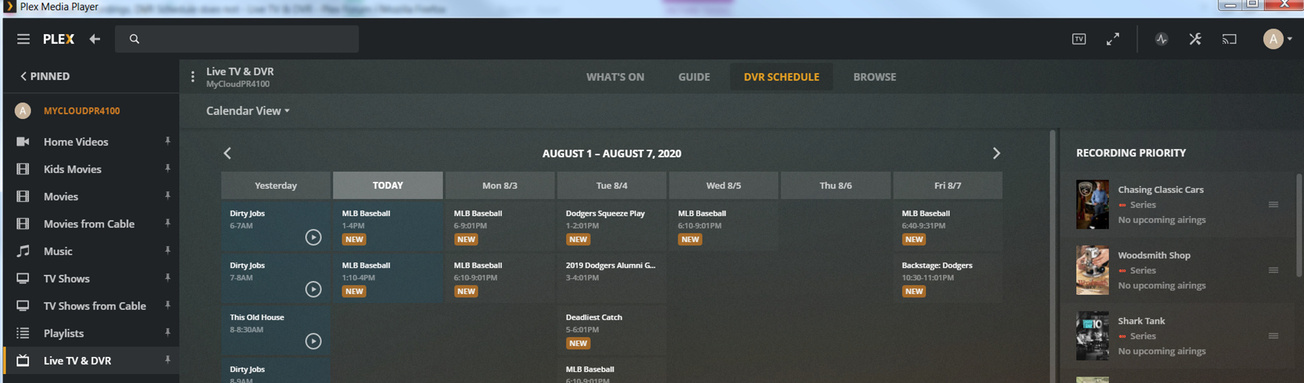
I am having the same problem as other users. That is to say I have scheduled recordings in the guide however they do not appear in the DVR Schedule. I have posted the two pictures above to help illustrate my problem.
Server Version -1.20.4.3517-ab5e1197c-x86_64.qpkg
QNAP TS677 - Firmware 4.5.1.1465
I have scheduled two recordings for the same day - ‘DNA’ and ‘The Bridge’. The Bridge appears in the DVR Schedule however DNA does not. I have selected ‘All Episodes’ and ‘New and Repeating Airings’. I have selected ‘Any’ for Airing Time.
Do you have any other episodes of DNA in your library?
Usual cause for issues like this is plex thinks the episodes already exists, if last weeks was also named the same as this one (date 1/1/20), then next weeks will look like a duplicate and will get ignored
Plex need to fix this so the episode for next week has the date 14/11/20 on it and not 1/1/20
Yes, I do have other episodes of DNA in the library.
Why does Plex always get the recording date wrong? And why does it sometimes create a ‘Season xx’ folder and other times also create a folder ‘Season 2020’. Then the episodes are randomly stored in one or other of the folders and the sequencing of them is simply a mess. Any thoughts on how I can sort this out (other than going to my server and identifying the actual recording date) would be very welcome.
Unfortunately there is no easy fix for this
If it has a date as per your example, then a season 2020 folder will be used, if it had a S/E then that would be used instead, the guide data can get messed up, so if it changes between these ways of identifying the show then different folders are used
I would rename them one by one using the aired date and manually add the metadata back (i think dvr data is removed after renaming as online data sources are no longer used)
Thanks for your information. I was starting to wonder if the real problem is with the EPG and I looked back over earlier topics and saw you were engaged in some discussions about the EPG. I wonder what EPG you use and if it is worthwhile purchasing a subscription for an EPG. At moment I can’t rely on PLEX at all. For example, last week I set up a recording for ‘Industry’ on BBC Two HD. The first episode recording fine but the one schedule for this week on Tuesday was not scheduled for recording so I cancelled the original recording and set a new one. However that is not a sustainable solution where I have to keep checking for every recording.