Find where to watch something with "Discover" and your "Watchlist"

I have some feedback about the watchlist on the Apple TV.

Each time a trailer is played, there’s a “Add Movie to Watchlist” mention with a dancing arrow appearing for the first few seconds of the trailer.

I can understand this prompt appearing the first few times trailers are played to point out to the new feature, but right now it’s appearing every single time for all trailers. Could we have this prompt stop appearing after a while? Because right now, seeing this every time is very annoying. After a few times playing trailers, people will know that swiping up will present an option to add the movie to the watchlist, no need to always show this.

Better yet would be a way to tune that to a user preference in the settings. Maybe a "Show for trailers only the 1st time they are played for a User" & "Show once a day" & "Show Always" & "Show Never", maybe a "Show only for movies not in my Servers", & "Show only for New Movies" or even "Show only for Movies in Theaters Now"?

I was hoping for a “This movie is on Netflix” or “This movie is on Disney+” at the end of trailers but an “Add Movie To Watchlist” seems great. Just needs some refining.

1 Like

So far I am loving the new Discover feature and have been using it for the last few weeks as the center of my media hub. There are a few things I’ve noticed that I hope will be patched before it comes out of BETA.

  1. When launching a tv show from “Watchlist” it’s nice that it will automatically open the destination app and start the episode. I think it would be nice if PLEX then marked that episode at “Watched” so you didn’t have to do it manually every time you come back to it (and remember to actually go mark it as “Watched”.

  2. Once you select a show or a movie from “Discover”, it should be added to “On Deck” (I realize that marking WHERE in said episode or movie you were on would require cross-app integration so deep it might not be possible, but maybe at least the next episode should appear “On Deck” like it does for personal media or in-house PLEX movies/shows

  3. I’ve noticed while your own personal media will show up on movies from “Discover”, it’s relatively spotty if someone with a library shared to you also has those movies. Sometimes they show up, sometimes they don’t.

  4. Speaking of TV Shows, TV shows from “Discover” do not recognize if you have the tv show in your library, meaning, if under “Trending On Your Services” there is a show like “Stranger Things” and you select that show, your library will not show up as an option to play from.

  5. For some reason, the episodes for tv shows max out at 20. I checked “Community”, “Smallville”, and “The Fresh Prince of Bel-Air” and if you check a season, it might said “25 Episodes” but once you go into the season, only episodes 1-20 appear in the list and I haven’t found a way to reveal the remaining episodes.

Now, the next two items are really just “wishlist” type stuff

  1. The website trakt.tv which is a tv episode tracking guide would be perfect for a media aggregator and it’d be nice to see some type of integration with them (not to mention it’d probably be easier than trying to get every single streamer to jump on and integrate watch history with PLEX.

  2. I’d like an iOS widget for iPhone and iPad. Something simple like a quick “ON DECK” or “TRENDING ON YOUR SERVICES” or “ITEMS FROM YOUR WATCHLIST”, maybe all the above. I currently use an app called Television Time and they’re widgets are perfect.

1 Like

I don’t see them losing this feature because it inherently is one of the things that is designed to keep people within the PLEX ecosystem. I think you’re right, they could have it stop after a certain count hit or give the option to remove it, but since (to me , at least) the purpose seems to keep your organization in PLEX, they’ll keep it

Even if it’s not as flashy as a splash screen. Why not just add that to say your “On Deck” section or a new section like, “New From Your Watchlist”?

1 Like

IIRC somebody further up in this thread asked for an option to update the watched status automatically or semi-automatically when returning back to Plex (e.g. Have you finished watching xyz?)

There’s already a feature suggestion to add the next episode to continue watching – though as you pointed out Plex has no access to the exact progress/viewstate on another provider’s service.

Same rules apply… your friends’ libraries and their content will show in Discover / your watchlist if they’re using the current-generation Plex agents.

Same as #3 – make sure your library is using the Plex TV Series agent and potentially refresh its metadata. Shows I own and have on my own server are displaying that even if I access them through Discover.

Where exactly are you seeing this and can you maybe provide a screenshot?
I’ve just checked some shows I know to have more episodes and they’re all showing up fine for me.

There’s an existing feature suggestion covering that.

2 Likes

On the overall count it’s the Specials that make the count seems wrong. To avoid you have to mark all the specials as seen.
For the current season it’s that all planned episodes are counted, even the unaired ones. I consider this a bug, only the aired episodes should be counted.

There is also good progress of the PlexTrakSinc script.
The Python Unofficial Plex API is in the process to be updated (tests under way) so this can become an alternative way to sync the watchlist with Trakt

1 Like

Wow, thanks for all the info, I didn’t expect that to actually get any response. I appreciate it. Here are the screenshots of what I’m seeing. First, the landing page for the series showing Season 1 has 25 episodes

and the second here showing only 20 episodes once you go into the season

I’ve seen this happen with several shows. So far, “Smallville”, “Family Guy”, and “The Fresh Prince of Bel-Air” all have this issue.

Thx; yes, I can confirm that. Usually there’s an “overflow” (show all) button if things get too big. Seems this is missing.

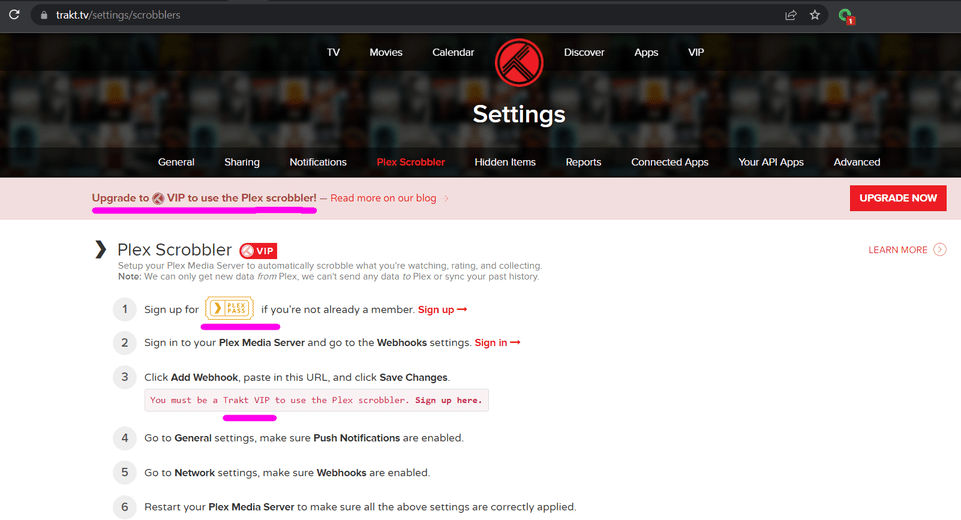
There is a trakt.tv integration. The official one requires a Plex Pass because it uses Webhooks as well as trakt’s Premium (read “Paid”) service. But there are also unofficial ones that you can find that do it for free.
It’s not exactly the same as it syncing your Watchlist from 1 to the other, but you might want to check it out, I love it personally (& I don’t pay for trakt because that seems silly)

On no, that’s my favorite part of the Watchlist, it shows upcoming episodes. I want them to find a way to utilize that better personally so I don’t want it seen as a bug… Please don’t squish it…:pray::pleading_face:

This ^^

Also there is no official Trakt option as far as Plex are concerned.
Nobody at Plex has heard of Trakt.

1 Like

It’s a bug not because lists the upcoming episodes but because it shows them in “Available From Your Watchlist” (and in the badge): they are not available yet! so shouldn’t be counted.

The official trakt.tv integration is very limited and it’s only one way (plex to trakt).

The watchlist is available on the server side at user level and available via the API, so I’m optimistic that soon it would be integrated in the unofficial one

1 Like

Yeah, I don’t pay for trakt either, I just use it to sync through another app I use to track tv shows. I’ll check into adding the official one, thanks

1 Like

Again the official one (as far as Trakt is concerned… because there is no such thing as an official Plex option) requires both PlexPass and Trakt VIP and is seriously flawed as it’s one-way sync.

PlexTraktSync is the way to go.
It’s free regardless of PlexPass or Trakt VIP and works far, far better.
And if you find the installation a little daunting/confusing then simply reach out here for help.

1 Like

My suggestion for a far easier installation is to use Docker and this image.
It’s updated in line with the official one and it’s already set up for doing both scrobble and sync.
You need to use the CLI only once at first start for the setup wizard to run. Then everything works without further intervention.
If you need to change any of the presets, you can easily do it by editing a text file.

1 Like

Yeah I actually use docker on Linux.

But depending on the guys OS and familiarity with different OS, docker may be an even more confusing thing.

I just wanted it to be pointed to the OP that what @LostOnTheLine offered as a solution is seriously flawed.

Not to mention his nonsense claim that Plex integrates with trakt.tv

Trakt integrates with Plex.tv but hey… to the clueless I guess that’s the same thing.

I say again… nobody at Plex has heard of Trakt.
Any integration from Plex is coincidental/accidental.

Emby, Jellyfin, Kodi and Infuse have trakt built in.

That’s kind of ironic though… other than infuse only Plex will display what you have previously Trakt rated your media in your chosen option.

But if you want reliable media ratings being pushed to Trakt and only care to see your ratings/syncs In Trakt then PlexTraktSync is absolutely the best option until someone at Plex hears about Trakt or offers two way webhooks. The latter will never happen.


I’m pretty sure it’s official… It’s presented as though it were official… If it’s not sorry? I guess… Not really sure why you are mad about me believing it was official, I don’t use it & didn’t recommend using it, just said that it’s there…

I personally use Plaxt along with a manually run PlexTraktSync via Docker to sync a Managed User Account & when, on occasion, the Plaxt one has a problem & misses an episode (Which happens on rare occasions probably when my Remote Access is not working or something like that is my guess) I posted about it above. I did have a problem where it wasn’t marking things as collected, but was marking them as watched, but that seems to be fixed after I “trakt-danced” by removing, re-adding, re-signing in, getting a new token, etc. But that seems to be working properly now. &, something I like, on trakt, when using Plaxt, it will show what you are currently watching in your Dashboard, which is really nice.

I didn’t know that. The combo I use does go both ways. I’m pretty sure the old Plex Plugin one went both ways as well, but can’t say for sure

I do use that one, but I feel it has it own limits, namely that it has to run manually (even if that means you set a scheduled task to run it manually) & just syncs the list across. That’s why Plaxt is my main one but I could understand people disliking that one if security is a big concern because it’s a 3rd Party that I don’t know what’s behind the curtain.

Except you have to schedule when it runs… & it doesn’t actually scrobble, it syncs. It doesn’t work in Real-Time

I mean I pointed out that I’ve never used the official one, & before the watchlist the sync TO Plex was rarely used. I personally dislike a program marking things on my server as watched. I feel, from my prospective, it kinda silly to go that way, so I never saw that the limitation was a thing. But it IS an official one, & Plex people have heard of it, at least a few years ago. If it doesn’t do 2-way then all the more reason to use the 3rd party Plaxt, because it runs in real-time, Scrobbles as you watch & even partial progress, & works both ways, at least it did a few years ago. I apologize for any information I got wrong, but I believe I stated that I hadn’t actually used it & never actually recommended it unless you ALREADY have a trakt VIP account anyway.

EDIT: So since people are getting bothered by things I went to check the word “Scrobble” to be sure the way I have been using it, & seeing it used was correct… & It’s totally not. So I will clarify that the way I have been using the term Scrobble is to mean when something tracks progress, likes, etc, in real-time. But apparently Scrobble actually just means "to record a user's preferences and recommend similar categorical things that he or she might enjoy" & it was technically intended to only be for Music preferences. I’m not sure where I got it from, but I’ve heard the words Scrobble & Sync to be used as 1 meaning to do it in real-time, the other meaning to do it at a scheduled time respectively. That’s the definition I was using.

Did you read fully what I wrote? Plextraktsync works in real time (scrobble), it’s your set up that is wrong. You just set up sync, not the scrobble part ( watch command).

For that I was suggesting to use the Docker image I linked above, it’s already set up properly for both sync and scrobble.
You can check that scrobble it’s working by opening Trakt w whilst watching a movie on Plex: you will see the progress in real time onTrakt

I didn’t know that. I saw other people saying the same thing, but all documentation I found when I was looking it up said otherwise & when I attempted to use it with the watch setting it just took up resources but didn’t actually work in real time, It actually took more resources than the Plex Server takes when playing a single item via Direct Play, & when I read the documentation it seemed as though it was essentially doing a sync every couple of minutes. Personally I thought Plaxt was just better for my use case. It runs on account level so it syncs to both servers easily. But I like some things like the ability to sync managed users, & though Plaxt syncs new changes in real time, it doesn’t deep dive for old changes, PTS does that very well aside from dates. So for me using both is best.
But I have an older system running my Plex server so I’m probably more concerned with things running in the background than most (I actually uninstall Edge & take ownership of it’s install locations & deny the system access to them which I know is extreme)

So if I was incorrect I apologize, it didn’t seem to work that way for me. I’ll take a look at your Docker container & give it another go. Thanks for the correction

UPDATE: So I looked into the PlexTraktSync Docker Github, it’s Documentation & parameters & there are a few things to note:

  1. It is not considered to be production ready. It is considered by it’s developer to be experimental, unsupported, & could change/break at any time. The developer actually warns: Please do not deploy them anywhere important
  2. It does NOT actually Scrobble, what it does is an Incremental Sync every 2 minutes, which is close enough to function essentially the same but at a noticeable but insignificant processor load on an i7-3770, & will likely not even be noticeable on a modern system. It then does a full sync every 2 hours.
    • An Allegory For Anyone Who Wants More Understanding: Essentially instead of being told that someone got out a bowl & put cereal in it, it runs into the kitchen every 2 minutes, but it doesn’t count the bowls each time or the cereal, it looks in the sink to see if any new bowls have been added & weighs the cereal shelf to see if it has changed, only if those things are true it then looks to see what color bowl was used & which box of cereal has less in it. Then every 2 hours it does a full check & counts the dishes properly just in case it was wrong in it’s quick check. This would catch, for example, if someone took a bowl with them when they left or went to their room, or washed the bowl. That wasn’t the best allegory but I think it got the idea across

I just noticed the same is happening with TV shows, not just movies. I wanted to point it out.

After playing a few trailers, I know that swiping up will present me an option to add content to the watchlist, no need to show this overlay every time. I really find this annoying.