All these probems will continue to exist until they release the new muxer for all Android clients instead of just mobile.
There’s your answer. No need to start a new thread.
All these probems will continue to exist until they release the new muxer for all Android clients instead of just mobile.
There’s your answer. No need to start a new thread.
which apparently is coming to ATV beta soon (or already has).
it’s not “replacing” exo player though.
Problem is this though I could provide my logs and plex people will says its the file, ive had it before, yet my subsequent tests of playing the same movie on 3/4 different device, where they all play fine means it ant the file. could be plex related or chromcast related.
Here are my logs batches 1 download whilst playing via the app on chrome cast, the other whilst playing via my laptop. The third one playing via chromcast using the VLC app. and the 4th one playing via the plex app on my actual tv.
Plex Media Server Logs_2022-03-09_19-17-39log4.zip (4.4 MB)
Plex Media Server Logs_2022-03-09_19-12-41log3.zip (4.4 MB)
Plex Media Server Logs_2022-03-09_19-05-27log2.zip (4.3 MB)
Plex Media Server Logs_2022-03-09_19-03-15 log1.zip (4.2 MB)
2,3,4 played perfectly. movie in question is Hotel Transylvania
The zombie version of Exoplayer2 that plex has been having us use since they got rid of plugins is trash. PERIOD.
They need to solve it, change it or update it
Just played the file again in Kodi and playing perfectly, on Chromecast. So for me im more convinced now that its plex app on android. After doing some further research, this sort of issue has been reported multiple times over the years and yet Plex Devs, appear to not have rectified it. Come on guys, sort it out or I will be switching to Kodi. Maybe use the player instead of exo player, it cant be that difficult to allow users to choose there preferred player.
Update
I have just also installed the plex plugin for kodi, and the same file that has been stuttering is playing perfectly, so ladies and gentleman I am 100% convinced now it is the Plex app on android. /chromcast with android. so Exo player needs sorting out asap or swapping for Kodi player, or even VlC
@VBB - how can i update exo player, or do i have to wait for plex to decide if they wil be updating it themselves.
You can’t update it yourself, but right now Plex is not that far behind with r2.16.1 (released Nov 19, 2021), There have been two updates since, with r2.17.1 just published today.
You have Plex Media Server scanning the Plex data directory, where metadata, subtitles, etc are stored. This will lead to system instability.
Log snippet:
Mar 09, 2022 18:25:08.819 [0x7f234f0dbb38] DEBUG - [Notify] Now watching "/data/Saw II (2005)"
Mar 09, 2022 18:25:08.819 [0x7f234f0dbb38] DEBUG - [Notify] Now watching "/data/American Pie (1999)"
Mar 09, 2022 18:25:08.819 [0x7f234f0dbb38] DEBUG - [Notify] Now watching "/data/Trolls (2016)"
Mar 09, 2022 18:25:08.819 [0x7f234f0dbb38] DEBUG - [Notify] Now watching "/data/Library"
Mar 09, 2022 18:25:08.819 [0x7f234f0dbb38] DEBUG - [Notify] Now watching "/data/Library/Application Support"
Mar 09, 2022 18:25:08.819 [0x7f234f0dbb38] DEBUG - [Notify] Now watching "/data/Library/Application Support/Plex Media Server"
Mar 09, 2022 18:25:08.852 [0x7f234f0dbb38] DEBUG - [Notify] Now watching "/data/Library/Application Support/Plex Media Server/Plug-in Support"
Mar 09, 2022 18:25:08.875 [0x7f234f0dbb38] DEBUG - [Notify] Now watching "/data/Library/Application Support/Plex Media Server/Plug-in Support/Caches"
Mar 09, 2022 18:25:08.881 [0x7f234f0dbb38] DEBUG - [Notify] Now watching "/data/Library/Application Support/Plex Media Server/Plug-in Support/Caches/tv.plex.agents.movie"
Mar 09, 2022 18:25:08.881 [0x7f234f0dbb38] DEBUG - [Notify] Now watching "/data/Library/Application Support/Plex Media Server/Plug-in Support/Caches/tv.plex.agents.movie/HTTP.system"
Rearrange your media and library definitions so the Plex data folder is not scanned.
For example, you could move your movies into /data/movies, then add that folder to your movie library. That would avoid Plex scanning its data folder.
After fixing your library definitions, rescan the libraries, empty trash, clean bundles, and optimize the database. This will clean the incorrect info out of the database.
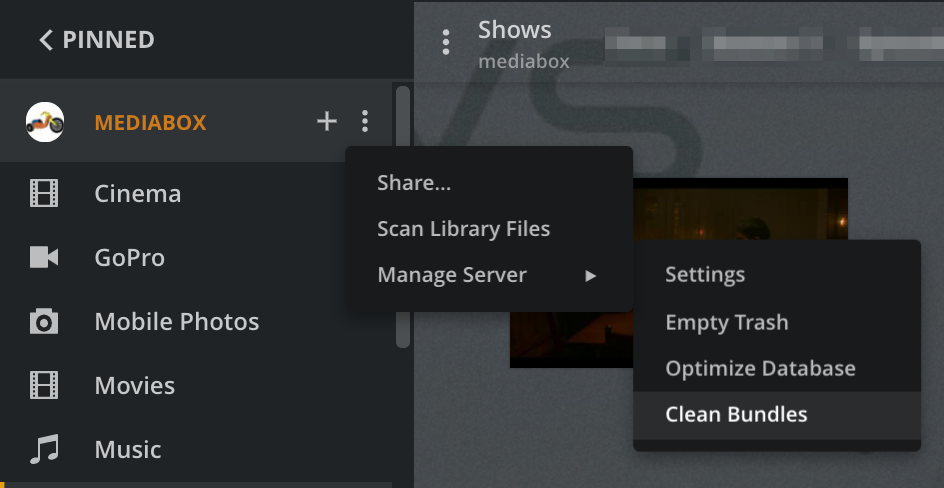
Thanks I will try it, however why would that resolve the issue. When
Surely in the long term this is something within plex/app that’s causing this?
I am currently using Trueness scale to run and host my plex server, so will need to look into moving and adding folder. But I can’t see how that will change things. But I will give it a try. I still think there are better options than exo player. If what your suggesting does not work, then I will use the plex plugin via Kodi.
It may or may not help with the playback problem. However, it is a well known issue affecting Plex stability. It has to be fixed first. Once the server is correctly configured, we see how things work and proceed from there.
Not sure how I do this within True nas scale.
Caveat: I’ve never used TrueNAS and don’t run Plex in a docker container, so don’t know if you do this via CLI, a graphical file manager, a SMB mount from a PC, etc.
In /data, make a directory named movies - /data/movies.
Move your movies from /data to /data/movies. For example, instead of /data/Trolls (2016) you would have /data/movies/Trolls (2016).
Edit the Plex Library. Change the folder that is added to the library from /data to /data/movies. Save changes.
Then rescan the libraries for Plex to pick up the movies in their new location.
If everything is working OK, empty trash, clean bundles, and optimize the database.
You’re going to have to wait until Plex releases the new muxer on the rest of the Android ecosystem. It’s only enabled for mobile as far as I know so until then can’t really say Exo Player is at fault here.
According to Employee posts elsewhere the new muxer significantly improves the stability and playback.
here is the layout of
/mnt/PlexMedia33/Movies how it i seen using winscp
I have done it, its mounted at mnt/plexmedia33/movies
File still buffers and stutters though, shall i do a new log
Thanks for the update.
Yes. Time for new log files.
Also, if you can, pull the Plex Android TV log files.
see attached
