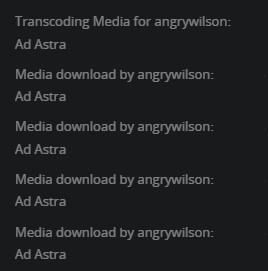
My Qnap shows support for hardware encoding, I have the Nvidia drivers installed and the resource use is set to QTS Mode. Under Transcoder Use Hardware acceleration and hardware accelerated video transcoding are selected. With all that my system does not use the Nvidia card. I put in a ticket with QNAP and after some testing it showed that the card is working properly with their media server. Any ideas on how I can get plex to use the card?
I would appreciate the instructions, I would like to benchmark the two. I would think that the Nvidia card would have a higher processing power. I often transcode movies in bunches so time does matter.
On QNAP, already built into the package is a “PlexData” shared folder mechanism.
This PlexData shared folder links the QPKG internal storage to FileStation.
All you need to do is:
Stop PMS
Create a shared folder, anywhere you want, named PlexData (exact case)
Start PMS
Open FileStation → PlexData
You will see a Plex Media Server folder link.
When you click Plex Media Server, it will actually open the storage location under .qpkg/PlexMediaServer.
This mechanism makes it easy to do backups, fix what’s broken, and make custom edits of your “Preferences.xml”
After PMS starts up ok, you can stop it
Make certain the QNAP Text Editor app is installed.
In FileStation, open PlexData/PlexMediaServer
Right-click ‘Preferences.xml’ → Open with Text Editor
go to the last line , before the closing />
This is where we specify which GPU to use.
a. /dev/dri/renderD128 is the QSV ASIC in the CPU
b. /dev/dri/renderD129 is the first Nvidia GPU card you have installed.
To the Preferences.xml file, add HardwareDevicePath="/dev/dri/renderD129"
(be certain to have a space before and after the preference)
It will look like: SomePref="Value" HardwareDevicePath="/dev/dri/renderD129" />
SAVE the file
Start PMS
To change back to the QSV ASIC (with PMS stopped), either -
a. Change 129 → 128 and save
b. Remove the entire preference=value and save
Thank you for those detailed instructions. I just realized that half of my movies fail instantly when I try and download them/transcode. I assume that is because of the format type.
Before I post this next issue I thought I would ask you since you clearly know the system inside and out. Ever since the last update I cannot download two movies in a row. I successfully download/transcode one movie. Then the next movie basically thinks that it is making progress but it never starts to transcode. I have to go onto my qnap and stop and start the service. Then it will transcode one movie again. It also keeps adding download lines to the dashboard. See attached.