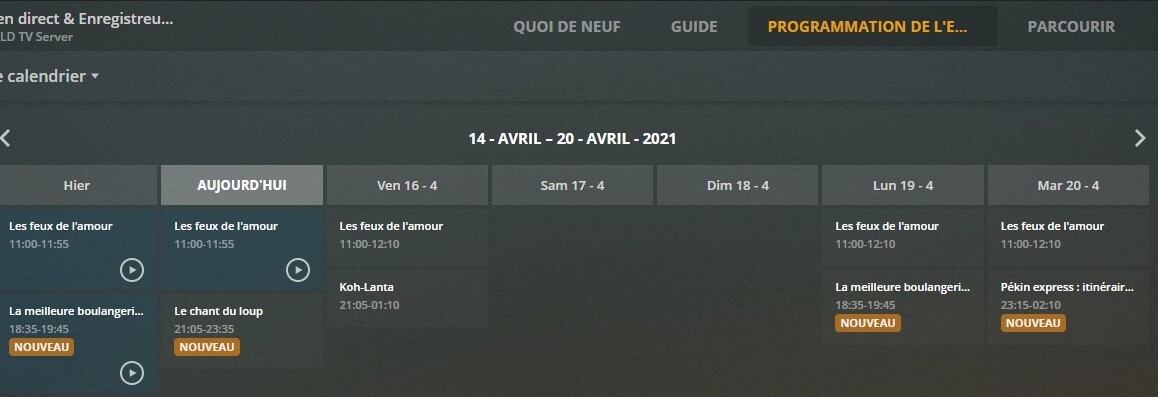
Guide Shows Recordings, DVR Schedule does not

Hi,
Thats correct, the main problem is the EPG, the new provider Plex went to have continuous errors and it needs constantly checking to make sure things work, the good news on this is Plex are going back to the original provider which is much better (not 100% sure when, but heard before end of year)

For me i went back to using an external app (used it for years before Plex dvr) to do all my recordings, using Schedules Direct as a source, I then just point my Plex library at the recordings folder, this is just a setup and forgot, no having to manually check things

I still have Plex DVR running, but i only use it nowadays to occasionally watch live tv, my trust of it for recordings at the moment is zero, far too many issues with the data

Hello,

I am using HDHomerun as my tuner. It allows recording of 4 channels simultaneously which is handy. They also have a DVR capability which I can install on my NAS for $35 a year which is reasonable. I don’t what format they use to store the recordings. If it is TS then I could just point PLEX at the folder. What app are you using?

If I recall when I was setting up the PLEX DVR there was an option to use a different EPG. Have you tried to Schedules Direct with PLEX?

I use NextPVR and pay $25/year for the EPG, can be used for free with just the Freeview guide, but i found that was just as bad as what Plex has now

There are ways to get Plex to use Schedules Direct, but this is against the terms of SD so i didnt bother, Gracenote (which Plex are going back to is the commercial version of SD, so the data is the same)

$35/year to use HDHomerun as a dvr sounds good, I dont have any experience of using it though

LET’S KEEP THIS THREAD ALIVE UNTIL THEY FIX IT!

This just happened to me (AGAIN) tonight, and this time I caught it in the act! (Usually, I just wonder why my seasons are incomplete and blame my available space or the Plex Server being up, etc.) Was going to start a new thread, but found this one. The title here is better than what I was searching for and going to write, and repeating it seems like spamming.

I’ve been recording a 5day/wk news show FOR MONTHS. It’s new every night, then repeats late-night hours later. So, logically, I have long had it set for New Airings only.

Tonight, a Monday, I checked ā€œDVR Scheduleā€ and noticed this show was not going to be recorded. Sometimes something preempts it or a scheduling change occurs, but not this time.

It was recorded all last week; no changes since; and it is still scheduled to record tomorrow. The shows around it recorded fine (same channel), so it shouldn’t be the server, or provider, or space issues (I mean it shouldn’t really be anything, actually). But this single instance just would not record.

I checked the Guide and, consistent with this thread, the Guide looked like it would record AND it was marked as ā€œNewā€ in the Guide.

Lo and behold, it did not record at the proper time. So, hours before the repeat airing, I modified this recording to include Repeats. That affected NO CHANGE to the DVR Schedule, though it should have.

And, as I complete this, the 2nd airing is occurring. It is not recording. But when I click on Record, it takes me to the Record Options interface to Chancel or Save Changes to the Recording (that is not happening). I now have no faith that I can get this to record via Plex.

Is THIS THREAD supposed to fix this?
And even if so, are there in-Plex workarounds? What can be done?

And if that thread won’t fix it, can we PLEASE get a fix happening here? I mean, THIS OTHER THREAD shows that this issue has been going on for YEARS now.

Plex Server: for Free-BSD, Version 1.20.3.3437
Provider: Verizon Fios CableCard in a HDHomeRun PRIME…
Model: HDHR3-CC
Firmware: 20200907
[but this has been going on for a long, long time across several combinations of server versions and HomeRun firmware, etc]

1 Like

Ahh - I posted here at this other thread Recordings not being saved

but this thread here you have may be just exactly what I am experiencing.’(OK is this bad manners? Ie. Should I delete the other post linked above?)

Soo…reading this all, I am nost sure. Umm. Is there a fix or is something still pending? Is there anything I can do?

This seems to be an on going problem. We need a fix.

1 Like

Ongoing issue. Show was working fine last week and now it doesn’t record. All settings verified and Monday through Thursday is not in schedule this week. It is magically there for Friday though.

1 Like

Any news?

Where we at with this? This an issue for me as well. I’m trying to record something and the guide indicates that it will be recorded but on the DVR schedule it’s not listed. However, it is recording the show at other times. When I go to record the show at the time that isn’t in the dvr schedule it says it’s already set to record.

Plex has made it crystal clear for over two years that they just don’t care that users can’t get their DVR to work. There’s a very obvious solution that would allow users to work around these types of problems. Let us specify a recording by time, channel and length. If something is wrong in the EPG and we can’t get something to schedule, instead of fighting with it (usually unsuccessfully), we just schedule it manually and we’d be done.

If PLEX actually cares, then I really need to see some proof. Manual scheduling is something that every other DVR on the planet can do and it’s obviously been requested by PLEX users. I gave up and switched to something more reliable.

1 Like

Monthly reminder this remains a problem.

This just started happening to me too

Having this issue as well. DVR schedule is not showing episodes that are set to record for new to me series I just set to record.

EDIT: I wiped the DVR and started over, it seems to be working. I thought I had done that previously when they announced the EPG change, but I guess not.

Just started happening for me

Windows 10 server 1.22.2

Plex01

When was that series recording originally created? Before or after our EPG change from TiVo to Gracenote (Jan. 1-ish)? If it was created before it may be as simple as deleting it and recreating it. Also, kick off a manual refresh of your EPG before you delete/re-create, we pushed some updates tonight.

This is still happening. I want to keep loving Plex, but if going back to Gracenote was supposed to fix the problem, it did not. If deleting and rebuilding my DVR was supposed to fix the problem, it did not. If refreshing the guide was supposed to fix the problem, it did not. If canceling and rebuilding the recording of the series was supposed to fix the problem, it did not. Four episodes back to back, showing in the guide as ā€œto be recordedā€, yet, right now, not recording. The DVR Schedule only shows one of the four timeslots to be recorded. They are all on the same channel, with the same name, and I have the setup set to record all episodes. Is there anything else to try except finally give up on Plex DVR? I begin to regret my Plex Pass subscription.

It seems to be working after the latest update

Hi,

The problem is still here and it’s very frustrating.
I have a monthly plex pass, I’m not sure to continue to pay for this if it is not reliable.

Some programs works very well but for some others it’s not ok.

For instance, I have this program that looks like scheduled (it occurs every week day):
Note that I don’t understand the date of this program : ā€œ8-9-15ā€ (it’s a new program, not a repetition).

epg1

But in fact not (and it does not record) :

We can see that it is scheduled on monday 19th but not tuesday 20th !..

I think the problem comes for the guide, I tried to use several EPG but the result is always the same.
I have also the same problem on my nvidia Shield TV Pro server and my Windows 10 PC Server.

In the console, I can see this error every 15 seconds !

To complete my previous post : I confirm the problem comes from the EPG.
Even if I delete the whole programmation for the program, I can’t record only one episode at all.
What can me we do to solve this problem ?

Are you using XMLTV guide data? If so, can you provide the data for both of the airings from your example (the full <programme> to </programme> listing for each)? If Plex believes it’s just the same airing repeated it won’t record the second one. There needs to be sufficient information in the guide data to identify them as two separate programs.

Here’s an example of the data for a program:

<programme start="20210413100000 -0400" stop="20210413103000 -0400" channel="29.4.plex.tv">
	<title>Let's Go Luna!</title>
	<sub-title>Totally Totem; Glacier or Bust</sub-title>
	<desc>Andy and Luna enlist the help of a totem pole artist to tell their story; Andy wants to see the blue light of the Mendenhall Glacier ice caves.</desc>
	<icon src="https://metadata-static.plex.tv/4/gracenote/48357bef95743cc30039f367b91964ec.jpg" />
	<episode-num system="original-air-date">2020-12-01 16:36:45</episode-num>
	<category>Entertainment, Educational</category>
	<previously-shown start="2020-12-01 16:36:45" />
</programme>

Please excuse the formatting…