Thanks for your answer.
I suppose I’m using XMLTV guide data, I didn’t change the default settings.
How can I get the data you show in your example ? Where is it located on my shield server ?
Thierry
It would be in the XML file you point Plex to when setting up your DVR. If you’re providing Plex a path to an XML file then you’re not using XMLTV guide data. I think I misunderstood your comment about trying multiple different EPGs. Sorry for the confusion.
If you’re just using the Plex-provided EPG data selected during DVR setup, then something else is going wrong.
Is there a way to download the XML file corresponding to the EPG ?
I’m sure the problem comes from its content and I would like to check it.
And I think this would explain why my console shows a parsing error every 15 seconds !
There is no Plex-provided means by which you can download its EPG data as XML. The data is stored in a SQLite3 database alongside of the library database. Having said that, I’m working on an application which reads this database and writes the EPG to an XMLTV-formatted file. The code is early and has only been tested on FreeBSD and Linux. The output I provided above was actually produced by it.
If you’re running your server in one of these environments and would like to give this code a go, let me know and I’ll PM it to you. I don’t have it up on Github yet, but when I do it will be MIT- or BSD-licensed. It’s currently configured to build with Clang, and against libc++; this is was done primarily to make it execute in a reasonable amount of time.
Regarding those error messages you’re seeing every 10-15 seconds in your logs, they have nothing to do with your EPG data. Those are SSDP parsing errors and are caused by some device on your network replying to Plex’s SSDP queries; when Plex interrogates the device for additional information via the URL provided in its response, there is a parsing error. These errors can be safely ignored.
Thanks for your proposition but I run the plex server on a Shield TV Pro so it can’t help.
I must say that I have this problem only on one program (for the moment).
All the others I have scheduled go perfectly and are well recorded.
BUT I must understand where the problem is because for me this system is not fully reliable.
If you’d like, you can send me your zip (post) code and the lineup name you use and I’ll create a test DVR here. Let me know the channel and program with which you’re having issues and I’ll see if I can dump it to XML.
Sorry for the delay…
My zip code is 38090 (France).
The program I try to record every day is named “La meilleure boulangerie de France” on M6 chanel.
Important : the last episode is tomorrow (next week is another program on the same chanel that is well scheduled : “Mon gâteau est le meilleur de France”).
Here you can see the program is scheduled today but not tomorrow :
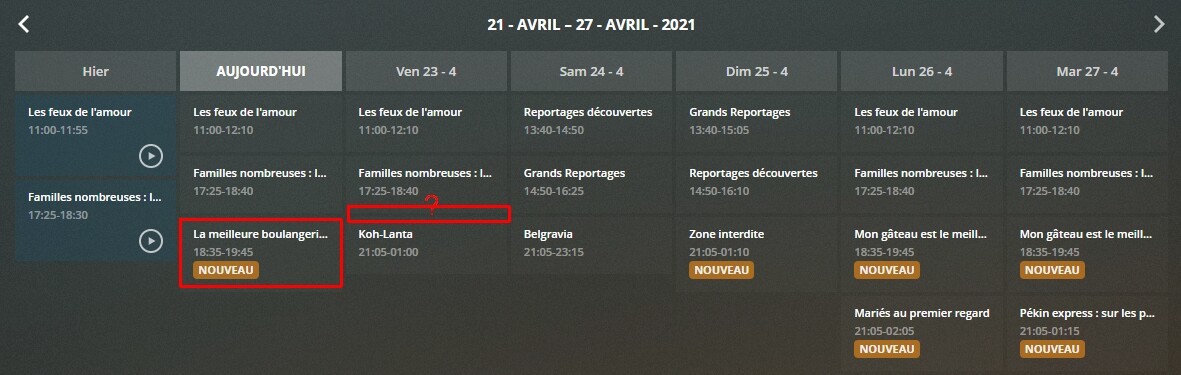
If I look in the Guide tab, I see that this program is scheduled 
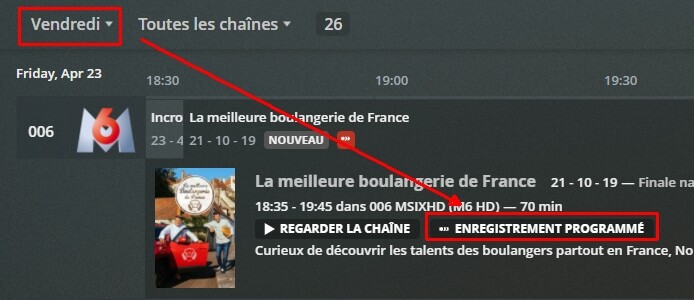
Here are the recording options :

Thank you very much for your time 
Thanks. I configured a test DVR with your postal code and mapped a channel with M6’s data. Here’s the XMLTV dump for the two different airings of that program.
This one is from today:
<programme start="20210422123500 -0400" stop="20210422134500 -0400" channel="006.plex.tv">
	<title>La meilleure boulangerie de France</title>
	<sub-title>Finale nationale</sub-title>
	<desc>Curieux de découvrir les talents des boulangers partout en France, Norbert Tarayre chef cuisinier et Bruno Cormerais, Meilleur Ouvrier de France Boulanger, repartent sur les chapeaux de roues.</desc>
	<icon src="https://metadata-static.plex.tv/9/gracenote/9647bc0f89f3b16715ec7beac1e7eb51.jpg" />
	<episode-num system="original-air-date">2019-10-21 08:00:00</episode-num>
	<previously-shown start="2019-10-21 08:00:00" />
	<category>Entertainment, Cooking</category>
</programme>
And here’s Friday’s:
<programme start="20210423123500 -0400" stop="20210423134500 -0400" channel="006.plex.tv">
	<title>La meilleure boulangerie de France</title>
	<sub-title>Finale nationale</sub-title>
	<desc>Curieux de découvrir les talents des boulangers partout en France, Norbert Tarayre chef cuisinier et Bruno Cormerais, Meilleur Ouvrier de France Boulanger, repartent sur les chapeaux de roues.</desc>
	<icon src="https://metadata-static.plex.tv/9/gracenote/9647bc0f89f3b16715ec7beac1e7eb51.jpg" />
	<episode-num system="original-air-date">2019-10-21 08:00:00</episode-num>
	<previously-shown start="2019-10-21 08:00:00" />
	<category>Entertainment, Cooking</category>
</programme>
Should these be recorded as two separate episodes? If so, Plex won’t be able to do so. The episode-num elements are identical between the two of them. As far the Plex DVR is concerned, this is two different airings of the same episode.
If you believe they should be recorded as individual episodes, you may want to post over in this thread regarding inaccurate guide data.
Thank you very much for your analysis !
You have pointed exactly where the problem is : the EPG data is incorrect.
And finally the program is well scheduled today (perhaps because I have deleted the one recorded yesterday, I will never know…).
What I don’t understand is that I have configured the DVR to record the repetitions, so shouldn’t it record all the episodes, even if there are exactly the same ?
But you’re right, I will post this problem on the thread relative to.
Have a nice week-end !
I finally happened to find a pending issue before it has occurred (it will occur 10pm ET Wed July 7), if anyone can make some time to help me troubleshoot it.
I’m in U.S. zip 21117 with Verizon FiOS TV. Plex server on FreeBSD unix. Content via Silicon Dust HD Homerun Prime (Cablecard). But from what I’ve read here, the problem is likely the EPG?
Ch 520 is Telemundo. My wife currently records the weekdays 10pm ET show called “Cafe con aroma de mujer” (coffee with the scent of a woman, BTW). All episodes are new.
Tonight it recorded episode 30. Tomorrow (Wed) at 10pm, Plex DVR indicates it will NOT record E31. But Thursday at 10pm Plex DVR looks set to record E32, and Fri looks good, too.
Meanwhile, the Verizon (and Plex) Guides show E31 at the expected time, and the Verizon DVR can be set to record E31 (not preferred).
THE BIG QUESTION: How can I/we fix this in 22hrs so Plex WILL record E31 tomorrow, as it should?
Upcoming tonight … Guide says, “Yes.”

DVR Schedule says, “No!”
What should I look at?
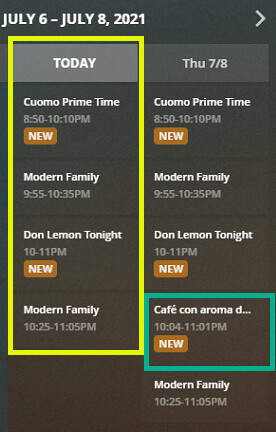
Check the filename on disk.
@WiiGame The Guide indicator (at least currently) only indicates if the series is set to record, not if a specific episode is set to record. The DVR schedule shows what episodes will record. It is an interface that causes confusion pretty regularly.
Now, to your question, is your Prime a HDHR-3? (e.g. 3 tuner). If so, then I think I understand what is happening per below. If it has more than three tuners then please ignore the rest of this post.
If your Prime is a 3 tuner, then Plex is likely doing what it should. You already have three recordings that will be going at 10:00 (Cuomo Prime Time, Modern Family, and Don Lemon Tonight) and therefore there isn’t a tuner available to record “Cafe con aroma de mujer”. Assuming that all three of those that are set to record have a higher priority than “Cafe”, then Plex is chosing to do the right thing.
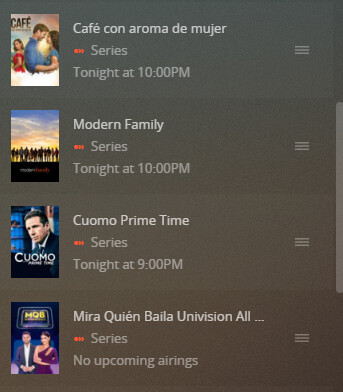
If you want “Cafe” to record instead of one of the others, then in Plex Web go to “Live TV & DVR” and under “Recording Priority” drag “Cafe” up above one of those other three shows. Plex should automagically update the recording schedule based on your newly assigned prioritization.
Actually, @hokierulz, that theory – while a good one – doesn’t really work here.
While you are correct that I do have a 3 channel Prime tuner, look at the schedule for tomorrow night in my pic. If your theory held true, I would be seeing Cafe drop off for Thursday, as well. And Friday, and so on.
Also, I’ve been running this exact schedule week-daily for months successfully. Only recently does Cafe occasionally disappear, and I usually don’t’ find out until my wife complains about it.
What the Prime + Plex actually does here is it figures out that Cuomo and Lemon are on the same channel and only uses 1 tuner where the recordings for the same channel overlap.
Since I am only using 3 distinct channels and 3 tuners in this setup, it always works.
So, my theory is now back to something more like what others recently me have indicated … an aberration in the guide.
BTW, this exact thing happened with Don Lemon a few weeks back or so. Lemon runs at 10pm then 11pm. But Plex suddenly started sporadically dropping only the 10pm show. But that issue corrected itself before I could post about it because CNN changed the name of Lemon’s show entirely, which reset everything.
Anyway, a great starting point for me in the next few minutes would be … Where would I find the Guide file on my system – in a human readable format – so that I can compare the listing for today and for tomorrow? Thanks!
Also, this is the existing, untouched recording priority (with Lemon down much farther below):
I mean even if I knew the files on the unix Plex Server to save off before it happens, it might help figure this out later.
And if I could tell Plex to just record a certain channel between certain times, that would at least temporarily resolve tonight’s episode.
The guide simply indicates you have a recording schedule for that show, not that that specific airing is being recorded. The recording schedule is the only thing that will indicate what will record at what time.
OK, so then, what is to be done about this? Obviously too late for tonight’s issue, but this is a persistently random problem. Where to look and how to fix when this incomprehensible issue arises again? And it will.
… if I can manage to see it coming ahead of time again, that is.
I paid for Plex in order to someday get rid of Verizon’s DVR. I don’t want to have to rely upon them whenever Plex fails, and that’s not rare. “Oh, well. I don’t know what to tell you” will not be an acceptable response here.
If you want to see what is scheduled to record, then I’d recommend looking at the recording schedule, and not the guide. The guide simply shows what is on, and if you have a series recording for that show, not that that specific airing will be recorded.
