When you picked up the GTX 1050 did you move the monitor/tv cable to the GTX? Also did you disable the onboard VGA and enable the GTX as the Primary Video?
Hi Tiebierius,
Yes the monitor is plugged into via VGA connector. The onboard VGA was disabled in BIOS and in Windows Device Manager.
I am beginning to think this is a GTX setup issue.
I tried to troubleshoot it using Handbrake to see how much GPU it would use when transcoding. The button for Nvidia was grayed out. so i researched this and lo and behold Handbraked needed Nvidia driver 3.99 or newer. I checked my driver and it was 3.88 (off the disc that came with the video card). So i headed over to Nvidia website and downloaded 3.99.07 and installed that. In Windows Device manager the Nvidia card had a yellow icon indicating the driver is not installed right or there is an issue. SO I used the tool to automagically download driver. Now I can select GPU in Handbrake, however, in task manager in Windows the GPU shows up, but does not provide details it did earlier - it doesn’t show driver, amount of memory etc.
So am starting to think once this is all resolved, maybe it will work fine in Plex.
Yes I believe you are on the right track, you can also check the device manager and be sure no other video device is active.
How did you find that driver version? when I go to the nvidia site and put in geforce GTX 1050 on win 10-x64 the version that it suggests to me is 436.48.
399.07 is from aug 2018
perhaps you just thought to try that since they said 3.99 or newer? In any case the version that I use on my test win 10 with nvidia system was 436, I can’t use newer because of another bug, unrelated to transcoding.
There is a thirty party tool that might help, display driver Uninstaller
I totally missed the version, the new Plex transcoder requires 418 or newer.
thanks for the help. This is getting to be a one step forward three steps back type of thing. I switched from Linux to Windows for the Plex server as I thought nvidia may work better on windows. However that has not been my experience.
The 388 driver that came on disc with the card works for Nvidia
I went up to 399 to test the GPU on Handbrake as that is what Handbrake requires, however that did not work.
Last night I tried 436 as Mervincm is using and 441. somehow I broke windows  and it had to restore to a previous working state, I then reinstalled the latest using Nvidia Experience software. while it did install, it has a yellow check mark in device manager.
The error indicates a upnp 2001 and 2003 error. I have chased these down some but have not had much luck.
I know I need at least 418 for plex transcoder and will try that one and 436.48 tonight after work. If that does not work, I may install a fresh copy of Lubuntu Bionic LTS and try that.
If you are going back to Linux I would suggest a straight Debian/Buster or Ubuntu 18.04 without a desktop then layer in the drivers you need. If you go for the Nvidia provided drivers(vs the repository), take care to match up the kernel with the driver you are pulling down.
https://askubuntu.com/questions/1130895/install-nvidia-drivers-for-ubuntu-18-04-server
You can install a desktop after you get the server working which would make troubleshooting easier.
I wonder if the vintage of your system is part of the problem with windows? It is definately older than what intel lists as officially supported. that being said, as long as you are running 64bit, I have had good luck on old systems.
Do you have a spare SSD/HDD? you can install windows fresh in a 15 minutes on a fresh HDD, you might consider trying that.
I don’t, I have a couple of spare old school hdd’s no solid state, just old spindle drives, however, this drive was formatted to remove Linux file system structure and win 7 was installed and upgraded to windows 10 64 bit. It is a new install.
Thanks for the help everyone. This is becoming somewhat ridiculous - in theory this shouldn’t be this difficult.
Last night i got home from work, turned on my Plex server and had somehow broken Windows again. Just having the non-working driver installed and the PC on must have somehow broken Win 10.
I installed Lubunut LTS 18.04.3 Bionic
ran ubuntu-drivers devices
it recommended open source 440 driver
added the nvidia ppa repo
i installed the 440 driver using - - > sudo ubuntu-drivers autoinstall
thought all was well, but the driver was not working.
nvidia-smi command stated it “couldn’t communicate with the NVIDIA driver. Make sure that the latest NVIDIA driver is installed and running”
running nvidia-settings opened the settings gui but it had a help and quit button and nothing else.

talk about frustrating.
so I did an - > sudo apt remove nvidia-*
sudo apt purge nvidia-*
and installed the next driver listed in the - > ubuntu-drivers devices command.
I tried 435 and 430 – one of them was the proprietary driver but i cant remember which one.
neither worked and nvidia-smi gave the same response.
finally tried 390
and that seemed to work.
If i type nvidia-smi now, i get the following.
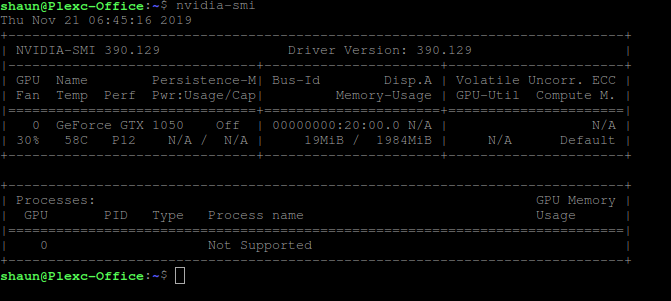
the problem now is that i dont see any gpu processes running.
And, I need at least driver 418 for the plex transcoder.
lshw gives me the following

prime-select query indicates nvidia is primary driver

nvidia-settings remains non-working as shown above.
I have been unable to resolve this problem, though this is unlikely to be Plex related.
I have done all I know how to do: upgraded BIOS to latest (Nov 2015), done a fresh install of Windows and Linux to test both environments and reached out for support on the forums.
At this point the GTX 1050 will not work with anything higher than driver 390, which installs and allows access to the Nvidia Control Panel. In Windows, any driver higher than the 390 gives the error code 43 and is marked as having an error in the device manager. And in Linux, any other driver installed does not allow you to access Nvidia-Smi - it gives an error stating something about unable to use driver and please download the latest driver).
the 390 driver is not really helpful, Plex needs 418 or higher for hardware acceleration.
I have no way of really telling if this card is broken, considering i bought it used or if it is simply my aging hardware - which still performs wonderfully.
Any ideas on how to test the card would be appreciated.
GPU Caps gives me this:

and GPU Shark gives me this:

The fan speed seems to always state 0.0 RPM and the GPU is typically at 0%.
Is there anything you can see that would suggest the card is non-working or my hardware is too outdated?
I might send the card back, though i am unsure what GPU to try next.
This topic can be closed. I have been working with the Nvidia Forum tonight to see if they had any info.
turns out this is a FAKE Card, someone probably flashed the bios of an older card with GTX 1050 bios info. That is why it cannot go higher than a 391 driver as that was the last driver for the original card (whatever that was).

I bought this through Walmart online and thought it would be reputable, but evidently i was duped.
Yeesh, that sucks. good luck getting your funds back!
Thanks MervinCM, it sure explains why none of your suggestions were working.
Before buying another card, i am going to be a little more cautious this time. I am going to check in with HP and see what cards my BIOS can handle, review them and try to get one that’s new not used.
This topic was automatically closed 90 days after the last reply. New replies are no longer allowed.
