Server Version#:1.18.1.1973
Player Version#:4.12.2
I am running Plex MS on Linux Mint Rafaela which has reached end of life and will be upgraded soon.
Processor is Intel® Core™2 Duo CPU E8500 @ 3.16GHz
4 gigs Ram
VGA compatible controller: Intel Corporation 4 Series Chipset Integrated Graphics Controller (rev 03)
I recently added a HDHomerun Connect Quattro.
In Plex, live TV transcodes, maxing out the CPU.
Optimizing recorded TV shows also maxes out CPU.
Would adding a Graphics Card bring down the CPU usage to a reasonable level for transcoding and optimizing/
I did some looking around the forums and it seems Linux graphic cards are questionable, in the sense that some have drivers that decode but don’t encode. Certain other cards don’t seem to work with Plex.
Is there a reasonably priced card that is guaranteed to have Linux drivers that will assist with transcoding and optimizing to save CPU usage?
I am not sure my CPU supports Quick Sync, will a graphic card transcode without QS?I am looking around for a used 1050, anything else you can recommend at around the $80 mark?
thanks for your help.
-shaun
I believe so yes.
PS have you considered a CPU swap? You might be able to pick up a quad that you can drop in for 20$ or so. its throw away money, not reusable like the GPU, but for 20$ if you like playing with PC hardware … why not …
I am also posting the information in hopes everyone can understand how to look this up for themselves too.
ark.intel.com contains the specifications for every CPU Intel has made.
By looking up the specification and searching for “Quick Sync Video”, (usually the Control-F key), it’s very easy to find out if the specific processor is indeed capable.
thanks ChuckPA and Mervincm.
A search through the page doesn’t show Quick Sync for this chip.
considering it does not have Quick Sync and I am using Linux, will adding a card like the GTX1050 allow the processor to not work so hard on transcoding.
The CPU is still plenty powerful for most of what I use it for, streaming my DVD and music collection. The only time the CPU runs at 100% is when I am optimizing a .ts I have recorded via OTA antenna and HDhomerun or if I am using Plex to watch live TV. I tend to use the Roku HDhomerun app to watch live TV which has no effect on the CPU. I thought adding a graphic card might allow me to optimize the recorded live TV shows without working the CPU too hard.
Unfortunately, I know drivers has often been an issue with Linux in the past and at this point am unsure whether to proceed and try a video card with GPU.
Please could you explain whether adding the Video Card would work, considering I don’t have Quick Sync.
thanks,
-shaun
yes a supported card will. gtx1050 will support 4k to 1080.
there is still no color conversion between HDR to SDR, so if you try to watch a 4k movie on a non-4k device, then it will probably have washed out colors.
TechnoJunky,
I am somewhat new to this. I know an OTA signal is likely 8VSB and the .TS contains a mpeg2 file. Not sure what the audio format is.
I also don’t know if its H264 AVC or H265.
I did some googling but cant seem to find the answer.
any idea what video codecs I should be using?
Audio is usually AAC or AC-3.
Both of these are easy for the CPU to transcode.
When you get into BluRay, you’ll get into the better audio codecs (5.1 or better).
These will require a bit more CPU if transcoding is needed but nothing in comparison to video transcoding if needed.
I am looking at the MSI GeForce GTX 1050 3 Gig card.
I can get one for under $100 right now.
Hopefully it will result in a significantly decreased load on CPU.
thanks for everyone’s answers.
I upgraded my Linux mint Rafaela to Linux Mint Debian edition 3, a rolling release.g
Installed and configured Plex.
All was working well, as expected.
I purchased a GeForce GTX 1050 with 2gb memory on the card.
Installed Nvidia driver from tutorial.
Apt install llvm clang
Dpkg --add-architecture i386
Apt install Linux-firmware nvidia-drivers nvidia-settings nvidia-xorg
Ran nvidia-xconfig
Rebooted
Lspci shows card and it appears to be working. The Nvidia software app is working too, shows fan speed video card temp etc.
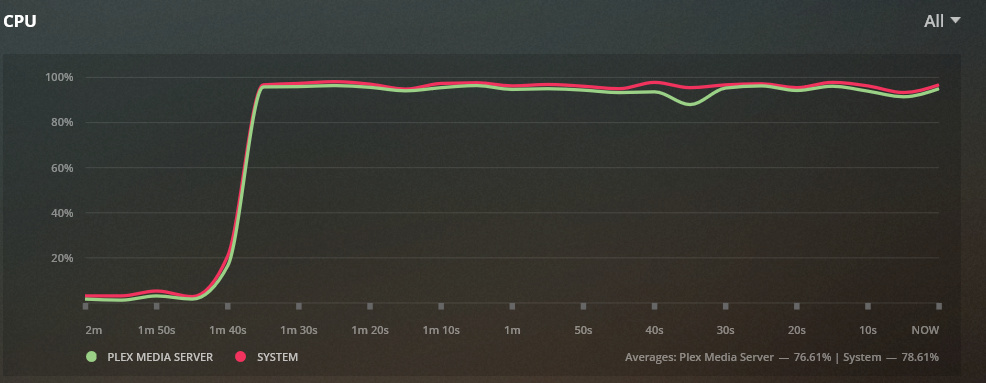
Watching a tv show I recorded as a .ts stream that needs transcoding is still using 97% CPU, I thought the Nvidia would significantly reduce CPU use age.
Any ideas on how to fix this? Do I need to switch to windows?
I do not use a tuner card, so I am not sure what is used there. Have you been able to confirm the hw transcoding is working at all, what about on a standard video file?
You can grab sample test files here http://jell.yfish.us/
you can watch the dashboard status and it will show there if you are using hw encoding and hw decoding.
here is an example of a test file using hw to both decode and encode
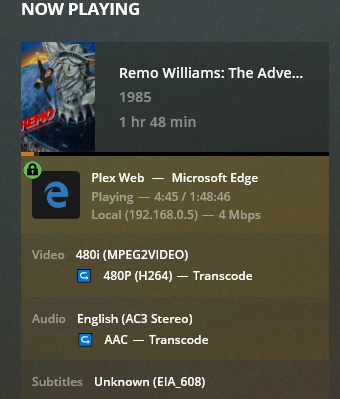
I believe transcode is working. I recorded this video off the TV last night as a test of the DVR via HD-Homerun connected to TV antenna.
According to the image it is transcoding.
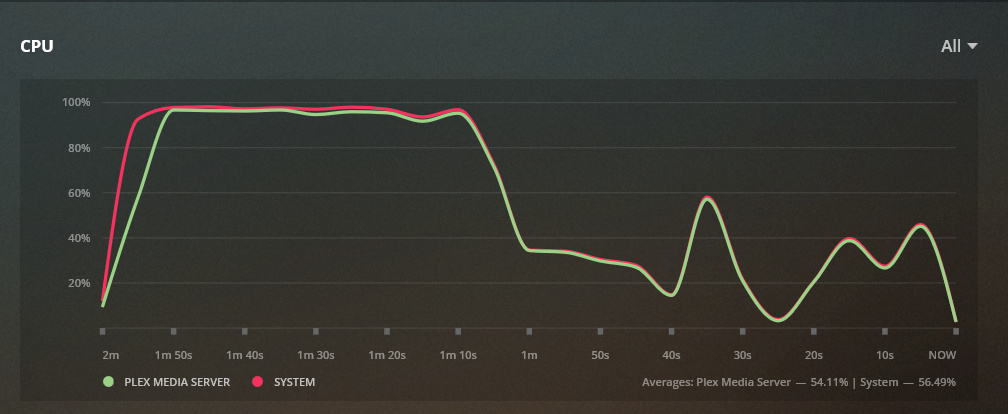
The CPU was at 100% for a short period of time on playback and then settled down to a more respectable level.
However still at 100% when optimizing the file for playback. I don’t know much about this, but presumed that optimizing would be similar to transcoding and would use about the same amount of CPU. But when optimizing the CPU stays high.
EDIT: I also noticed that with live TV transcoding at 1080p, it maxes out the CPU and 720p it uses about 70%, any ideas on how to remedy this situation would be greatly appreciated - maybe I just need some info on how to setup the Nvidia card to work with Plex.
You see on my snipped the (hw) twice? That shows my CPU gaphics system is assisting the CPU for both encode and decode. Yours is showing neither. your nvidia card is not assisting, your CPU is left to do it all. you are doing software decoding/encoding.
Are you logged into the plex server with your plex account that has the plex pass? Have you checked the use hardware acceleration when available box on the transcoder page of the server settings?
When doing software decoding, spikes like that are expected and normal. Plex powers through the transoding really hard at first to ensure it performs smoothly. It transcodes enough till it is satisfied and then it throttles back to use less CPU, spending just enough to maintain that headstart it created early.
I believe optimize works differently and it just powers through it till its done. Maybe those that use it more often can comment, but that is what I recall seeing.
I tried ubuntu linux with hw transcoding, and the standard install resulted in a system that had all the drivers I needed. Similarly with Xpenology (a synology based community NAS OS)
PS: do you use the actual plex clients (plex for windows, or on IOS or android) to avoid transcoding as much as possible? it can really help if you have not tried them.
Mervincm,
Appreciate your assistance.
I was logged into my plex pass account on server and use hardware acceleration is checked.
I generally use the Roku Ultra Plex app as player, though the results I sent last night were from Windows 10 laptop, logging into plex via plex.tv.
I switched the server over to Windows 10, yesterday to see if it was a driver issue. In task manager the gpu barely shows any activity.