Hardware transcoding issue

The easiest way to know if you missed a Public release is to simply look at the release number :slight_smile: -OR- use Plex/web which has the “Update” channel notification.
-OR- Plex Media Server (Announcements)

Beta releases – they are “disposable” in many ways.

  • Yes they are the release candidate
  • No, they aren’t guaranteed to be the next Public version released
  • (They can be superseded with fixes if/as needed – which does happen)

The internal (development) builds we did for development & fixing never show up anywhere unless we (individuals) share test builds to confirm problems are resolved.

The only information which does end up coming forward in the release notes is what got fixed. (Usually just the Ticket # and brief description)

In this whole Nvidia / Transcoder fixing process, everyone got a chance to see just how much we build / test / share / rework / test again – all before things go to QA.

Not sure what to say here.

Please do show me where:

If something got left out of the release notes
– Honestly, it wouldn’t be the first time
– Nor will it likely be the last. (being human)
– I will get it fixed. I just need to know so I know where to start looking

Ref: Plex Media Server - #558 by janoskk

Hi there :slight_smile:

Sometimes, I’d really love to understand my server… (v. 1.31.1.6733)

Plex play infos:

image

Impact on CPU:

Play options in web browser (non quality options available & no subtitles):

But I’m lucky, it’s PLAYING !!! :crazy_face:

I just updated my plex under docker to 1.31.1.6782. Still having the VAPI errors? Was this fixed?

DEBUG log files are needed.

I am testing with the new version and not having any issues.

Need to see what the issue is

It works when using Direct Stream. If I disable Direct Stream on Roku plex app I have the following errors:

I am using CUDA 12 and 5.25.78.01 (Picture direct from inside of the container)

Plex Media Server Logs_2023-03-09_14-42-15.zip (2.0 MB)

Please forgive me if I did anything incorrect.

According to your logs, the docker container is not seeing the Nvidia card.

Mar 09, 2023 14:36:00.033 [0x7f888d051b38] DEBUG - [Req#324/Grabber/5fc76e0a7a5882002d878c53-5fc705e24c4901002fec3d5f-c27179deff5b2d02b5a5b6c03bc1998e] MDE: : selected media 0 / -1
Mar 09, 2023 14:36:00.033 [0x7f888d051b38] DEBUG - [Req#324/Grabber/5fc76e0a7a5882002d878c53-5fc705e24c4901002fec3d5f-c27179deff5b2d02b5a5b6c03bc1998e] Cleaning directory for session 2d856eea-1b51-4d04-a72a-5146335d8b54 ()
Mar 09, 2023 14:36:00.033 [0x7f888d051b38] DEBUG - [Req#324/Grabber/5fc76e0a7a5882002d878c53-5fc705e24c4901002fec3d5f-c27179deff5b2d02b5a5b6c03bc1998e] Starting a transcode session 2d856eea-1b51-4d04-a72a-5146335d8b54 at offset -1.0 (state=3)
Mar 09, 2023 14:36:00.033 [0x7f888d051b38] DEBUG - [Req#324/Grabber/5fc76e0a7a5882002d878c53-5fc705e24c4901002fec3d5f-c27179deff5b2d02b5a5b6c03bc1998e] Streaming Resource: Added session 0x7f888d8767c8:2d856eea-1b51-4d04-a72a-5146335d8b54
Mar 09, 2023 14:36:00.034 [0x7f888d051b38] DEBUG - [Req#324/Grabber/5fc76e0a7a5882002d878c53-5fc705e24c4901002fec3d5f-c27179deff5b2d02b5a5b6c03bc1998e] TPU: hardware transcoding: enabled, but no hardware decode accelerator found
Mar 09, 2023 14:36:00.034 [0x7f888d051b38] DEBUG - [Req#324/Grabber/5fc76e0a7a5882002d878c53-5fc705e24c4901002fec3d5f-c27179deff5b2d02b5a5b6c03bc1998e] TPU: hardware transcoding: final decoder: , final encoder: 
Mar 09, 2023 14:36:00.034 [0x7f888d051b38] DEBUG - [Req#324/Grabber/5fc76e0a7a5882002d878c53-5fc705e24c4901002fec3d5f-c27179deff5b2d02b5a5b6c03bc1998e/JobRunner] Job running: FFMPEG_EXTERNAL_LIBS='/config/Library/Application\ Support/Plex\ Media\ Server/Codecs/7e8dc7a-4467-linux-x86_64/' X_PLEX_TOKEN=xxxxxxxxxxxxxxxxxxxx4345-a0bb-a402589211a3 "/usr/lib/plexmediaserver/Plex Transcoder" -noaccurate_seek -ignore_unknown -scan_all_pmts -1 -rw_timeout 30000000 -reconnect 1 -reconnect_streamed 1 -reconnect_delay_max 30 -fflags +discardcorruptts+fillwallclockdts -probesize 20000000 -i http://192.168.10.12:34400/stream/7c65b527f49fc5c0d5781b0d3850f395 -map "0:V?" -codec:V copy -map "0:a?" -codec:a copy -map "0:s?" -codec:s copy -break_non_keyframes 1 -segment_format mpegts -f ssegment -individual_header_trailer 0 -segment_time 1 -segment_start_number 0 -segment_time_delta 0.25 -segment_list "http://127.0.0.1:32400/video/:/transcode/session/2d856eea-1b51-4d04-a72a-5146335d8b54/5a28a7c2-7907-488a-9207-a0fd1ee93e3e/manifest?X-Plex-Http-Pipeline=infinite" -segment_list_type csv -segment_list_size 5 -segment_list_separate_stream_times 1 -segment_list_unfinished 1 -max_delay 5000000 -map_metadata -1 -map_chapters -1 "media-%05d.ts" -y -nostats -loglevel quiet -loglevel_plex error -xioerror -progressurl http://127.0.0.1:32400/video/:/transcode/session/2d856eea-1b51-4d04-a72a-5146335d8b54/5a28a7c2-7907-488a-9207-a0fd1ee93e3e/progress

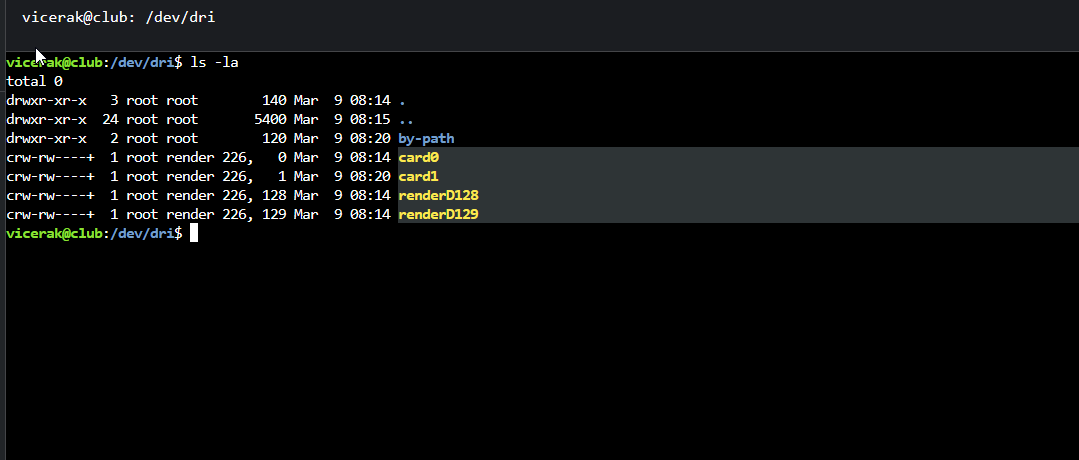
If you docker exec -it into the container and type ls -la /dev/dri what do you see ?

You should see card0 and renderD128

Now come back outside the container and check /dev/dri again, You should see them there too.

Check this because nvidia-smi can see the card outside the container.

This is what I see inside of the container:

This is what we have on the host:

One Additional thing:

If I downgrade to version 1.29.2.6364-6d72b0cf6 this issue does not happens.

@Vicerak

Please make certain DEBUG logging is enabled and recreate the problem so I can see it.

Then download logs ZIP file and attach here.

I’ll go through them.

I believe I enabled debug.

Please find Zip file attached.
Plex Media Server Logs_2023-03-10_11-40-00.zip (1.6 MB)

Your logs show me

Mar 10, 2023 11:39:07.594 [0x7f198b4bab38] DEBUG - [GPU] Got device: TU102GL [Quadro RTX 6000/8000], nvidia@unknown, default true, best true, ID /dev/dri/renderD128, DevID [10de:1e30:103c:129e], flags 0x7
Mar 10, 2023 11:39:07.594 [0x7f198b4bab38] DEBUG - [GPU] Got device: TU102GL [Quadro RTX 6000/8000], nvidia@unknown, default false, best false, ID /dev/dri/renderD129, DevID [10de:1e30:103c:129e], flags 0x7

In your Preferences.xml file, with Plex stopped, try these values:

HardwareDevicePath="/dev/dri/renderD128"

and then

HardwareDevicePath="/dev/dri/renderD129"

Your Preferences.xml should look like this: (it’s the last pref in the file)

SomeOtherPref="Value"   HardwareDevicePath="/dev/dri/renderD128" />

Test transcoding between each

NO success at all. It does not even come close to the buffering percentage.

Plex Media Server Logs_2023-03-10_13-13-45.zip (1.3 MB)

You’re telling me neither “renderD129” nor “renderD128” found your Nvidia card ?

I smell a rat.

[chuck@lizum docker.2040]$ groups plex
plex : plex video render
[chuck@lizum docker.2041]$ 

You better see that plex is a member of the render group (which is controlled by udev and how we get hardware access to the card.

image

Plex is part of the render group. Also why it works fine with previous version?

Not making any sense .

We’re at the point now where only a select few are having problems with Nvidia.

I need to figure out why.

The adapter has output?

What do you mean by that?

Also other question. Why the docker version is different than bare metal?

Docker is at 1.3.1.xx and bare metal is at 1.3.2.xx.

What I mean is that, I’m not understanding what is causing this outlying errors (like you ) this far into working on, resolving, and then testing the fixes.

Do me a favor please, Copy/paste the console (terminal) output of:

dpkg -l | grep -i nvidia

See screenshot bellow
This is from the host.

That’s bad. You’ve got the i386 in there.

Additionallly you have 510.47.03 (nvidia-settings) and 525.78.01 on nvidia

It’s mostly there. By comparison, this is what I have

[chuck@glockner ~.1997]$ dpkg -l | grep nvidia
ii  libnvidia-cfg1-525-server:amd64       525.60.13-0ubuntu0.20.04.1        amd64        NVIDIA binary OpenGL/GLX configuration library
ii  libnvidia-common-525-server           525.60.13-0ubuntu0.20.04.1        all          Shared files used by the NVIDIA libraries
ii  libnvidia-compute-525-server:amd64    525.60.13-0ubuntu0.20.04.1        amd64        NVIDIA libcompute package
ii  libnvidia-decode-525-server:amd64     525.60.13-0ubuntu0.20.04.1        amd64        NVIDIA Video Decoding runtime libraries
ii  libnvidia-encode-525-server:amd64     525.60.13-0ubuntu0.20.04.1        amd64        NVENC Video Encoding runtime library
ii  libnvidia-extra-525-server:amd64      525.60.13-0ubuntu0.20.04.1        amd64        Extra libraries for the NVIDIA Server Driver
ii  libnvidia-fbc1-525-server:amd64       525.60.13-0ubuntu0.20.04.1        amd64        NVIDIA OpenGL-based Framebuffer Capture runtime library
ii  libnvidia-gl-525-server:amd64         525.60.13-0ubuntu0.20.04.1        amd64        NVIDIA OpenGL/GLX/EGL/GLES GLVND libraries and Vulkan ICD
ii  nvidia-compute-utils-525-server       525.60.13-0ubuntu0.20.04.1        amd64        NVIDIA compute utilities
ii  nvidia-dkms-525-server                525.60.13-0ubuntu0.20.04.1        amd64        NVIDIA DKMS package
ii  nvidia-driver-525-server              525.60.13-0ubuntu0.20.04.1        amd64        NVIDIA Server Driver metapackage
ii  nvidia-kernel-common-525-server       525.60.13-0ubuntu0.20.04.1        amd64        Shared files used with the kernel module
ii  nvidia-kernel-source-525-server       525.60.13-0ubuntu0.20.04.1        amd64        NVIDIA kernel source package
ii  nvidia-prime                          0.8.16~0.20.04.2                  all          Tools to enable NVIDIA's Prime
ii  nvidia-utils-525-server               525.60.13-0ubuntu0.20.04.1        amd64        NVIDIA Server Driver support binaries
ii  xserver-xorg-video-nvidia-525-server  525.60.13-0ubuntu0.20.04.1        amd64        NVIDIA binary Xorg driver
[chuck@glockner ~.1998]$ 

I also have the 10.x development tools but those don’t factor into HW transcoding operation.

I will also add that my CPU is older (E5-2690 v4) so it doesn’t require the HWE kernel. It runs kernel version 5.4 quite happily.