Hello Chuck,
Should I open a new thread? I am more than welcome to do so.
I just tested with the new driver.
Same problem.
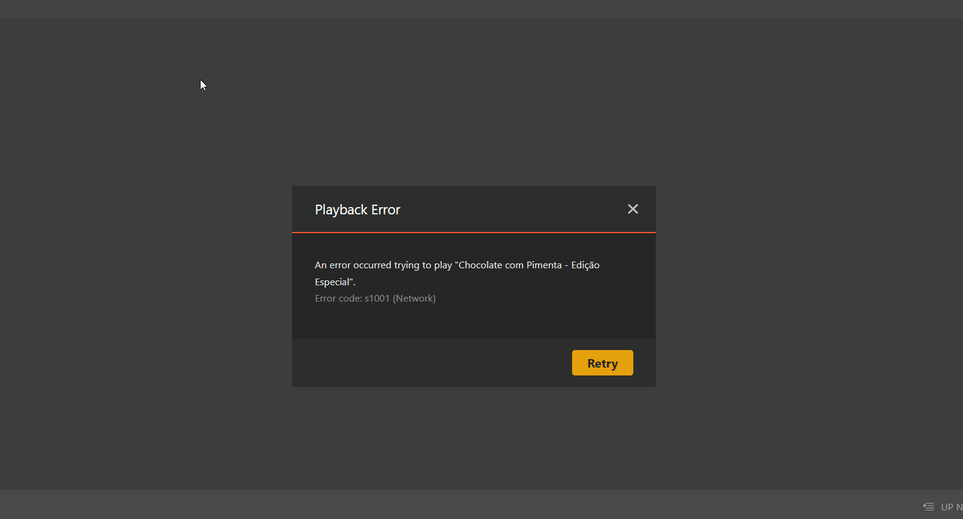
And again, It works if I reverse bac.
Plex Media Server Logs_2023-03-28_11-06-31.zip (604.2 KB)
Hello Chuck,
Should I open a new thread? I am more than welcome to do so.
I just tested with the new driver.
Same problem.
And again, It works if I reverse bac.
Plex Media Server Logs_2023-03-28_11-06-31.zip (604.2 KB)
I’ve also updated to the latest and still have the same issue as before. I have made some progress as I have found that if I select “convert automatically” it passes the stream over to my Nvidia GPU. I can see the stream if I run Nvidia-smi.
However if I select any of the qualities such as “convert to 720p HD” the video hangs and never gets passed to my GPU. I have downloaded the logs and happy to attach them or DM them across.
Under normal operation,
You have an Intel CPU without QSV
When you install the native app, the installer should tell you it found the Nvidia card
When PMS starts, in your DEBUG logs, it will tell you it found the GPU (PCIe)
/dev/dri will show you
– card0 / renderD128 if the CPU isn’t QSV capable
– card1 / renderD129 if the CPU is QSV capable
nvidia-smi will confirm the libraries are in sync with the kernel.
You’re running in docker.
The logs show:
Mar 28, 2023 11:05:13.534 [0x7faf00896b38] DEBUG - [Req#22c/Grabber/5fc76e0a7a5882002d878c53-5fc705e24c4901002fec3d5f-kvevj2ct3rptzwpxhkn77qkw] TPU: hardware transcoding: enabled, but no hardware decode accelerator found
Mar 28, 2023 11:05:13.534 [0x7faf00896b38] DEBUG - [Req#22c/Grabber/5fc76e0a7a5882002d878c53-5fc705e24c4901002fec3d5f-kvevj2ct3rptzwpxhkn77qkw] TPU: hardware transcoding: final decoder: , final encoder:
Mar 28, 2023 11:05:13.535 [0x7faf00896b38] DEBUG - [Req#22c/Grabber/5fc76e0a7a5882002d878c53-5fc705e24c4901002fec3d5f-kvevj2ct3rptzwpxhkn77qkw/JobRunner] Job running: FFMPEG_EXTERNAL_LIBS=‘/config/Library/Application\ Support/Plex\ Media\ Server/Codecs/2584b51-4483-linux-x86_64/’ X_PLEX_TOKEN=xxxxxxxxxxxxxxxxxxxx4197-9eca-91174c92a4f5 “/usr/lib/plexmediaserver/Plex Transcoder” -noaccurate_seek -ignore_unknown -scan_all_pmts -1 -rw_timeout 30000000 -reconnect 1 -reconnect_streamed 1 -reconnect_delay_max 30 -fflags +discardcorruptts+fillwallclockdts -probesize 20000000 -i http://192.168.10.12:34400/stream/7c65b527f49fc5c0d5781b0d3850f395 -map “0:V?” -codec:V copy -map “0:a?” -codec:a copy -map “0:s?” -codec:s copy -break_non_keyframes 1 -segment_format mpegts -f ssegment -individual_header_trailer 0 -segment_time 1 -segment_start_number 0 -segment_time_delta 0.25 -segment_list “http://127.0.0.1:32400/video/:/transcode/session/780e6ad6-2755-4e6b-9e41-7c43da28f19c/3ccd6c89-d2d2-4d66-a026-41c4949612e4/manifest?X-Plex-Http-Pipeline=infinite” -segment_list_type csv -segment_list_size 5 -segment_list_separate_stream_times 1 -segment_list_unfinished 1 -max_delay 5000000 -map_metadata -1 -map_chapters -1 “media-%05d.ts” -y -nostats -loglevel quiet -loglevel_plex error -xioerror -progressurl http://127.0.0.1:32400/video/:/transcode/session/780e6ad6-2755-4e6b-9e41-7c43da28f19c/3ccd6c89-d2d2-4d66-a026-41c4949612e4/progress
Now to ask again (my being pedantic)
What does nvidia-decode show ? (so I can catch up)
What do you see in /dev/dri
Is the PUID/PGID which the container runs as a member of the group which owns /dev/dri ?
My system: the group needed is ‘render’
[chuck@lizum testfiles.2022]$ ls -la /dev/dri
total 0
drwxr-xr-x   3 root root        140 Mar 29 14:52 ./
drwxr-xr-x  21 root root       5140 Mar 29 14:52 ../
drwxr-xr-x   2 root root        120 Mar 29 14:52 by-path/
crw-rw----+  1 root render 226,   0 Mar 29 14:52 card0
crw-rw----+  1 root render 226,   1 Mar 29 14:52 card1
crw-rw----+  1 root render 226, 128 Mar 29 14:52 renderD128
crw-rw----+  1 root render 226, 129 Mar 29 14:52 renderD129
[chuck@lizum testfiles.2023]$
I checked and my ubuntu user (vicerak) was not part of render. I went ahead and added the user to render.
See below the user I am using when deploying the container:
version: “3.5”
services:
brazil:
image: plexinc/pms-docker:latest
runtime: nvidia
restart: unless-stopped
container_name: brazil
#network_mode: host
environment:
- PLEX_UID=1000
- PLEX_GID=1000
- NVIDIA_VISIBLE_DEVICES=all
- NVIDIA_DRIVER_CAPABILITIES=all
- TZ=America/Los_Angeles
networks:
plex_enp166s0:
ipv4_address: 192.168.96.2
volumes:
- /data/containers/plex/brazil:/config
- /tv:/tv
- /movies:/movies
- /data/transcode/brazil:/transcode
- /data/downloads:/downloads
devices:
- /dev/dri:/dev/dri
networks:
plex_enp166s0:
external: true
Plex Media Server Logs_2023-03-29_15-24-26.zip (552.9 KB)
did you log out and back in after the group add
as well as restart the container ?
Confirm group membership with the groups xxxx comand
I restarted the entire server.
I am considering to rollback to 22.04… Do you think this could reflect into anything?
I still didn’t because like I said, if I rollback plex to 1.29 it works fine
first off – 22.10 won’t be a LTS release. I stay with even-numbered .04 (april) releases
if you get success at 1.29.2 then there’s something stuck
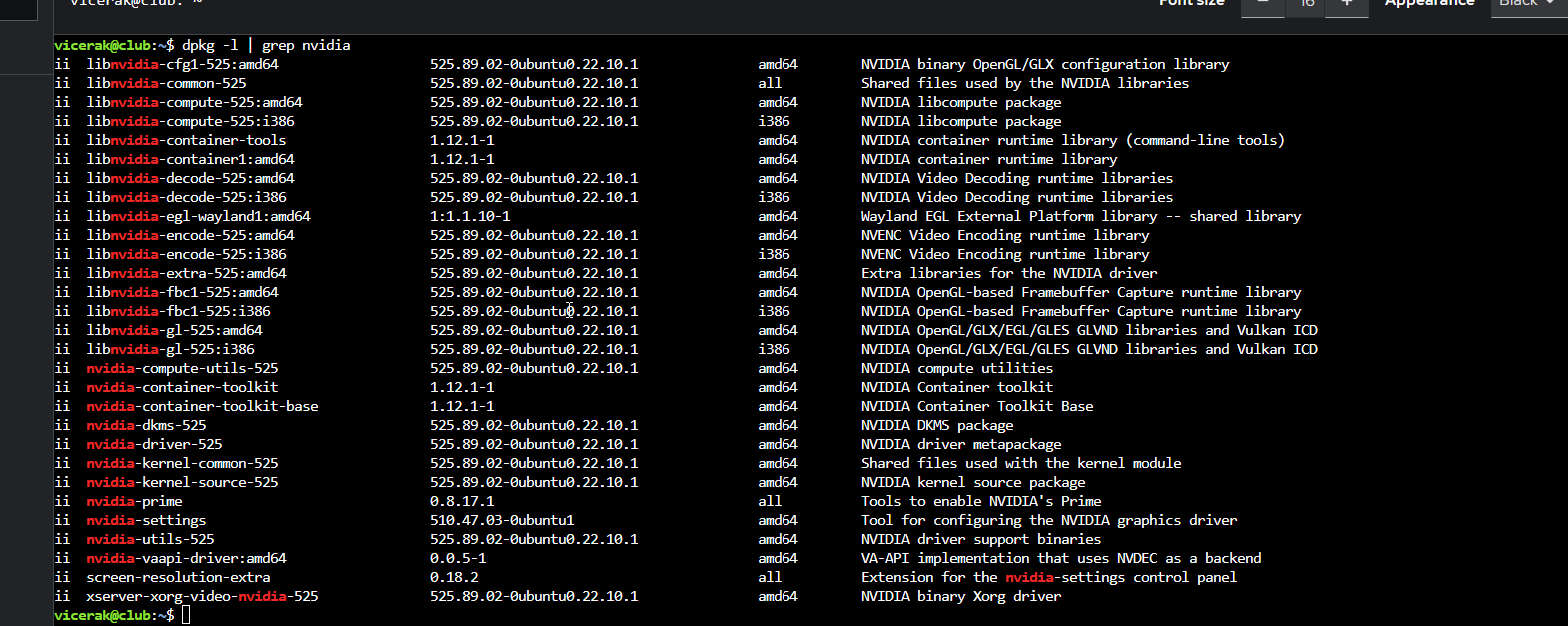
dpkg -l | grep nvidia
Is there anything from the old drivers ? (check the decode and encode packages)
On the side of caution, since we don’t need them anyway
remove the i386 libnvidia packages.
When you look at mine, there aren’t any 32 bit packages
[chuck@glockner ~.1997]$ dpkg -l | grep nvidia
ii  libnvidia-cfg1-525-server:amd64       525.85.12-0ubuntu0.20.04.1        amd64        NVIDIA binary OpenGL/GLX configuration library
ii  libnvidia-common-525-server           525.85.12-0ubuntu0.20.04.1        all          Shared files used by the NVIDIA libraries
ii  libnvidia-compute-525-server:amd64    525.85.12-0ubuntu0.20.04.1        amd64        NVIDIA libcompute package
ii  libnvidia-decode-525-server:amd64     525.85.12-0ubuntu0.20.04.1        amd64        NVIDIA Video Decoding runtime libraries
ii  libnvidia-encode-525-server:amd64     525.85.12-0ubuntu0.20.04.1        amd64        NVENC Video Encoding runtime library
ii  libnvidia-extra-525-server:amd64      525.85.12-0ubuntu0.20.04.1        amd64        Extra libraries for the NVIDIA Server Driver
ii  libnvidia-fbc1-525-server:amd64       525.85.12-0ubuntu0.20.04.1        amd64        NVIDIA OpenGL-based Framebuffer Capture runtime library
ii  libnvidia-gl-525-server:amd64         525.85.12-0ubuntu0.20.04.1        amd64        NVIDIA OpenGL/GLX/EGL/GLES GLVND libraries and Vulkan ICD
ii  libnvidia-ml-dev                      10.1.243-3                        amd64        NVIDIA Management Library (NVML) development files
ii  nvidia-compute-utils-525-server       525.85.12-0ubuntu0.20.04.1        amd64        NVIDIA compute utilities
ii  nvidia-cuda-dev                       10.1.243-3                        amd64        NVIDIA CUDA development files
ii  nvidia-cuda-doc                       10.1.243-3                        all          NVIDIA CUDA and OpenCL documentation
ii  nvidia-cuda-gdb                       10.1.243-3                        amd64        NVIDIA CUDA Debugger (GDB)
ii  nvidia-cuda-toolkit                   10.1.243-3                        amd64        NVIDIA CUDA development toolkit
ii  nvidia-dkms-525-server                525.85.12-0ubuntu0.20.04.1        amd64        NVIDIA DKMS package
ii  nvidia-driver-525-server              525.85.12-0ubuntu0.20.04.1        amd64        NVIDIA Server Driver metapackage
ii  nvidia-kernel-common-525-server       525.85.12-0ubuntu0.20.04.1        amd64        Shared files used with the kernel module
ii  nvidia-kernel-source-525-server       525.85.12-0ubuntu0.20.04.1        amd64        NVIDIA kernel source package
ii  nvidia-opencl-dev:amd64               10.1.243-3                        amd64        NVIDIA OpenCL development files
ii  nvidia-prime                          0.8.16~0.20.04.2                  all          Tools to enable NVIDIA's Prime
ii  nvidia-profiler                       10.1.243-3                        amd64        NVIDIA Profiler for CUDA and OpenCL
ii  nvidia-utils-525-server               525.85.12-0ubuntu0.20.04.1        amd64        NVIDIA Server Driver support binaries
ii  nvidia-visual-profiler                10.1.243-3                        amd64        NVIDIA Visual Profiler for CUDA and OpenCL
ii  xserver-xorg-video-nvidia-525-server  525.85.12-0ubuntu0.20.04.1        amd64        NVIDIA binary Xorg driver
[chuck@glockner ~.1998]$
I’m using ESXi and had quite a similar experience for a while. I held back at version 1.29.xx as it was the only version I could reliably get transcoding. Is this how you all were/are, holding back to around that version? I’m only asking, as I managed to upgrade to the previous beta and documented what I did here. I did make sure to have my virtual graphics card fully disabled, so only 1 GPU was listed… As a follow up, I managed to upgrade to the latest public release just yesterday  - and I re-enabled my virtual graphics card - and all is well :
Anywho  I have no idea if this will help anyone? And looking at some of the posts, there’s people more knowledgeable than me on Ubuntu here
For those who are using Nvidia container toolkit, you might be hitting this GPU drop-out issue.
I noticed that I can’t run nvidia-smi inside the Plex container after some time and it seems to be causing transcoding issues.
Restarting container fixes the issue.
I know. I just dont know who else to contact.
Chuck has been a great help. Really spend a lot of time troubleshooting and we officially discover the issue is with Live TV with no expectation to fix the issue.
Maybe i will try contact billing?
Now I considering move back to Emby…
I think I’ll mark this as a solution… 
I was also considering moving to a physical server but I’m not sure it will solve transcoding… And with the power price increase in Europe… well! 
This has been a while and I lost the track, @ChuckPa do you have any idea on how we can follow that up?
I eventually upgraded to 1.31.3.6819-2ef591a4c_amd64.deb (beta!) and the transcoding was working. I have updated since then an all was fine. Not sure what version I’m on, just now, I think I am one version behind 
Just checked  I’m on 1.32.0.6918, and all is fine. I even updated ESXi to 8.0c and all is well
Cross-posting myself
This updates the Intel QSV transcoding.
Nothing about the docker issue that i am facing right?





 )
)