@ChuckPa Do you have any news on this issue still ongoing ?
J3455 (ApolloLake) was fixed and released in 1.32.5.7210
There have been no reported failures for ApolloLake since then.
We still have the GeminiLake issue we’re working on
in conjunction with subtitles.
If you’re still having issues, please capture one session which fails (DEBUG logging only) and attach the ZIP file for me to review.

Hi,
Unfortunately, when i play the exact same file in 6999 and 7349 (lscr.io docker), I have transcode issue with the later.
Maybe it’s caused by subtitles burning, I understand, but still, it worked fine before, and not anymore. I do my test on Chrome especially to test this, since some of my users have limited player capabilities.
Other files are tanscoding correctly though even with HDR tone mapping.
I attached the logs of the 2 versions.
Plex Media Server-7349.zip (96.0 KB)
Plex Media Server-6999.zip (444.7 KB)
If you can provide me any advice ?
I could search another version on this show, but only in last resort. Especially because I can probably have another shows or files that have the same issue and it’s a big mess if I have to replace a lot of files.
I don’t want to bother you too much on this single issue.
Your suspicion about subtitles is correct. It is burning them into the video
Aug 14, 2023 13:48:34.214 [140185723509560] DEBUG - [Req#2cb/Transcode] MDE: analyzing media item 34132
Aug 14, 2023 13:48:34.214 [140185723509560] DEBUG - [Req#2cb/Transcode] MDE: E1 - Un départ et des amis: Direct Play is disabled
Aug 14, 2023 13:48:34.214 [140185723509560] DEBUG - [Req#2cb/Transcode] MDE: E1 - Un départ et des amis: media must be transcoded in order to use the dash protocol
Aug 14, 2023 13:48:34.214 [140185723509560] DEBUG - [Req#2cb/Transcode] MDE: E1 - Un départ et des amis: selected subtitle cannot be converted to a compatible format, burning into video stream
Aug 14, 2023 13:48:34.214 [140185723509560] DEBUG - [Req#2cb/Transcode] MDE: E1 - Un départ et des amis: avoiding video remux due to burned subtitle stream
Aug 14, 2023 13:48:34.214 [140185723509560] DEBUG - [Req#2cb/Transcode] MDE: E1 - Un départ et des amis: no remuxable profile found, so video stream will be transcoded
Aug 14, 2023 13:48:34.214 [140185723509560] DEBUG - [Req#2cb/Transcode] MDE: Cannot direct stream video stream due to profile or setting limitations
Aug 14, 2023 13:48:34.214 [140185723509560] DEBUG - [Req#2cb/Transcode] Codecs: testing hevc (decoder) with hwdevice vaapi
Aug 14, 2023 13:39:37.279 [140111344708408] DEBUG - [Req#1094b0/Transcode] TPU: hardware transcoding: final decoder: vaapi, final encoder: vaapi
Aug 14, 2023 13:39:37.280 [140111324777272] DEBUG - We're going to try to auto-select an audio stream for account 1.
Aug 14, 2023 13:39:37.280 [140111324777272] DEBUG - Selecting best audio stream for part ID 36106 (language: fr)
Aug 14, 2023 13:39:37.280 [140111324777272] DEBUG - We're going to try to auto-select a subtitle.
Aug 14, 2023 13:39:37.280 [140111324777272] DEBUG - Subtitles: Found a candidate subtitle language [fr] for a foreign film
Aug 14, 2023 13:39:37.280 [140111324777272] DEBUG - Audio Stream: 103790, Subtitle Stream: 103792
Aug 14, 2023 13:39:37.280 [140111344708408] DEBUG - [Req#1094b0/Transcode/JobRunner] Job running: FFMPEG_EXTERNAL_LIBS='/config/Library/Application\ Support/Plex\ Media\ Server/Codecs/e51a01b-4528-linux-x86_64/' LIBVA_DRIVERS_PATH=/usr/lib/plexmediaserver/lib/dri XDG_CACHE_HOME="/config/Library/Application Support/Plex Media Server/Cache" XDG_DATA_HOME=/usr/lib/plexmediaserver/Resources X_PLEX_TOKEN=xxxxxxxxxxxxxxxxxxxxxxxxxxxxxxxxxxxxxxxxxx "/usr/lib/plexmediaserver/Plex Transcoder" -codec:0 hevc -hwaccel:0 vaapi -hwaccel_fallback_threshold:0 10 -hwaccel_device:0 vaapi -codec:1 ac3 -analyzeduration 20000000 -probesize 20000000 -i "/volume1/video/Animes/Hunter X Hunter (2011)/Hunter x Hunter (2011) - S01E01 - Departure x and x Friends.mkv" -map_inlineass 0:3 -filter_complex "[0:0]scale=w=1920:h=1080:force_divisible_by=4[0];[0]format=pix_fmts=nv12[1];[1]inlineass=font_scale=1.000000:font_path=/usr/lib/plexmediaserver/Resources/Fonts/NotoSans-Medium.otf:fontconfig_file=/usr/lib/plexmediaserver/Resources/fonts.conf:language=fr[2];[2]hwupload[3]" -map "[3]" -metadata:s:0 language=jpn -codec:0 h264_vaapi -b:0 20000k -r:0 23.975999999999999 -force_key_frames:0 "expr:gte(t,n_forced*1)" -filter_complex "[0:1] aresample=async=1:ochl='stereo':rematrix_maxval=0.000000dB:osr=48000[4]" -map "[4]" -metadata:s:1 language=fra -codec:1 aac -b:1 256k -f dash -seg_duration 1 -dash_segment_type mp4 -init_seg_name 'init-stream$RepresentationID$.m4s' -media_seg_name 'chunk-stream$RepresentationID$-$Number%05d$.m4s' -window_size 5 -delete_removed false -skip_to_segment 1 -time_delta 0.0625 -manifest_name "http://127.0.0.1:32400/video/:/transcode/session/g6av2tgkluo69hjvwhuk51tm/49fe525a-c24e-4204-96e6-0228b71d2511/manifest?X-Plex-Http-Pipeline=infinite" -avoid_negative_ts disabled -map_metadata -1 -map_chapters -1 dash -map 0:3 -f null -codec ass nullfile -start_at_zero -copyts -vsync cfr -init_hw_device vaapi=vaapi:/dev/dri/renderD128,driver=i965 -filter_hw_device vaapi -y -nostats -loglevel quiet -loglevel_plex error -progressurl http://127.0.0.1:32400/video/:/transcode/session/g6av2tgkluo69hjvwhuk51tm/49fe525a-c24e-4204-96e6-0228b71d2511/progress
Synology CPU don’t have enough speed/power to do that
Some playback devices will accept the ASS subtitles and some won’t.
In this case, it’s not able to play ASS as a 3rd stream so it’s going to burn in.
Yeah ok I get that… But it worked perfectly fine on .6999 then broke after ,on the exact same player and media setup.
So … Synology CPU had enough power to burn subtitles on 6999 but not on newer versions ? Sorry but I don’t follow the logic on this. I don’t understand why it worked before, and not now, on the exact same setup.
There must be another issue still ongoing. There is no reason it worked before, and not now.
I’m having the same issue with my Synology 1019+ with the Intel Celeron J3455. Assumed everything was working fine with transcoding until I ran PGS subs on the Samsung app over the weekend. Movie stopped every 10-30 seconds to buffer. Same issue on PC MS Edge browser. This wasn’t happening with .6999 and earlier releases. I ran PGS subs on the same system/app for years with no issues. Aside from running subtitles, HW transcoding appears to work fine with Version 1.32.5.7349.
Same issue for me, I left my docker version hardcoded to the last version that actually works its the only way.
Something is very muffed with plex now on NAS devices since they brought in these new transcode setting selections like choosing GPU etc.

Any chance we can get an update on a fix for Gemini Lake? Been a few months now… Thanks.
I second that. Been waiting using an old version for quite a while.
From other threads:
To add to FordGuy,
I will answer/assist in any way I can while the new transcoder team and I (I’m involved deeply now) work to get us back on track.
@ChuckPa and @FordGuy61 - Thanks for the replies. Is this the best thread to monitor for updates?
Here is what fixed the issue for me on the latest 1.32.5.4349 build. I have DS920+ with Gemini Lake CPU. I manually added the driver as explained here, and also updated the preferences file to use video acceleration driver i965.
I was looking for a fix for weeks, and happy to finally have it working. The CPU is around 20% while transcoding video and audio and burning subtitles. No lagging or buffering.

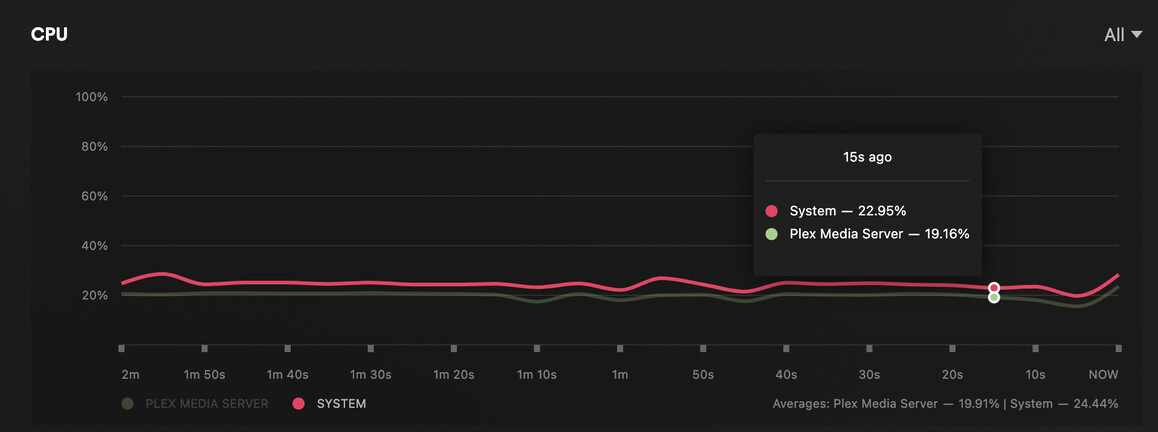
This is the workaround I’ve been using ever since, minus updating the preferences, I removed i965 from my preferences and works fine as long as that driver is in the cache folder.
Do you have DS920+ as well? I tested without adding I965 in preferences and there was no improvement to transcoding.
I do, did you restart the NAS after adding the driver into the folder? I had to do that to get it to pick it up.
I don’t think NAS restart is needed, so I only restarted the plex server. I just did another test
- keep the driver in the cache folder
- remove the i965 config from Preferences.xml
- restart NAS
I’m back to square 1 where HW transcoding is working, but as soon as I turn on subtitles, the CPU stays at 25% and video is constantly buffering. At least in my case, I have to have the setting override to have it working as expected.
Oops I meant Plex, not the NAS sorry!
