Haven't got any server option after install

Server Version#: 1.18.3.2156-349e9837e
Player Version#: 1.4.1.940-574c2fa7 (but it is uninstalled now)
OS: Windows 10 64 bit

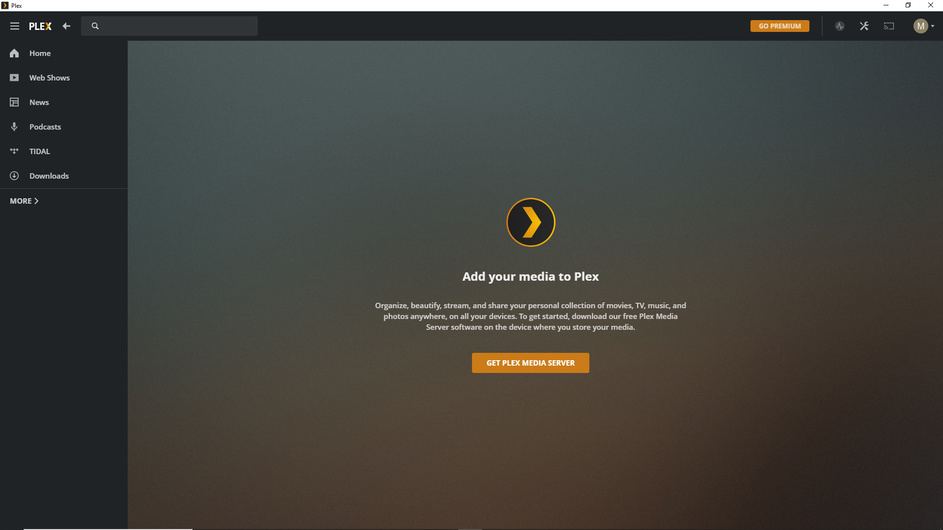
I have installed Plex Media Server, but after login, I can’t get any sign of server setup as the video tutorials suggest.

I only see this:


Did you complete the initial setup of the server as described here:

Specifically, did you perform the step of opening Plex from the icon in the notification area (“System Tray”)?

What do you see if you open Plex from a local browser on the server:
http://127.0.0.1:32400/web

See also:

I was responding to the OP. I’m not sure what your issue may be. You may want to start a new thread (tagged with server-linux) and describe your problem in detail; this thread is about a PMS issue installed on a Windows host.

Yes, I did both.

The link takes me to Plex’s home screen. Everything seems functional, but I still haven’t got my own server.

Try again with the web browser, this time using a private browsing session (In Cognito, InPrivate, Private Window, et al…). Again, using http://127.0.0.1:32400/web. If you could grab a screenshot of that it may be helpful.

It’s still the same. In the private window the home screen was empty until refresh, but that’s all.

Did you sign in as a different user this time? Your original screenshots from Plex Media Player show your “M” user signed in; this new screenshot shows “T.”

Also, to this point, I’ve assumed this was a completely new setup on a new system. Is that correct?

The “M” is derived from my e-mail address, but I have just added a username to the same account.

Hmm… Do you see the same behavior if you try to connect to the server’s IPv4 address? Something like:
http://192.168.mmm.nnn:32400/web

Can you also make sure it is actually listening on port 32400? In a command-prompt window, run:

netstat -a | findstr :32400

It should show at, at least, 0.0.0.0:32400 and x.x.x.x:32400, where x.x.x.x is the IPv4 address of the server.

Yes, I can connect. And the port is listening.

Same problem here. The old version was streaming this morning, but when I needed to add new media to the library, Plex wanted me to upgrade. Now there is no library, and the server asks me to get a new server…
If this is not the first installation of Plex server on this computer, you need to perform https://support.plex.tv/articles/204281528-why-am-i-locked-out-of-server-settings-and-how-do-i-get-in/ to remove the old account data from the advanced server settings (which are not removed when you uninstall Plex server).

OK, this worked.

Thanks, deleting the old registry datas helped.

This topic was automatically closed 90 days after the last reply. New replies are no longer allowed.
