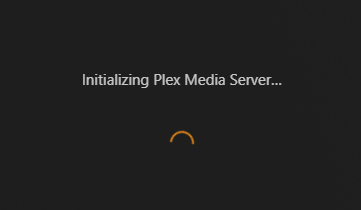
I’m at a complete loss here. I installed the Plex Media Server on a new machine (old machine went the way of the dodo), and have since reinstalled it several times, but it won’t open in any browser no matter what I do. Be it right clicking on the tray icon to select Open Plex, or manually adding the line to my address bar, all it does is open an infinite loading screen. There are no error messages to speak of.
There are files named Plex Crash Uploader in the Logs folder, six of them, but looking at them in a text document doesn’t reveal any recognizable error code. The top line states Server and User IDs along with the version. Below that, it mentions pre-processed minidump and post-processed minidump. That’s all that’s in them.
Yes and no. If you want one of the crash uploader files from the Logs folder, I can reiterate what I wrote above, or exclude my personal information and include one, but the instructions on that linked page do not match what I see. I do not have a Manage option under Settings in the Plex Web App. There’s Account, Online Media Sources, Authorized Devices, Watchlist, and a few other things, but no Manage option to speak of.
That’s the problem. I’m able to download and install Plex Media Server, and it runs in the tray, but that’s the entirety of what I can do. No setup, no login, nothing else. Both of those links you provided lead me to the same infinite loading screen.
I have neither of these, and I’ve tried multiple browsers. On that note, the Plex Media Server was one of the first things I installed, fresh off assembly, and it’s been like this ever since.
Just reinstalled the Plex Media Server once again. I lost count how many times, and how many directories, I’ve tried in hopes something will click. This is the screen (and the address) it opens immediately after installation. As mentioned before, it never moves beyond this loading screen to setup. Is the address incorrect? I’ve tried in Chrome, Edge, and Firefox to no avail. I just can’t comprehend what the issue is.
@Robathon could you export this registry area to a text file using RegEdit and zip and send to me by Private Message
HKEY_CURRENT_USER\Software\Plex, Inc.\Plex Media Server
To troubleshoot, could do with browser dev console network logging - and all saved into a har file and zipped and sent to me by PM - and would need the server logs as well to go with it
Make sure no browser session / tab running in browser with Plex Web
Relaunch Plex Media Server, wait 5 minutes
Launch browser and enable dev console logging F12 (as above) and select Network view and tick Preserve Log.
Change the url in this browser session to http://127.0.0.1:32400/web
If this fails to open up Plex Web and allow you to authenticate (if not already authenticated) - then note the time, take a screenshot, save the dev console network log into a har file.
Copy out the C:\Users\Owner\AppData\Local\Plex Media Server\Logs files into a temporary location/directory and also the C:\Users\Owner\AppData\Local\Plex Media Server\Logs\PMS Plugin Logs contents and zip the contents of the temporary directory that npw has all these files
Provide me with the zipped logs, zip of the har file and the screenshot and the time
I notice you have two servers - is the other one ok ? I presume you are setting up a new server and that is where the issue is
To eliminate DNS Rebinding protection, could you in command line, do this on the server and let me know what you get back
Since I’ve never done any of what you would like me to do, it’ll take me some time to figure out the what and how of it all, but I wanted to jump in to say I shouldn’t have two servers.
I installed Plex Media Server and ran it without issue on my old machine. When it met its end, I built a new one, and one of the first things I installed was Plex Media Server. I basically wanted the new machine to be the new server host, replacing the old one, but I haven’t been able to sign in, let alone set up the server. I literally can’t do anything but download and install Plex Media Server.
I don’t know how in the world I’d have two servers. I can’t sign in, I can’t go through setup. I can only download and install. That’s the entirety of it.
Did you copy any settings across from the old server to the new one?
Are there any port forwards in the router to local IP addresses 10.0.0.63 and 10.0.0.69?
(these being the local IP addresses of the two servers)
Are these IP Addresses static / dhcp reserved in the router ?
At the moment I don’t have anything to go on - I need to establish what Plex Web was waiting for and I was hoping the browser dev console logs would help with that - together with the server logs.
Please in future provide whole set of logs and not just one log file - you could copy out the contents of the Logs folder including the PMS Plugin Logs folder and zip the copied folder structure and provide that - that is in situations where you cannot get Plex Web to download the logs
Also when taking a screenshot - please note down the time and indicate that so i can relate it to the timestamps in the logs
I notice your binaries install path is not standard C:\Apps - any reason why you are not defaulting to C:\Program Files being the default path for the 64-bit Plex Media Server binaries
You could start again by purging this registry entry tree HKEY_CURRENT_USER\Software\Plex, Inc.\Plex Media Server
and deleting C:\Users\Owner\AppData\Local\Plex Media Server structure and do a fresh install = doing the purging whilst the server binary is not running - so check Task Manager and end any Plex processes - there should be no harm leaving the Plex Update Service.exe process running
after purging all this. go through Windows Add or Remove Programs to uninstall Plex Media Server and then restart Windows and try to install again
Make sure there are no Plex Web sessions active on the computer when you launch lex Media Server for the first time after the install - Existing Plex Web session may get in the way of Plex Media Server invoking first run sequence - so close all browser sessions for all browsers - then launch Plex Media Server after the install
If the problems persist - get screenshot. note the time and all the server logs zip
(ideally if Plex Web is hanging up in setup - the browser dev console would help - but this logging needs to be sent by PM)