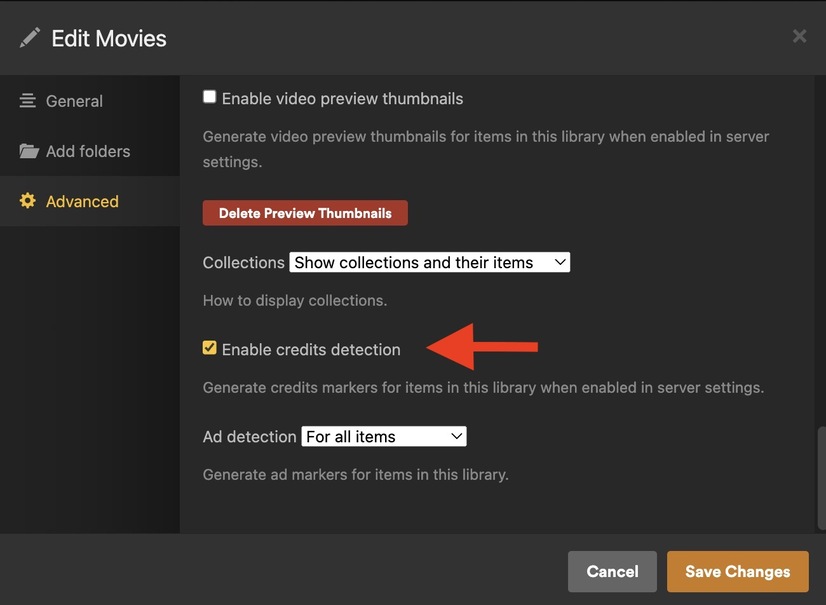
There are some more tweaks on their way with regards to taming CPU usage, although it won’t be a magic bullet as local detection still requires CPU horsepower.
2 Likes
This could be beneficial for the collection of older movies I have where the credits are literally a 10 second screen of “The End” or a very brief “The Players” credit scene.
I haven’t re-enabled the feature yet, because comments I have seen indicate the video shrinks at the credits, and it can be cumbersome, if not impossible, to return to the full screen credits. Maybe there’s a way to enable credits detection for a better end of video threshold, but still leave the screen full sized. I don’t see anything obvious in the player or server settings to do that.
1 Like
When my kids and grandkids invite me along to the theatre, it always includes, “We’ll even stay to the very end with you!”
2 Likes
On Android TV clients this is easily done with one press on the OK button. I don’t use other full screen clients, apart from Plex HTPC.
1 Like
The slow server has a Core 2 Duo E8400. It’s pretty darn ancient. It can do approximately one 1080p → 720p SDR transcode.
But it can easily do 8+ Direct Stream/Play sessions so it’s still genuinely useful. I’ll replace it when I’m bored or it breaks.
It’s running FreeBSD (TrueNAS CORE). I don’t have any trouble with analysis or background tasks interfering with Plex.
I think that Tegra CPU is faster than mine! At least multicore. Maybe not single.
But I agree that’s a tiny system! I wonder what the specific resource constraint actually is. RAM? It’s probably a unified memory system. Simple bus bandwidth? USB storage speed/IOPS?
I wonder if the additional changes Plex have mentioned will be enough. Interesting!
I have mixed results on files with multiple mid credit scenes.
An example is The Thing (2011).
While I’m aware thats certainly a tough one with about 9 (!) mid credit scenes or more precisely one long scene interrupted by credits, credit detection detected total bollocks on that one.
1 Like
It might be a little annoying to do, but you can trim off the dead-silent Netflix dub credits without actually transcoding. I use MP4Tools if it’s an MP4 file, and MKVTools if it’s an MKV file. It’ll split the file up on keyframes, which means you can always get exactly where you want the split to happen but 99% of the time, I’m able to split it after the final logo and before the dub credits, right on a black frame. And it’s fast, usually taking 20 seconds or less per file.
The only annoying part is that you have to go episode by episode, playing it to see the time stamp of where the dub credits start, so you know where to split. And then if you want to be extra precise, you gotta watch it after splitting to be sure you picked the right time (it’s not uncommon to need to shift it forward or backward a couple seconds to get in just the right spot).
I posted in the Plex subreddit about specific files where the credit detection got things wrong, and a plex employee recommended I post about it to the forums. If this would be better off in another post, or in it’s own post, please advise. It’s extremely rare that I post here.
So far I’ve had 2 episodes on two different shows where it made the same mistake, which is that it flagged part of the regular episode as credits when it shouldn’t have.
The first one is kind of reasonable. It was South Park, Season 2, Ep. 4, titled Chickenlover. At the 19:50 mark, Officer Barbrady gives the ‘camera’ a thumbs up and just freezes like that while some 70’s style cop-show music plays (it sounds like the Charlie’s Angels theme). And when the music starts, a single “Executive Producer” credit appears on a screen for a moment as a joke. I assume the music and the producer credit is what caused the false positive. But after about 20 seconds of that, the rest of the episode continued.
The second case, I’m not really sure what the server was thinking. Oddly enough, it was a different show but also Season 2, Ep. 4. This time, Star Trek: The Next Generation, episode titled The Outrageous Okona. At 41:30, with about 4 minutes left to the episode, Data is on stage acting like a stand-up comic as he tries to learn about comedy. He’s telling bad jokes, the holodeck audience is laughing, there’s no music, and the only text on screen is a fancy sign behind him on stage. So I have no idea what triggered it to think that was part of the credits. There’s other sections before and after the false credit markers, that also feature him on stage with a laughing audience which weren’t flagged as part of the credits. So yeah, no clue.
I have to say, I’m a little worried this feature is going to have a really high rate of false positives. Since detecting credits was added, this problem has happened twice so far, in less than a day, across the first two shows analyzed, after watching only a few episodes of each show.
This seems to be a bit buggy. The moment I press the OK button the video will enlarge again, but immediately after that, it shrinks back to minimized video. Very annoying! Am I doing something wrong?
It’s a bug on the Android client and will be fixed soon.
Thanks for the info! It would be great to have the end credits detection (and possibility to skip) similar to the ‘skip intro’ button. That would be a very elegant solution, compared to shrinking the video!
The shrinking of the video seems somewhat inconsistent. Limited testing, but TV shows seem to always shrink, and a couple of Marvel movies showed a “Skip Credits” button and stayed full screen. Those movies had multiple mid credit scenes, so perhaps that’s the difference.
Personally, I vote for getting rid of the little video all together, and just give us the option with the button.
I also vote for getting rid of the video always shrinking into a small box for movies. For TV shows it makes a lot of sense, but for movies I’d rather just have the “Skip Credits” button appear without the video shrinking into a small window. I often like to let the credits roll for movies, and to have them shrink automatically is always very distracting and immediately gets me out of the experience. (I’m using an Apple TV for client, if it makes a difference.)
That’s why after some testing, I decided to enable the credits video markers for my TV show library, but NOT for my movie library. If we eventually get the option to stop the video automatically shrinking into a small box, I would definitely enable credits video markers for my movies too.
1 Like
I’d like to submit a vote as well to NOT automatically pull up a mini-video once the final end-credit marker has appeared. Allow me to click [Skip Credits] with a button, but do NOT ever pull up the “related movies” preview.
I hate that thing with a passion. It shows the exact same info as the movie page itself, except that clicking on a movie will immediately play that movie, rather than taking me to its movie page. Every time I select one of these movies, I want to see the info on it, and it automatically plays it rather than showing me the plot or cast. When I press to go back, I am on the PREVIOUS MOVIE’S info page, not the one that it automatically played. It’s strange, inconsistent behavior.
If this mini-movie screen causes many issues with the skip credits option, just throw it away and be done with it, rather than keeping it and fixing these issues.
1 Like
I’d rather propose a setting under experience in the apps. Simar to the auto play function were we can choose, I’d rather have it if I’m binging 16 seasons of 22 episodes of criminal minds.
Another vote from me for an option to disable the auto-shrinking of the video during the credits. This drives me nuts on other platforms and I’m disappointed has been added to Plex without any way to disable it.
In light of all the above comments. Maybe we should make out a well worded and rounded feature request, if @OttoKerner or @drzoidberg33 may advise if necessary or that idea has been explored yet. A well worded request ensures we get maximum traction from all user preferences.
Hello all Plex User.
I’m using Plex Media Server on a synology NAS with a Plex Pass and when I see Credit detecetion annoncement I fell really enthusiastic.
So I decide to upgrade my Plex Server to 1.31.1.6716 to have this great function unable.
But…
When I came to setting the credit detection is set to : scheduled task and when a file is added
So I import new files and for this files detection run well, but…
When i’m on scheduled task times it seems to not run any credit detection.
Come to plex.tv to have more infos and see I can manually ask for credit detection and force it with analyse on a media, but when I try it nothing happen…
Moreover since I update Plex Server this one told me “sonic analysis for 2 albums” form hours now, my music library was scan with sonic feature just one week before and I don’t import new files on it…
So I really don’t understand what happen…
Credit detection seems only scan my new media file and not launch as scheduled task, can’t force credit detection using analysis on any other files ans sonic analysis seems working in background since hours now for two album I haven’t add in ly library…
I try to stop and restart Plex Server without any result and have exactly the same state after the server restart…

Credit Detection is CPU intensive. If you have a lot of files, it might take several “scheduled task” time windows to run through it all. I have no idea how long it takes per file, so I just kind of assumed it will take my server a month to get through all my content at the worst. Perhaps it is too busy doing a backlog of your server’s sonic analysis to get to the backlog of credit detection?
To trigger a manual credit analysis, you must select episodes (and only episodes) individually. You cannot do analyze on a season level or the entire show level. You can select multiple episodes at once to analyze though. Go to a season, then select all episodes in it by:
- Point at the episode count at the top of the list.
- Look for and click on the selection circle that appears to the left of this count.
- In the multi-selection box that appears along the top, click the triple dot
...then clickanalyze. - You should now see in credit detection working for those episodes.
If this works and your collection isn’t TOO big, you can set your TV Show library to display not by TV Shows, but by Episodes. This will allow you to multi-select all episodes rather than having to go into each show and do each season one by one. Plex doesn’t have a “select all” circle here like they do in seasons view, so you might have to select one episode, scroll down a bit, hold shift and select an episode to select all in between, etc etc.
2 Likes