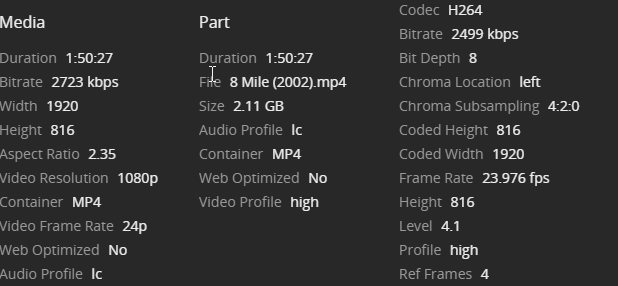
Help identifying any bottle neck for remote play?

Server Version#: 1.19.3.2852
Player Version#: Not sure, varies. Samsung smart TV app.

Just looking for some advice on where a bottleneck could be for remote play, or more so how to find it. My server is running on ubuntu 18.04 with a AMD Ryzen 5 1500X Quad-Core Processor (8 threads).

I do not have a public IP address due to my ISP using CGNAT. So instead, I have a VM hosted by digital ocean which is connected to my server via OpenVPN. I have port 32400 forwarded from that VM to the server via iptables. Clients connect to the VMs public IP.

Lately, remote clients have been unable to “play original quality” without massive buffering. I don’t think this is a transcoding issue as the CPU never seems to be struggling, and what they end up doing is transcoding usually 1080p to SD.

The user(s) in question have 100Mb/s down connections or greater. This is a speedtest I just ran on the plex server:

Testing download speed................................................................................
Download: 559.77 Mbit/s
Testing upload speed................................................................................................
Upload: 390.70 Mbit/s

The upload will be limited to 100Mbit/s again soon likely, it was increased by the ISP during COVID.

And the server acting as the forward:

Testing download speed................................................................................
Download: 2813.99 Mbit/s
Testing upload speed................................................................................................
Upload: 1710.56 Mbit/s

My storage is on another server located next to the Plex app server, connected via ISCSI. The storage server is a 4 disk zfs raidz. However, I’ve never seen any IO wait or high utilization reported, and they are connected with gigabit ethernet.

Is it the bitrate of the various video’s being played? The internet connection of the client? The fact that I am forwarding 32400?

It’s my understanding all the port forward does is send the application requests along, but the actual video stream is not going out through the offsite VM, is that correct?

I know I have played 4K at this client before with minimal buffering. If this is a bitrate issue, based on the above what kind of bitrate should I be looking for in files?

This is an example video that was unable to played in 1080p:

winter

Quality isn’t the setting for them.
Remote Quality is.

If they set Remote Quality to, say, 12Mbps 1080p - whatever that is in the app.

The file as you have shown should Direct Play.
We didn’t see the audio.
We didn’t see the subs, if any.
and we didn’t see your Dashboard in progress.

For your part:

You can’t do anything at the server for them.
Other than feed them material they can Direct Play.
It’s all them and their Remote Quality Setting.

They probably were using subs now that you mention it, they love em. I can update with more info when someone watches something again. I actually do have tautulli:

tat

Image based subs?
bog standard srt - not ASS - should Direct Play, but

If you can do a transcode they shouldn’t be all ate up with the Orange - if you know what I mean.

I forgot to mention also, the server reports them as local. The IP they are coming from as the VPN adapter on my forwarding server. Wasn’t sure if that was confusing the app at all.

It’s confusing me…

so you’ve got a bunch of places your throughput could be suffering.

Why don’t you eliminate all but about one gateway in/out of your place - like wide open through the forwarded port, using the adequate security already in place - and see what you get then?

buffer

buf2

8

this is currently suffering from a buffering issue. With and without subtitles. It is not actually local physically.

Well, that means you can’t transfer 3Mbps.

Turn on Adjust Automatically - or whatever they call it.
What happens then?

note:
in order for that to work the stream must start in transcode.
Lower the remote quality low enough for that to happen.
If simply turning it on doesn’t trigger a transcode.

I’m hearing more that it is subtitles causing the issue now.

I have an un cooperative client at this point, they just want to watch 8-mile lol. I’ll have to wait until I can be there again, damn virus.

Do the subs make it transcode and the transcode is the issue?

When in Direct Play do you get buffering?
If so enable Adjust Automatically, play the stream and it should continue without buffering, even if it has to lower the bit rate. Whatever it lowers the bit rate to - that’s how much bandwidth you have.

If the subs are causing a transcode with buffering.
That’s different.

You see them as local because you enabled source NAT on your VPN. Besides Plex, have you checked if your storage interface is in full-duplex?

Yeah both sides are of that are reporting full duplex 1000Mb/s, also this doesn’t happen when actually playing local which relies on that same storage to app server connection.

Now that you mentioned it I do have an iptables rule for SNAT, I believe the return traffic wouldn’t work without it.

No subtitle direct play run started becoming unwatchable user reports after half an hour or so.

I am going to assume this is a client side issue I guess, but am curious if I am ever able to get a public IP from my ISP, or host storage with a cloud provider somewhere too if it will work any better. Will try the auto adjust setting as well.

If you’re using a VPN provider, don’t expect to have the full bandwidth of your internet connection to be available. You can never know the routing of a given VPN provider, and more than often using any of them will severely impact your usable bandwidth.

I wouldn’t be surprised if they even couldn’t sustain the 3 Mbps for this movie.
Plex already provides encrypted connections between server and clients.
There is no need and sense to impede it further by relaying all traffic over a VPN tunnel.

Mine was giving me 14MB down a moment ago - I only allowed it 2MB up, but it used every bit of that.

But…

That’s a fact.
A completely unnecessary endeavour.

He is using his own OpenVPN to connect to his Cloud instance, not a regular VPN provider. He uses it as IPv4 tunnel to be able to connect remotely due to CG-NAT. Only way around it.

Well, not exactly.

A call from a ‘troubled’ user is usually all that’s needed to have that nonsense removed from the equation.

Most ISPs want happy customers that keep paying the bill.

True, the other one is the technical way around it :wink:

Temporarily - while shopping for a new ISP.
(or making them believe you are - even if they know you aren’t)
(The Squeaky Wheel Syndrome covers a lot of ground - when it starts squeaking at the management level - much the same way Fix Match don’t work at the episode level - Fix CG-NAT don’t work at the Outsourced Phone Support Level)
:wink:

My guys are pretty good.
I whined a little about a 15 dollar/Mo. modem - and they gave it to me.

I also told 'em if they ever put me on CG-NAT - there was gonna be trouble and they promised that would never happen… I believe 'em.

They probably laughed at you for believing you made a good deal with the modem. And also when you thought you made an actual threat that they would care about.

grafik