It takes me right to the sign in page
last straw to pin this down.
for this, we need to build one of the exact URLs Plex fails to access and see if this is a general thing or if it might be a problem with your Plex setup.
-
371c85f9d6de1cfc625f5b50c4d3a274f618b6afis a unique reference to your particular server -
xxxxxxxxxis a token which should only be known to your setup (and is therefore not included in the logs)
Inside Plex Web… pick any movie, open its pre-play screen and click ... > Show Information.

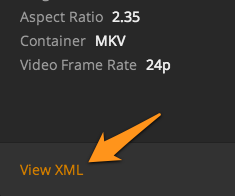
In the following dialog, click View XML
Check the URL of the XML file for the value of the attribute X-PLEX-TOKEN – side note… do not post this value here!!
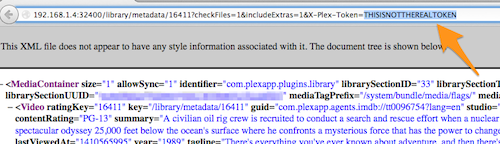
Replace the xxxxxxxxx section in the URL above with the value of X-PLEX-TOKEN.
Please check if you can access this URL with a regular browser from
- the machine your Plex Media Server is running on
- another computer in your home network
- optionally: from a mobile (when not connected to your home WLAN)
I hope I did that right.
By the way, totally off topic: I love that the sample you gave is from The Abyss! Awesome movie, I can’t believe it hasn’t been released on blu-ray in the US yet.
almost… take the Plex-Token you found in the picture above and replace the “xxx”-part of the link below with that string:
https://plex.tv/servers/371c85f9d6de1cfc625f5b50c4d3a274f618b6af/access_tokens.xml?auth_token=xxxxxxxxx&includeProfiles=1&includeProviders=1
We want to check if the machine hosting your local Plex Server can access Plex’ backend (e.g. the matching infrastructure/proxies). If you can access that link it more or less means that there’s no obstructions between your PMS and the Plex backend… so the issue would appear to be part of your Plex installation/configuration.
I should clarify that the movie I used for that sample was one of the problem titles. Here is the same information from one of the titles that was added before the problem started, and therefore has all the correct information linked to it. (Yes, it’s The Abyss)
In checking one against the other, it looks like the problem title is using the GUID of Local, whereas the good title uses The Movie DB. I don’t know why this is.
When I go to the problem title and try to Match it, I choose the Plex Movie Agent (under Search Options), but it still finds no match.
you’re on a wrong track.
All you need from that XML file is the X-PLEX-TOKEN information (the part you hide in the screenshot).
The rest of that information doesn’t matter at this stage.
Just take the X-PLEX-TOKEN string and integrate it in this URL (replacing the “xxxxxx” part):
https://plex.tv/servers/371c85f9d6de1cfc625f5b50c4d3a274f618b6af/access_tokens.xml?auth_token=xxxxxxxxx&includeProfiles=1&includeProviders=1
Here’s what it shows me:
ok… just wanted to be sure about that one.
it seems your trouble really is within the Plex setup/configuration which fails to connect to the internet / Plex backend when there’s no actual restrictions (as you can access those links just fine).
However… I’m running out of ideas how to actually fix this.
Should I try re-installing Plex?
might be worth a shot
I tried it, but I got the following error message. Unfortunately, I can’t enlarge the window to read the rest of what it wants me to do. Is it safe to uninstall the software first, then re-install it? I’m afraid it will assign a different address number. Once I reinstall the program I can sign in with the same login info I use now, and the server name (Toddbuster) will not be shown as “already in use” or somesuch, right?

I’ve been off Windows for some time.
I believe there’s an option to repair an existing install. Otherwise… uninstalling the app itself won’t change any of your configurations. Those remain unless you manually delete the data (database, metadata, configuration).
https://support.plex.tv/articles/201941078-uninstall-plex-media-server/
or… as others put it:
nuke the setup and have a clean install to go forward with. this looks really messed up.
I tried to repair the install, but that didn’t work even after rebooting. I then uninstalled Plex, rebooted, re-installed Plex, and rebooted. I did NOT do the update, hoping maybe that’s where the problem came in, but no such luck. When I opened PMS, I was already signed in and live, but I still had the same problem with the newly-added movies.
Unless anyone has a better idea (PLEASE, somebody have a better idea!!!), I guess my next step is to uninstall Plex, reboot, backup all of the program-related files to another drive, reboot, then install Plex again and hope for the best??? Oh, I hope not, I have almost 20TB of files in the server, plus the plugins and Live TV. That would be a real PITA, so I’m hoping someone can save me from the hassle…
just a note / request…
can you go to Settings > Server > General, enable Advanced Settings and check that debug logging is enabled (but not verbose logging!).
When this is done, restart the server and re-produce your matching problem.
When this is done, download your logs again and upload them here.
Can you please include a screenshot of the LAN settings (Settings > Server > Network)?
Bonus question… do you have any security software installed (incl. Proxy settings, VPN, any kind of content blockers)?
Debug logging is selected. Still can’t upload the log file, so here’s a new link. I do have a VPN installed, but I’ve tried matching movies when it is on and when it is off, and there’s no difference. I am also running Avast Premier.
@ToddBuster said:
Debug logging is selected. Still can’t upload the log file, so here’s a new link. I do have a VPN installed, but I’ve tried matching movies when it is on and when it is off, and there’s no difference. I am also running Avast Premier.
Are you taking the logs from the Plex server settings/help and not from the MacOS Library. Those are not compatible to the forum, zip are compatible.
If “Tokens” are enabled message to Tom only.
Warning.

