Hi All,
I am new to plex and NAS systems so please go easy on me.
I have TrueNas setup and running and I have all my media stored there. I am trying to get Plex to see those media files but I can’t seem to add them.
When I go to add folders I am setting my address as 192.168.68.33 for example but Plex doesn’t find any of my videos, music or photos.
What system is the Plex server on? You mentioned a TrueNAS setup, but only indicate that your media resides on the machine. I have heard of Plex servers installed on these machines as well, but I don’t want to make an assumption. If the Plex server is installed on your local machine (Windows?), then the mehod for finding your media will differ than if the server is also on the TrueNas.
If it’s on Windows, you may want to map a network drive on your local computer to the NAS, and rely on the drive letter to access your media. If you do not, at the least you might need to use the Windows convention of "\\NAS_IP\MEDIA_SHARE" (two backslashes) to find your media.
If it’s on the TrueNAS, you should just be able to find the local fileshare name and use that (“/Media” for example).
I am in fact running Plex on the Truenas device and connecting through a UI it generates.
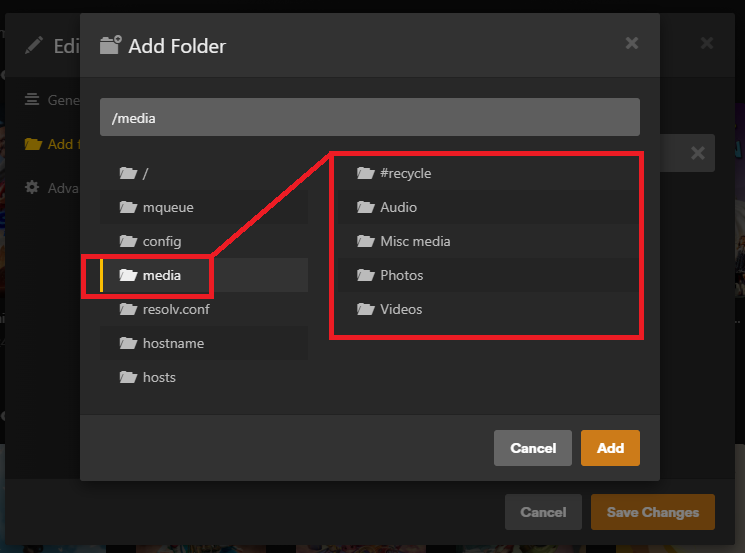
When I go in to add the folders for my media I can only see is this
Okay, so you need to get to a local media share on the same box as the NAS. That should be simpler than a Windows share.
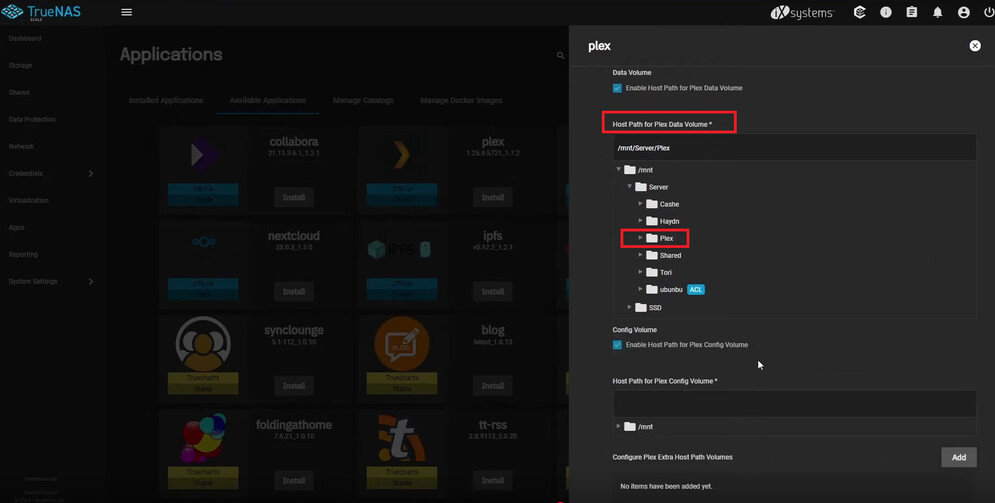
I have a Plex Docker, installed on Ubuntu, so I was able to configure the location of my Plex media within the docker config file. I think you need to do the same thing, but first in the install mechanism for Plex itself, not within the UI at this time. I searched a bit, and found one forum post that has a very similar issue, and it was resolved in a UI I haven’t seen before. It looks like a TrueNAS config page:
The user fixed his issue in a self-reply by watching a youtube video, which you can reach in the post, but the man’s accent is hard for me to parse (maybe you can do better, I’ve always been bad at heavy accents) and he goes off on odd tangents. But I believe the primary thing you need to do is modify the Plex config (which appears to be a Docker-like config) to create a map to your local media share:
The point is creating a “Host Path for Plex Data Volume” that points out exactly where your media is. In this video, the user first created a new “share” in the “Storage” system of TrueNAS called “Plex”, which then is selectable in the Plex install config shown in my screenshot.
Once you do that, launch Plex as usual, and use the Plex UI that you showed me, and this new “/Plex” folder ought to be there and browsable, like in my own setup:
Thank you again @Divideby0.
I followed the tutorial and everything seems ok but I have run into a problem.
I don’t know how to give the correct permission to either plex or the Plex folder I created in the Dataset so I can move say movies from my PC into the Plex folder on my NAS.
Its weird because I can access the other datasets no problem just not the new plex ones I just created.
Any ideas please?
Thank you.
This might be a TrueNAS question for their forum, or perhaps someone with experience with TrueNAS here can chime in at this point.
But I can give it a try. I assume all you need to do is figure out which “user” the Plex app is installed as, then set the same user to have permission to the new “Plex” share you created. HOW you do this, though…
I don’t think you needed to follow the tutorial I linked to the letter. If you already had media on your TrueNAS in the Dataset, you can leave that where it is, and simply point to this existing share in your Plex setup panel (the “Host Path for Plex Data Volume” in my screenshot). Making a whole new share called “Plex” means having to relocate your media to this new share.
FYI: One link in that forum postled me to a permissions/ACL documentation, which mentions that Plex’s user ID is 972. You would edit the storage pool to add a new ACL, and put in
Who: User
User: 972 (Don’t worry if it says “Could not find a username for this ID”)
ACL Type: Allow
Permissions Type:
Basic Permissions: Read
Flags Type: Basic
Flags: Inherit
Please use the linked article rather than rely on my quoting. There is more info in the article, such as setting the permissions recursively. If this looks scary, do not proceed, check around first for a more definitive answer, or hopefully someone chimes in at this point.
@Divideby0 I really appreciate your help with this especially as you don’t use Truenas. Thank you.
I will try what you have suggested and Ill jump on the Truenas forum too for additional help.
Cheers