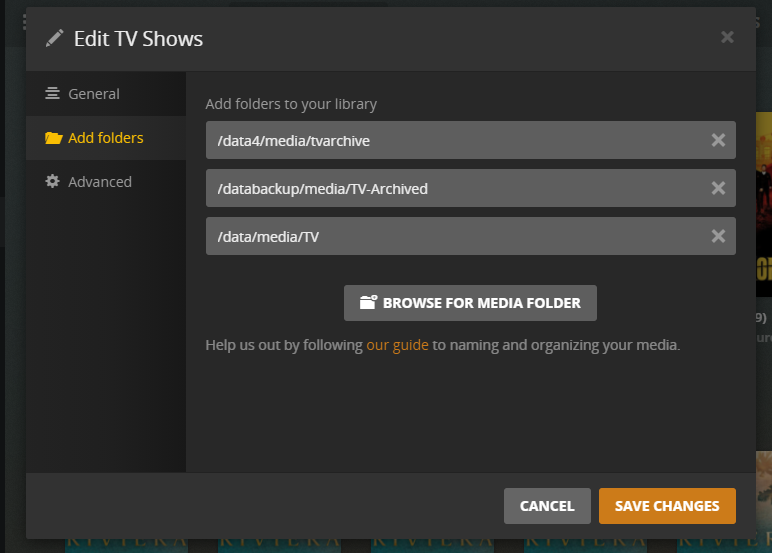
I have 2 separate TV show categories, ‘Anime TV’ and ‘TV Shows.’ These categories each draw from folders on 2 separate HDDs on the same Windows machine. (‘Anime TV’ points to H:\Plex\Anime\Anime TV, whereas ‘TV Shows’ points to F:\Plex\TV Shows)
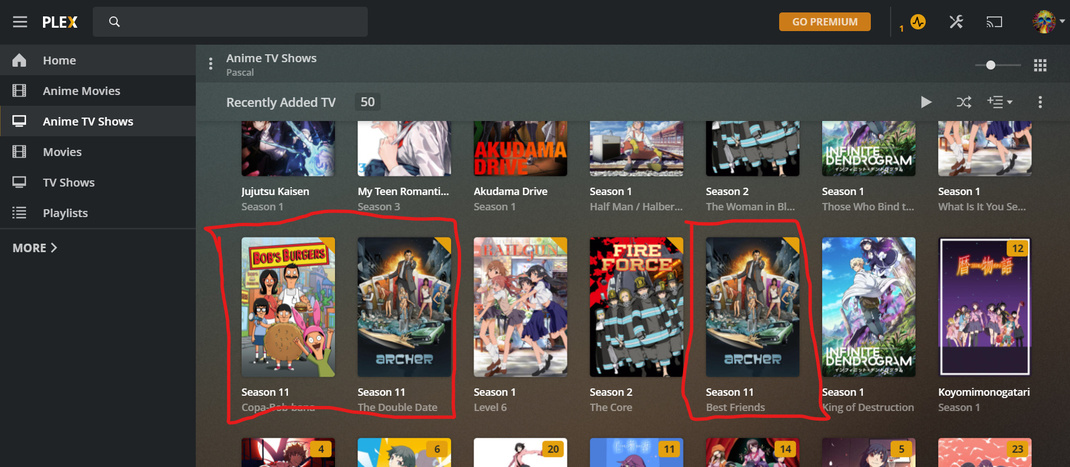
Under Recently Added in the ‘Anime TV’ category, shows from ‘TV Shows’ are popping up, which is not correct. However, the reverse is not happening under Recently Added in ‘TV Shows’. I checked to make sure the shows in question were in the correct directories and I made sure the categories are only pointing to their corresponding folders, but I cannot get this to go away. This is a brand new problem.
what version of the web app are you using? the local one at IP:32400/web or app.plex.tv which is newer.
Just making sure we are talking about the same thing. The items on the left are libraries not folders. You’re saying when in either of the TV libraries, Anime or TV Shows, under the “Recommended” tab, the Recently Added hub shows content from all the TV libraries not just the one you are in correct?
Ah, Libraries, not categories. I have two TV libraries. One is called Anime TV, the other is TV Shows. Specifically, when I am under Anime TV, the recently added shows recents from all TV libraries. This does not happen in the TV Shows library.
I have attached a screenshot, outlined in red are just a few of the objects that should not be here: