Ok after this recent update YOu changed something and I do not like this change!
First off their is a reason I created categories for my movies and TV Shows
I have different categories to separate TV SHows, Cartoons, and Anime TV.
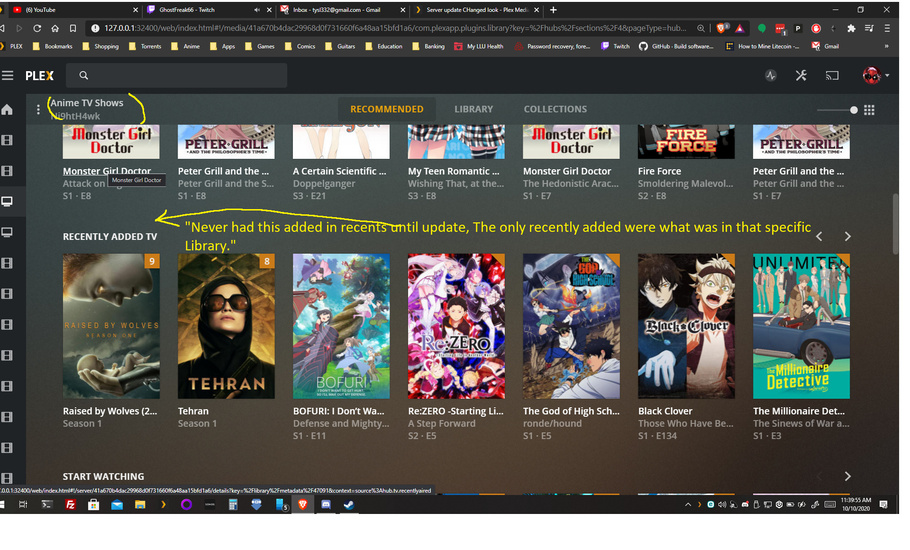
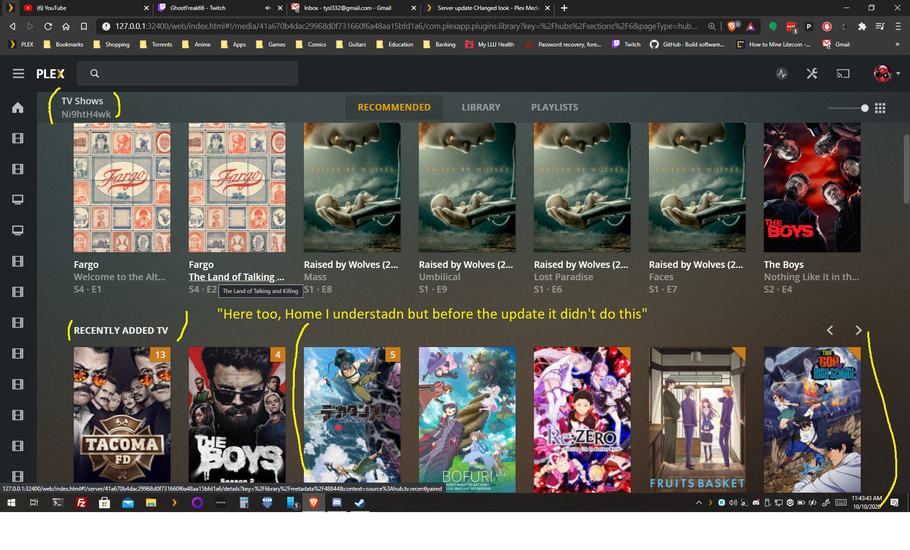
IN recommended I use to just get recommendations for that category, after the update I get Oh lets just group all the TV shows instead! it confused the hell out of me because I was like wait? didn’t i put this show into this folder and have this category specifically to read that said folder???
If I want recommend to see my recently added or aired shows I expect to see them for that specified category, even Plex Media Player is like this… WHY???
Just leave it alone PLEASE I don’t wanna see in recommended Full Metal Alchemist when I browse to my standard TV SHows category I’d rather see that in the category I have it in Anime TV. You can call me crazy for making a big deal about it but when something like that changes I get frustrated because I don’t want that change! PLEASE CHANGE IT BACK!
In the Home category, I understand but this just triggered my OCD. Like this too in the Plex Media Player app as well.
But Recently Added TV use to be just for that said library and I’d only see what TV shows were recently added in the “TV SHows” Library and what cartoons or Anime were recently added in its own library, not a mix of what was recently added in every TV library.
I have separate libraries for each TV show and they are in their own folders on my drives labeled “TV shows” for nonanimated shows “Cartoon Block” for cartoons" and “Anime Shows” for anime and that’s how I have my Plex set up.
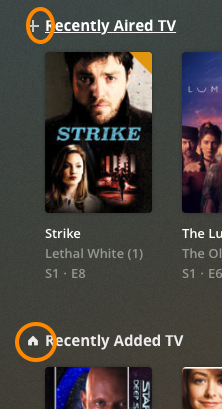
If I understand you correctly, you cannot stop seeing the “recently added” for that library, but you can remove it from the home with this library setting:
You are partially right,
Before the server update, the “recently added” would only show what was added in that library alone, and not mix up what shows I have in other “TV SHow Libraries” On Home Library is different, it now shows other shows from my other TV libraries within the “recently added Shows” as I showed in that screenshot which it never did before it just showed what was recently added within that said TV library (I have a few separate libraries as stated for different TV shows.) I have one TV shows Library label TV shows- and the recently added TV (not aired) would show what was recently added IN THAT LIBRARY same would go for my Anime TV shows Library and Cartoon Block Library. Home was the only one that actually mixed them all into that Recently Added TV category.
nothing to do with it, I’ve already gone to both server web apps local IP and the app.plex.tv already no difference if it did I wouldn’t have posted here. Not to mention same thing in my Plex Media Player app as well.
@OttoKerner what @Tysl332 is saying is that, at an unknown version in the past, the “Recently added TV” row in the “Recommended” screen of any given library (not home screen) would only show recently added TV from that specific library.
in 1.20.2.3402, the “Recently added TV” row in any given library shows the recently added TV from all TV libraries. Movie libraries display this same behaviour.
I have personally never noticed this before so cannot state at which version level this started.
I am trying to reproduce, but my libraries stay separated.
I have a general “movie” library and one with only “animation” films.
I recently added items to both libraries.
The “Recently Added” hub in either library doesn’t get polluted with items from the other library in my server.
They are only conflated on the general Home page.
Sorry for asking the obvious: did you compare the folder paths on the ‘Add Folders’ tab in each library? To rule out any intersection of source folders?
Are you using the “Optimize” feature of Plex? If so, did you create a dedicated target folder for the optimized versions. And if so, is this target folder shared among both libraries?
Yes, I’ve made sure the folder paths were correct when this happened after the most recent server update; Version 1.20.3.3421.
(I made sure they were correct after I found the TV shows in the incorrect “Recently Added Shows” section.of said library.)
And they are, I am not using the optimize feature in plex.
IMHO, I think during coding someone submitted a an error in in the code for the update, it happens you fix one thing and you have 5000+ more bugs to fix lol.
Question: which agent is used for these libraries?
Are they using the same agent?
Are the cross-contaminated items “matched” to a different agent (e.g. by doing “Fix Match”)?
Have you tried to use the another browser or a browser instance with disabled add-ins?
Your screenshot shows quite a few add-ins which can possibly interfere with the web app’s proper function by filtering out content or API/URL parameters.