Server Version#: 1.32.5.7349
Player Version#: 4.114.3
Greetings,
I have spent the last few days scrolling around here and youtube videos trying to find an answer for one particular trailer not been added to a foreign movie. I have tried Inline and Sub adding and nothing seems to work. I have done Inline on four other movies with no problem. The file is an MKV for the actual movie and mp4 trailer downloaded from IMBD.
Tried several of naming options as follows
The Witch Part 1-Subversion (2018) (main folder)
The Witch Part 1-Subversion (2018).mkv (subfolder)
Theatrical Trailer 1-Trailer.mp4
International Trailer-Trailer.mp4
The Witch Part 1_Subversion Theatrical Trailer-Trailers.mp4
(The MP4 Trailer does play, and file is not corrupt)
Any advice would be appreciated.
Thanks, KP
/Movies
   /The Witch Part 2 - The Other One (2018) <-- folder
      The Witch Part 2 (2018) [Subversion].mkv
      Theatrical Trailer 1-trailer.mp4
      International Trailer-trailer.mp4
      Theatrical Trailers-trailer.mp4
Look up correct titles on Imdb.com or TheMovieDB.org
You can use either the title version for the language of your library, or the original title.
(Which in this case might mean you’d have to use Korean script.)
My apologies. I accidently place (Part 2) in my post.
The Witch Part1 -The Subversion (2018)
The Witch Part1 -The Subversion (2018).mkv
International Trailer 1-Trailer.mp4
This is copy and paste of folder/subfolder/and extra command as saved on my file system. Have tried sever versions of ''Theatrical" “International” ''1" and no number.
The “Extra” command has worked on three other movies. Reason I am lost.
I’m not sure what you mean by “Extra command”.
Use only lower-case characters for the extra type suffix. i.e. -trailer and not -Trailer.
The Witch Part1 -The Subversion (2018)
The Witch Part1 -The Subversion (2018).mkv
International Trailer 1-trailer.mp4
also tried
Theatrical Trailer 1-trailer.mp4

Plex Docs → Your Media → Local Files for Movie Trailers and Extras
-
Verify Local Assets is enabled. Edit Library → Advanced → Use Local Assets
-
Rescan the library and refresh the movie metadata after changing file names.
-
Alternately, use a
Trailerssubfolder.
EDIT: In addition…
-
Configure Windows to show file extensions. Windows Explorer → View Tab → check box for File Name Extensions.
-
Clean up your file names. Remove the extra
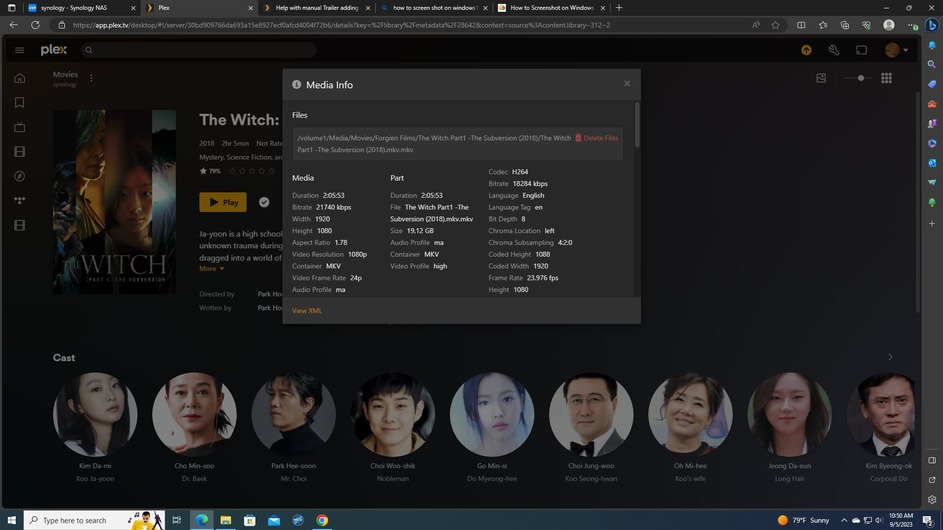
.mkv, and possibly.mp4, at the end of file names (look at the file name in the Media Info window). -
Verify the folder added to the movie library. Given the current file/folder structure, it should be
/Volume1/Media/Movies/Forgien Films, not/Volume1/Media/Movies.

So, this makes no sense to me. One screen shot is how I finally got The Witch part 1 trailer to work (subfolder of a subfolder) and the other one for The Witch part 2. Exactly text book of how extras should be added. I hope this is some sort of a one time issue. Unless anyone can explain.
I appreciate all the help. I am still learning some of the harder aspects of plex and servers. Its always the little things. HAHA.


See my prior post regarding file name extensions.
Remove the extra .mkv.
Already did. Good catch by the way. Do you have any idea why the trailer wouldn’t add until it was put in a subfolder or a subfolder?
Not according to your latest screenshot.
You’re effectively adding -Trailer.mkv to the file name, not -Trailer.
You would not expect Plex to recognize Theatrical_Trailer1-Trailer.blah.mkv. No different with Theatrical_Trailer1-Trailer.mkv.mkv.
Also, as @OttoKerner mentions, you might need to use -trailer instead of -Trailer (I’m not sure if Plex is case sensitive).

I use individual folders for extras, but that’s just a personal preference.
As long as you explicitly follow the documentation, things should work.
That tariler (The Witch 2) was already working even with the 2nd .mkv attached. I removed it after you noticed it.
My original problem was with The Witch 1. You can see from the screenshot the “extra” was set up correctly just like the others I manually uploaded. It did show up until i placed it in a subfolder of a subfolder. Does that make sense?. Just odd to me that one didn’t work the same as others.
Nope. Both methods should work. 
But if it works, let it be. If it ain’t broke, don’t fix it. 
Fair, very fair🤣
Keep in mind that changes in extras are usually only picked up after “refresh metadata”.
Completely understand. I always refresh metadata when changes are made to specific files.
