Server Version#: 1.21.1.3876
(1.18.0.1913)-listed on player
Player Version#: 8.11.0.22186
I am looking for general advice on how best to set up my configuration. I am interested in 4K playback with Dolby Vision + Atmos. I have many UHD Blu-ray rips via makemkv on the PC.
Equipment (all connected to the same gigabit router):
TCL Series 5 (2020) (eARC)
Sony STR-DH790 (eARC)
Nvidia Shield Pro (2020)
PC
-Windows 10 x64
-Intel duo core E8600 3.3Ghz (not ideal)
-8gb RAM
-Gigabit ethernet
-USB 3.0
First trials with the PC as media server did not go well. Topics of confusion:
Can this be setup to only play locally through the router?
Is the subtitle track on the mkv an image file or a .srt file? I don’t know how to tell.
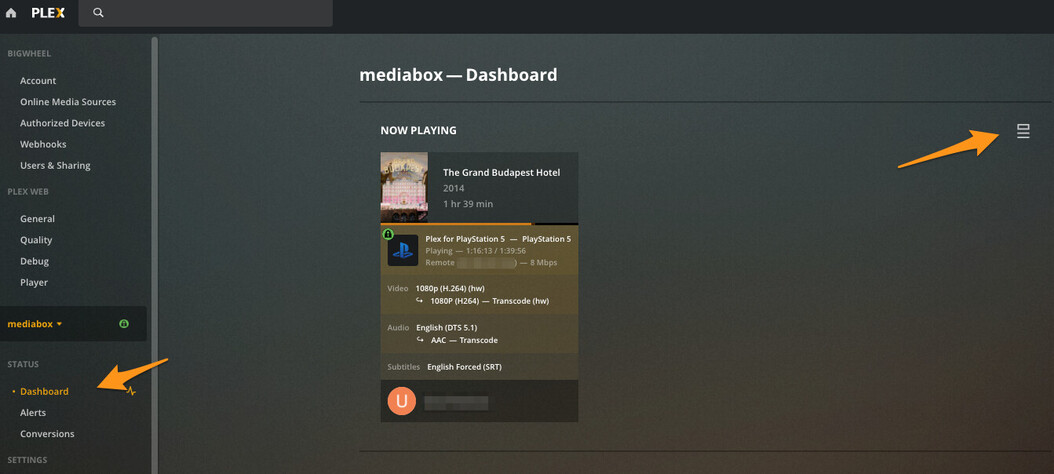
How can you tell if the file is undergoing direct
play, direct stream, or transcoding?
In the Shield preferences, will the option to transfer files via usb be of help?
I feel like I am close to understanding all of this. I really appreciate anyone that can point me in the right direction. I’ve searched here a lot, but can’t seem to put the right answers together.
I’m not really sure what you mean by that. If you are on the same local network then it will play locally. if not then something else is wrong like the shield and server computer being on two local subnets
if you ripped it from a bluray then it will likely be a PGS subtitle which is an image. it should say so in the web app subtitle selection drop down. afaik the shield can direct play PGS.
In the app while playing bring up the controller and click the settings gear and choose Playback info. or in the web app open the dashboard and it will show
help with what? If you have a computer to run it on it will be much better than running the server on the shield itself.
You didn’t really say how your equipment is connected via hdmi but for the shield to know what your Sony receiver can decode then it should be connect directly to that, not with the TV in the middle
Good to know. I couldn’t find an answer on local play.
Are you saying that the issue is likely that the PC and Shield are not on the same subnets? I will look into that. Thanks.
Great info. Thank you again.
Excellent. Thank you.
The setup is:
PC server connected via Ethernet
TV & Receiver connected via eARC
Shield connected to receiver via HDMI
All devices have wired gigabit Ethernet to router
First issue here was stuttering playback and buffering. Problem was solved by connecting a USB 3.0 male to male type A cable from the shield to the PC and enabling the transfer via USB option in the shield settings.
Dolby Vision playback has still not been achieved. I’m going to read through the active threads.
I understand what you’re saying now big wheel. The USB wasn’t the issue as you realized. (The system doesn’t work that way). My PC needs a better HD. Waiting on a new SSD now. Until then, as long as I’m not using the PC for anything but the plex server, all works well.
I also got type 7 Dolby Vision to playback with Atmos/DTS:X!! I just didn’t have the right resolution setting selected under advanced display settings in the Shield. Everything is perfect now. Thanks for the help!