Server Version#: Latest
Player Version#: Latest
Guide/Lineup name: 010
Using XMLTV?: YES
Channel number/Name:10
Location: Melbourne Australia
Hello…
As per the attachment, I live in Melbourne, Australia and CH10 icon is incorrect and showing as “WIN HD”. In Melbourne no channel called WIN HD and it should be Channel 10.
Can you please fix this or inform how to change the icon to correct icon?

The logo has been updated to the Channel 10 logo but should really be this on for Channel 10 HD (010).
Wow… awesome PLEX team. Awesome outcome to all people in Melbourne who use PLEX DVR.
@triks_melb How to get your fix? I did a re-scan of EPG but still the old logo. Any tips?
If re-scanning doesn’t fix it, try deleting the DVR and re-adding it.
Keep in mind the icon could be cached if using a browser.
@triks_melb I think issue is bit more complex…
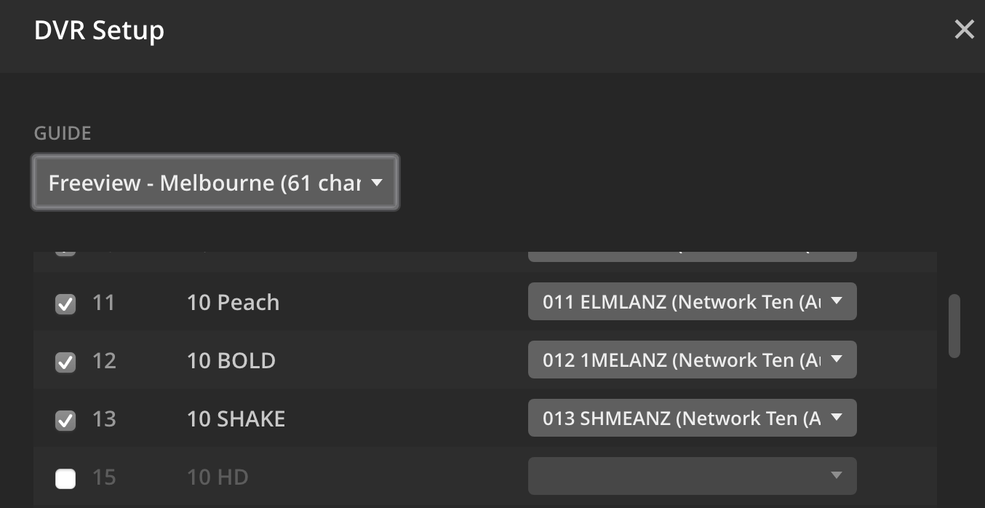
As you can see when I try to scan the channels the available mappings incorrectly mapping 01 to a CH9 channel and 15 is empty. This is the issue I think…
(Note: I use my own XMLTV file: all mapping is correct but Guide is not from PLEX and it’s from my PVR box.
Since Plex supply the guide now, I no longer use XML files (this has some advantages) so can’t comment but from your screenshot it looks like its Freeview, in which case just tick the box next to 15 10 HD and select 010 TENMANZ (Network Ten) Australia
If that doesn’t work, I would just put your postcode in during DVR setup and use the Plex guide.
@triks_melb Thanks for this. For some reason, the HD is not coming for this channel… see the below screenshot. I did try Free view for melbourn and my postcode 3000 as well.
Does it show on your actual tuner software or other software as HD?
I use HDHomeRun Connect Quatro, shows up as AVC HD, should be no different as you are also Metro Melbourne.
@triks_melb Thanks for helping me…
Yes it showing correctly. As I said when I use my tuner XML all channels mapping correctly but I can’t use it with PLEX as all posters and other stuff missing from the guide as it’s using Tuner EPG.
It’s unfortunate the software doesn’t show if it’s HD or SD. If you view channel 10 in Plex DVR can you see the 10 HD from their watermark?
In regards to the posters, mine just loaded automatically after I selected Freeview Melbourne and it did a substantially long scan of 5000+ items. After completion the posters show up consistently.
I’d like to help more but since we have different turners I can’t replicate what your are experiencing.
@triks_melb lets make things easy for you to investigate… let’s look at below config once the channel scan is done on “Free View Melbourne as the EPG Provider”
Also can we get some help from PLEX Devs as well???
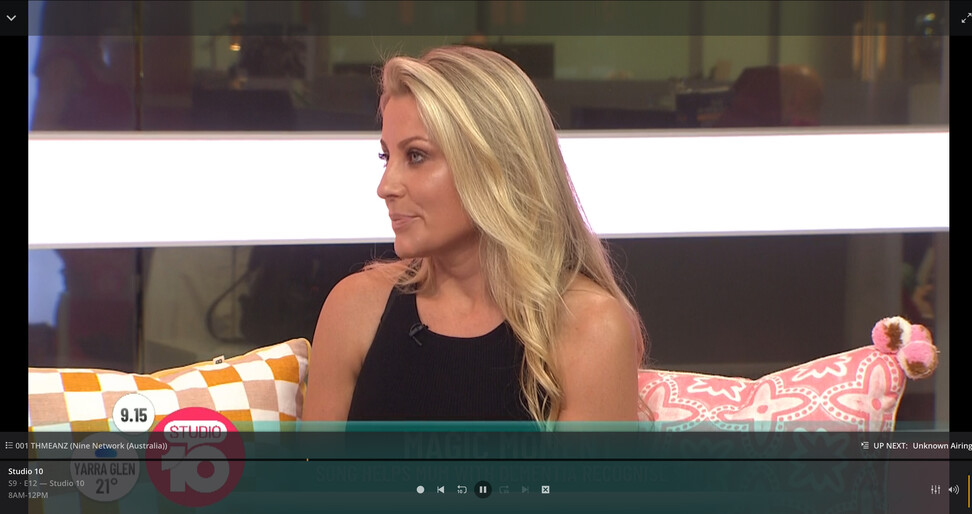
- Channel 1 is 10 HD_1 and “Guide Channel” is 001 THMEANZ (Nine Network) → This is incorrect
Questions → Why 10 network channel is showing as Nine Network in Guide channel.
- When play this channel in PLEX, it’s showing CH10 HD with correct EPG but the LOGO is WIN HD which is not correct.
I think if we can identify and fix the above issue, I will be happy.
Screenshot of Ch-1 playing:
@AliveKiller I’ve now submitted this and other issues to Plex developers.
In regards to the Win HD logo, can you try this:
- Delete existing DVR in Plex server
- Re-add DVR in Plex Server
- Do not use XML, instead enter a different postcode like 3000
- Scan all the channels as usual
Let me know if the Win HD logo is still present after those steps.
Thanks. Still the OLD logo. I followed all steps as you asked.
Also, I hard loaded images in browser / restarted PMS and also tried in my other devices.
Still the OLD logo coming for Channel 01.
thanks - I will also submit this as an issue.
Thanks. Happy to retest once you confirm.