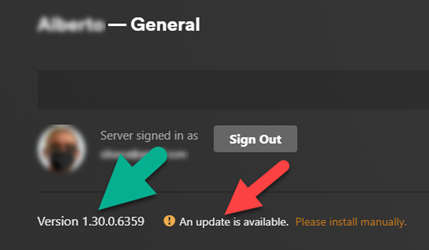
Server Version#:1.29.1.6313
Player Version#: 9.10.1.36024
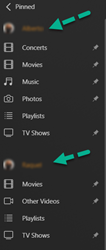
After last night’s SHIELD upgrade to V 9.1.1(33.2.0.157) my PLEX on my Shield TV stopped to accept two [2] servers at the same time.
I have two [2] MyCloud Nas Drives working in the house, but only one can be played, the other has issues to connect, them, if I revert to the one not working, the 1st one stops working.
I went to the extreme of making a Factory Reset of my SHIELD TV [2017] twice, just in case there was an error on the upgrade, but NO, still having PLEX not playing 2 servers.
On the other hand, my PLEX on the PC works fine, the two servers are available with no issues.
Anyone with the same?
Thank you
I thought I was the only one experiencing this issue. I was having issues with 4K playback on my Shield TV Pro so I decided to see if there was an update to the PMS and there was (1.29.1.6313). I was already updated to 9.1.1 on my Shield so I guess I’m in the same boat as you…
Hi,
At least I’m not the only one, I’m sure there are others with issues.
I even tried to install an old version the PLEX server, same problem. I think it has to do with NVIDIA SHIELD drivers or something…
Wrote to NVIDIA let’s see what they say.
This is what NVIDIA SHIELD supporting team sent me.
I tried it and, so far, for the last 30 min both servers are working… Let’s hope I’m not too early reporting this…
Thank you for contacting NVIDIA Customer Care
As a troubleshooting step, please try the following steps and let us know the results
Go to Settings Device Preferences > Apps > System apps
Choose Plex App > Clear cache, data and force stop this app
Choose Plex Server App > Clear cache, data and force stop this app
Now choose Network Storage Settings > Clear cache, data and force stop this app
Now restart the SHIELD and check the results
Looking forward to your mail to, assist you further
It has been like 6h+ since I last setup one of the SHIELD’s [the PRO version 2016] I have. It is still running normally with 2 servers displaying,’
Tried the same process on another SHIELD [not the PRO version] and I still have the same problem. I’ll have to try again when the machine is not in use by the family.
Cheers
I guess I spoke too early. Everything is back to the same issue, ONLY ONE SERVER works the other shutdowns…
When I go to the WD MyCloud system webpage and under APP and PLEX I do a OFF=>ON on the server, the servers show up again on PLEX but then the other server that it was on, goes off. Even if I do the same OFF=>ON on the second server, the problem reverses.
I followed those steps since this morning I woke up to the server not even being listed in Plex anymore. After doing that it won’t even find the server now…It keeps saying it’s “unable to connect securely” even though I turned off secure connections to see if that fixed anything. This is beyond frustrating…
You have to STOP the server completely, then start over again with the sign in into PLEX using the link, after that the SERVER will show up and you have to click on the choices you want
Ok everyone
After lots of hours around the problem, including writing to NVIDA [SHIELD], WD [MyCloud] and PLEX support, and lots of uninstalling and installing this is what I have NOW
1- Two Wd MyClouds
both connected to the same Network
2- Three NVIDIA SHIELD’s
3- Three TV’s, 2 Android Devices and one PC, all using PLEX
Both PLEX Servers working at the same time
After some looking around, I had realized that BOTH WD MyClouds where using the same Public Port to connect. I never had an issue with it and both were working 100%. Since the update I could see that [under remote access on PLEX] the Remote Access [on PLEX] had a X and even when I tried a manual connect on the port 32400, it would momentarily connect, but straight away it would disconnect.
The other thing, if insisting on doing the same on the other server [PLEX SERVER], only one would stay connected.
So I decided to ADD a different port for one of the servers [I had to setup up the router to open a new port], and that was it. Since I have two public ports [one for each server] the system has been up and running 100%.
Meanwhile for the last 4 days I have had few [driver & software] updates from PLEX, from WD and from NVIDIA…
I am sure this is not a case for everybody having issues. But it might help you guys find your way.
Hi everyone.
All is still fine and working.
Just one glitch that I have [I will wait couple of days to sort it out]
Today while monitoring my PLEX Server on my Windows [PC] noticed a notification for an update of my DL4100 Plex Server.
Did the normal process [you click on the link, download the BIN file and then you install it manually. [all done and running] except the message for an update continues there.
Glad you got yours working. After Nvidia told me to reset my Shield back to factory, it could see the server briefly but then wouldn’t show any media. I ended up just deleting the install and library metadata and starting over from scratch. No issues now but annoying that I had to wipe everything off…
Still working after wiping everything? This is probably the 6th time I’ve had to do this process because my server just disappears and the PMS option in the client is straight up not there.