Server Version#: 1.24.5.5173
Player Version#: Plex for VIDAA 3.13.14
Hi Plex,
Previously when issues encountered with Plex I contacted Hisense support and would undertake a new firmware upgrade process with them.
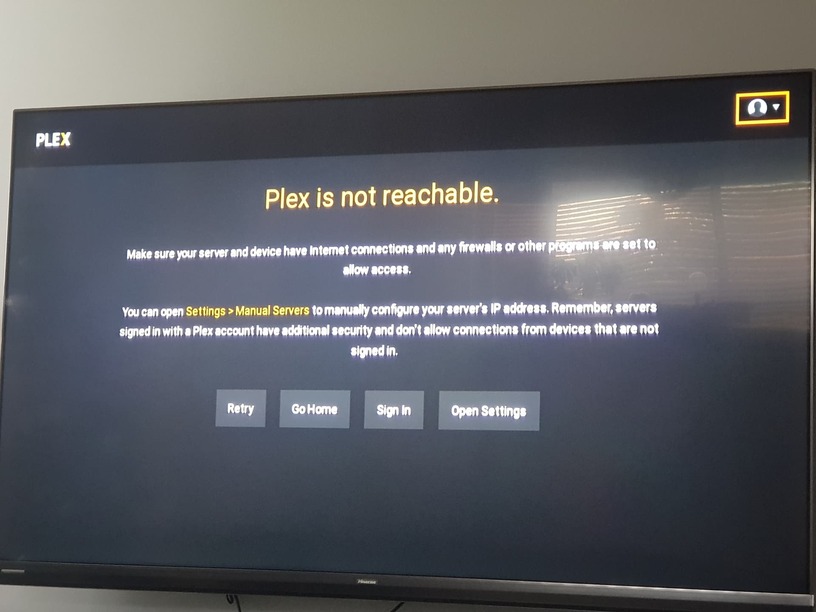
I have now upgraded the TV to the latest and greatest version of VIDAA L0331 with Hisense support but upon opening Plex app am greeted with:
I have tried to go into Settings and set the manual (Internal) IP of my server as located on the same network but continue to get prompted with above.
The issue started around the 17th November and initially this latest update did indeed fix my issue however a few days later I get prompted with above.
Hisense have requested I reach out here as the App is developed by Plex Team.
I am not sure why this isn’t working.
Could someone please assist I am stuck and not sure how to proceed.
I am a paid PlexPass user.
Thanks for sending that info over.
On there it says I need Plex version 5.x .
How do I please update the plex app on my hisense vidaa tv to version 5 from 3?
I’m not sure how to do this one been unable to find an update option?
You can’t. If you have version 3, that means the TV isn’t able to run version 5.
Obviously you care little for your supporters.
Thank you for your help and confirmation.
I had been using the playstation app as a workaround but I find the layout and ui horrible in comparison to the vidaa app and even note disappointed that the vidaa app groom what I have tried so far will not even work just locally without a requirement for an internet connection.
Are there any other workarounds or suggestions for this to work just on my local network without having to purchase an additional device?
It would be good as a paying customer to be a not to get to a suitable resolution.
The tv is still fairly new less than a few years old.
The issue appears to be a security certificate expiration. The culprit is likely the Let’s Encrypt’s DST Root CA X3 cross-signed certificate, which expired on September 30th. As noted by TechCrunch , Let’s Encrypt’s free certificates have been widely used across the internet since 2014, when the nonprofit began issuing free certificates for people to use. A whopping 380 million certificates had been issued as of 2018 across 129 million unique domains.
When Let’s Encrypt first started, they used the existing “DST Root CA X3” cross-signature on all their certificates. This ensured that older and current devices at the time immediately trusted those certs. Let’s Encrypt now relies on their own “ISRG Root X1” signature for all certificates.
The problem arises on older devices that still rely on only the CA X3 signature. Because that signature is now expired, devices like older smart TVs, older phones, and more will no longer establish secure connections.
There is no way to fix it.
Plex announced that support for the older Smart TV app was ending back in September of 2020. The last update to the app was in July of 2019.
To be clear, Plex’s version 5 of the app is a rewrite using modern coding. For HiSense TVs, the new app needs Vidaa 4. If your TV can be updated to Vidaa 4, you will automatically get the new app.
Ok thank you for the additional information.
I have asked hisense if we are able to update to Vidaa4 twice now and am waiting on a 3rd time.
As from what they say if it is like windows operating system I do not understand why our hardware cannot run the new version.
It is now a question of being curious on why technically it’s not feasible it whether it comes down to a political decision on their side.
It seems like side loading a new version of plex is not possible on vidaa??
Or even seeing the application app to only connect on libel network and bypass requirement for internet connectivity which is a shame.
I will look at getting another device to replace using the ps5 as the controller died run empty pretty quick.
Appreciate the help and confirms the research I had done prior.
It’s not a hardware issue exactly, more of an OS issue. Some OS’s won’t run on older hardware. The new Plex app targets modern programming code which needs newer OS’s to work. Just like in Windows, there are programs (Plex Media Server for example) that will only work with Windows 7+, if you still have Windows XP, those programs won’t work.