Server Version#: 1.24.2.4973
Player Version#: 4.62.1
I’ve scoured the docs but can’t for the life of me figure out how to name my files so they will show up correctly
Currently I have
 Directory of Y:\Media\Video\TV Shows\Battlestar Galactica\Movies

02/19/2019  11:13 AM     1,084,916,915 Battlestar Galactica S00E01 Miniseries {tmdb-71365} pt1.mkv
02/19/2019  09:29 AM            97,864 Battlestar Galactica S00E01 Miniseries {tmdb-71365} pt1.srt
02/19/2019  11:09 AM       905,594,552 Battlestar Galactica S00E01 Miniseries {tmdb-71365} pt2.mkv
02/19/2019  09:29 AM            88,994 Battlestar Galactica S00E01 Miniseries {tmdb-71365} pt2.srt
02/19/2019  11:12 AM            87,716 Battlestar Galactica S00E01 Miniseries.jpg
02/19/2019  12:26 PM       201,335,130 Battlestar Galactica S00E02 The Resistance {tmdb-129631}.mkv
02/19/2019  03:21 PM     1,801,126,160 Battlestar Galactica S00E03 Razor {tmdb-69315}.mkv
02/19/2019  10:19 AM            98,146 Battlestar Galactica S00E03 Razor {tmdb-69315}.srt
02/19/2019  03:18 PM       398,347,614 Battlestar Galactica S00E04 The Face Of The Enemy {tmdb-129621}.mkv
02/19/2019  02:05 PM     1,162,079,192 Battlestar Galactica S00E05 Blood And Chrome {tmdb-257368}.mkv
02/19/2019  12:13 PM            93,097 Battlestar Galactica S00E05 Blood And Chrome {tmdb-257368}.srt
And this produces
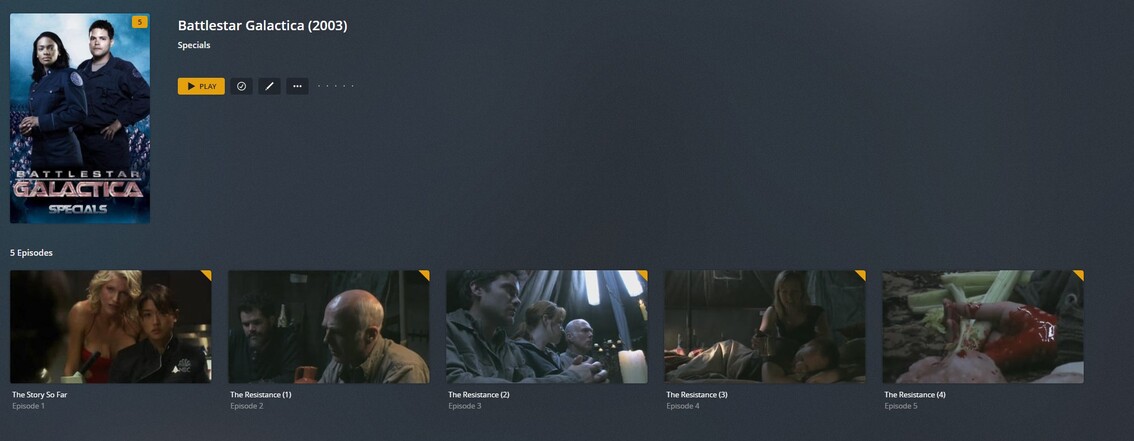
I’ve tried naming the webisodes using S01E01-E10 notations but then they disappear, so I have to number them S00… but then it ignores the {tmdb-####} and goes with whatever it has internally. What am I missing?
