How do I stream, but read this carefully before judging

I have a Plex Pass, and for years I watch content from plex via chrome and via plex app from my laptop, no problem so far.
Now I have a visitor and I wanted to stream content from my plexserver that is in my house, and is connected to internet, and I have my own domain on internet, linked also reachable from the outside. Now I want to stream, I start my plex app on my laptop, go to cast, then it finds none. The tv is on, the chromecast is also connected via cable and on, but it is invisible for plex.
Quick search on internet, I need to use chrome, ok, no problem you’d think, well, after I opened chrome, casted to the device, i chose the plex connection directly to my servers ip and port number, then it says that I need a secure connection… a what? I am at my home, my server is practically standing next to me and you say I am not secure? So I keep cool and click the link in the text to go ā€˜secure’ Via app.plex.tv it tries to connect to my server, probably with my local ip address because it does not work this way.
If I do a web connect to my server, plex.domain.ext, then my router does not know where that is, because the DNS of my ISP has data that says for that domain name you have to go to this public ip adress, AND I CAN NOT ACCESS MY PUBLIC IP ADDRESS!!! logically!!! it is not reachable, only from the outside. SO hence this stupid problem, I have never found or heard of a solution, if anyone can give me one, please do give a shout, because it is so annoying, havind all the criteria and software and then such thing I can’t use them at all.
I can stream my chrome page, no problem, but when I open plex in chrome, well, secure is the problem, and I can’t see the secure issue here by going first outside to the USA and then back for authentication. Way to go PLEX.

Oh, and by the way, when I open my Samsung tablet, and try the same, It works… No secure bullshit but fluently watching is also a problem. It is time to change.
Casting to Chromecast needs a secure (aka encrypted) connection.

Though it sounds like based on your description you have a DNS rebinding issue and I would probably try changing your DNS to Google’s or Cloudflare’s instead of your ISPs

AH, never mind, I do not know how to change something in something I do not know, so, it makes still no sense.
My ISP has a DNS setting that redirects when you call my plex server, your action goes via your ISP to the DNS and then to my public ip. In my router the call for my plex server is redirected to my actual hardware where plexserver is running. So, what do I need to change? The path works! only not from within my own domain, it is not intranet.
I hope you understand that, the only thing I can do at my ISP setting for my domain is change the route back to my home and port, any other public ip I type there, then noone is able to find me!

So changing it to google would make it impossible to actually find my IP, and therefor a bad decision. I know this is hard to explain, but go try it yourself, setup a plex server, on a computer with server software, run the thing, buy a domain name, redirect it to your home where a webserver is running, setup your modem/router and then come back to me with a better idea. (if it works)

That’s not how dns works. If it did no one could get to your domain at all unless they also used the same ISP

1 Like

Are you wrong here in your arguement? DNS worldwide makes it so that when you yell YOUTUBE! on the internet, the DNS makes sure it is going to the right public ip address. That is what I am saying. By having my own domain, my ISP allows me (it is a package-bundle, a prescription and a free domain, which I had since 2006) to add things like plex.domain.ext and mail.domain.ext. that redirects to my public ip. This is how it is setup, and I did it with my ISP’s network manager who controls everyday thousands of people so that their internet is working.
Besides this, my ISP had to change my public ip to another address some over a year ago and some weird things did happen, I made a snapshot of my router and they are still sifting through the huge amount of data it produced to see if there is something wrong with my IP. I still think this ip is from a former illicit, unsafe, illegal abused ip and that there are still hidden lists that makes me check via cloudfare sometimes, weird behavior etc…
So, today I did the same thing I did yesterday, via app.plex.tv, and now I had overview of all my content, while yesterday everything including my server was unreachable.

So, there are more things happening, but it is still a bummer that just in that moment I wanted to show my guest some content, and I was unable to stream, sad.

So thanks.

Ah, you have a domain through your ISP as well, which you set up the name records (A, www, mx, etc) to point to your home’s IP. This is handy if you want people to access services in your home without having to type in your ISP’s external IP address. IT is not, however, required to get Plex to work.

Remote Access
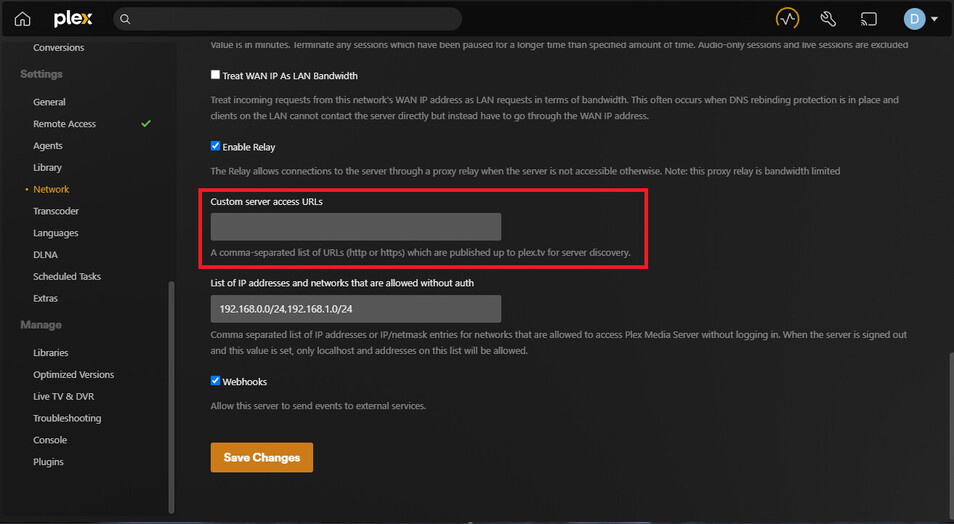
When you have an account with Plex, your server will automatically call up Plex (the company) to report in. Plex takes the IP this request came from and saves it in a database. Then, if anyone out there on the internet who has permission to access your server (including yourself) logs into their Plex account, Plex sends them your house’s IP address as one possible candidate for connection. Since this IP should be accurate (because your server is talking to Plex (the company) from it), you do not really need to add any additional alternate IP addresses to reach the server in your server management pane, seen here:

You can add your domain there (plex.DOMAIN.TLD), but it will resolve to the same IP anyway, and will just be redundant. It can be handy to do this anyway if your IP changes often and have a dynamic DNS that updates more often than once an hour, but otherwise it’s not necessary.

Local access
For those within your home network, your server ALSO sends to Plex (the company) your server’s self-reported IP address. This is the computer’s local IP address, and for most cases should work for most people. This IP is tried first by all clients, so as long as the IP is reachable (which it is by the sound of most clients working already), your clients should never attempt to use the ā€œremoteā€ IP address, which is your domain name, which is a bad way of accessing a local network (not to mention that I don’t know if it’s even possible to access the far IP port of a router from the interior, as you explained in your third paragraph).

Anyway, I think the primary problem is that you need a secure connection, and you CANNOT DO THIS by connecting directly to your server (via SERVER_IP:32400/web). Most encryption in a connection is handled by Plex (the company), so you need to use app.plex.tv and sign in with your account to be able to cast. If you connect directly to your server (by IP, or by domain, if you could get that to work), you bypass all authentication processes and now do not have a secure ā€œencryptedā€ connection to your server, which prevents you being able to cast.

Side note
You can get your web domains to work in a local network. A few of the consumer-grade routers I’ve been working on lately have the ability to set custom domain-IP maps. You might be able to set up on your router that ā€œPlex.DOMAIN.TLDā€ points to the local IP of your server, so you can enter that into a browser and be redirected to the server. But, again, this will not log you into your account, and you will have an insecure connection to your server.

I hope any of this helped.

1 Like

I for sure thank all your comments and did change the url in the network settings (I never thought it was needed as I had no problem to watch content on a LG OLED tv with the plex app installed at my former girlfriends house (half of that tv is stil mine!!!) and that worked. So now I am at my home, having a visitor and wanted to show it through google chromecast, especially bought with network cable because my RaspberryPi’s faulted too much, and I run into problems)
I’m gonna try this tonight, and see if it helps, other solution is… a new TV, only for plex.

Again, thanks all! and thanks for taking the time to read all my babble…

Just to side note this, the server where plex is running on, has had problems keeping up trans…? so I had this topic earlier this or last year resolved by a staffmember (I think) and was asked to use the plex app. Now, the plex app (on windows pc) does not cast or is not able to, but can handle the stress that the server can’t (100% utilisation on the CPU). Now using the chrome solution, this utilisation of the server’s harware runs now at 100%, making it constantly beeping that is it stressed out!.

So, why can’t the plex app for windows cast to chromecast. This might be something the developers might take a look at please…

The dedicated app has never been able to cast to chromecast.

because the only things the Chromecast API allows casting from is Chrome ( which includes some other browsers based on chrome) , iOS and Android ReferĆŖncia da API Google Cast  |  Google for Developers

1 Like

So, the solution is given by @Divideby0, because yesterday evening (exactly the day after he gave the solution, i was just late putting it here) I tested it and it worked without problems. Still the issue, you @BigWheel said:The dedicated app has never been able to cast to chromecast.
But there is an pictogram for castin in the right top corner, so where is this intended for if casting is its only purpose?
But, maybe developers would want to make this working, and showing off that they are thinking about this? Who knows.

The casting icon is a generic one we use for all app.

Plex clients apps can cast to other Plex client apps using our own Plex Companion protocol. https://support.plex.tv/articles/categories/features/casting-flinging-remote-control/

Apple mobile devices for example can cast to Plex Companion, Chromecast and AirPlay

Android devices, companion and chromecast

So, if I fully understand, the benefit for using the app is gone when using a browser while the app can’t cast to chrome devices, but the browser can, and the plexapp handles big difficult files far better without stressing out the server, while the browser is more dependent on the server, stressing the server into 100% utilization (the processor is at work at 100% and only goes down when stopping streaming via browser).

Is there hope that these qualities ever come together? That would open the road to more users stepping over to plex, or am I fairy tailing here?

I’m sure the Plex devs would love to, but as Bigwheel said:

That’s a bummer. That means it’s up to Google to open the API to calls from Windows app developers. Wonder why they allow browsers and mobile phone apps, but not desktop-based OSs.

Would it have something to do with money? or control? I guess that control is the winner, what do you think?

I’m not sure. If control was their priority, then opening up the API to Android and iOS seems like an odd choice.

Money might be a better thought, but not for the reason you may think. They might have to dedicate a team to create a Windows/Linux-based api library team, and they might not think there is enough demand for a Windows app to do chromecasting. If they want to allow a video to play on your TV, they might simply decide you can install a video player app on the TV instead.

:man_shrugging: Sometimes, big corps make odd decisions.

TV I have is too old, as in earlier writings I mentioned another option: A new TV…
But, as lovely this would be, I do not watch TV channels, they are boring, and for the things I want to see, I have my own PLEX. So, thank you for all the comment and info you provided.
Have a nice day!

This topic was automatically closed 90 days after the last reply. New replies are no longer allowed.