Until recently I was one of those using Plex Media Player still, because I could not get Plex HTPC to cooperate. Specifically, I had a problem with some kind of dropped frames or similar hitches… a glitch every few seconds, which made things unwatchable. This was a problem even with refresh rate switching turned on. You know how it is when a long smooth pan breaks up? The horror, the horror!
I saw a post recommending going to the Nvidia control panel and resetting all the 3d settings to default. This did not actually work for me, but then I created a new profile for Plex HTPC and started fiddling with the Nvidia settings. Before long I found a set that worked – my pans are now as smooth as movie popcorn fake butter.
Oh, I have also turned off the Nvidia overlay. I did that first and I don’t know if it contributed – by itself, it did nothing. I should turn it back on and see if Plex HTPC gets choppy again.
There may be a more optimized set of options, I doubt most of these 3d settings matter… but this worked and it’s where I stopped messing with it.
Hope this helps someone.
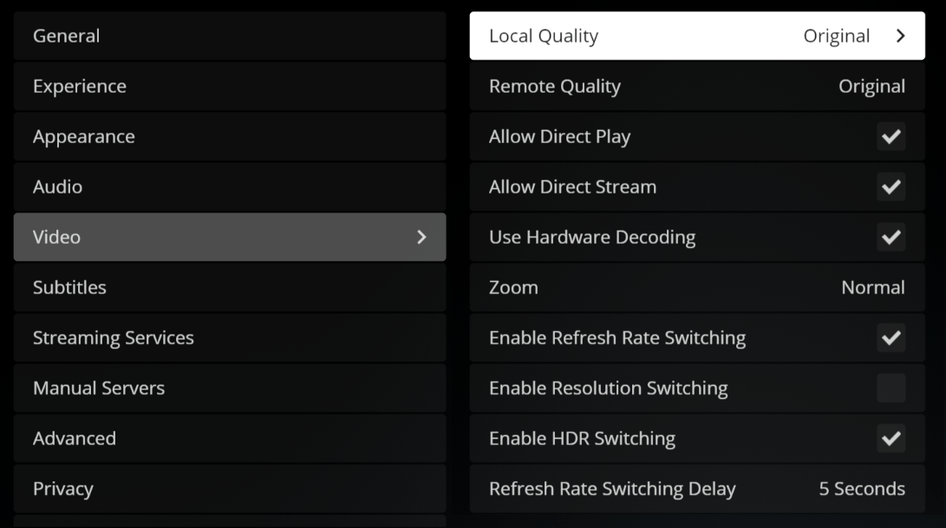
In Plex HTPC, these are the video settings – nothing tricky, but refresh rate switching is a must. What’s great is I could turn quality up all the way – and this seemed to make a big difference in final quality.
It is likely the Vertical sync which is the key setting among those you customized. Is this actually the case for you?
In my case I had to change the Power management mode to Prefer Maximum Performance or it would occasionally drop audio whether passthrough was used or not (HTPC Tips and Tricks - #5 by gbooker02). Usually it occurred around black or nearly all black frames. I have a video file where it occurred 3-5 times in the first minute each around an all black screen with some white text to indicate the actors’ names.
Vsync is one that I looked at more carefully because I know how important it is. What I found was that with the settings as shown but Vsync off, I had smooth pans with tearing in parts of the image. I could see the original hitching problem I was chasing had been corrected even as the image was unwatchable in a new way. Then when I turned Vsync on, everything was good.
In my overall Nvidia settings, I had turned Vsync on long ago, because my display is only 60 Hz and I really hate tearing in games. So, in my original problem report of unsmooth pans, it was definitely not a Vsync problem. The glitches I saw looked like the whole image freezing for a split second during pans–not sync tearing.
Ah yes, turning off vsync will induce tearing. Maybe it’s the power management or the max frame setting settings then.
BTW, with my above comment about audio drops, that only occurred on the highest quality preset and not on the lower ones.