I simply love PLEX but am completely in the dark about subtitles. My father is deaf and watches my account from both a PC and a Fire Stick. I cant for the life of me figure out subtitles.
I dont mean to aggravate anybody by mentioning Kodi, but as a way of comparison Ive gotta say that it is very simple to get subtitles in Kodi. One has only to specify a service/library like Opensubtitles and then while watching a video one has only to scroll to subtitles and have them fetched for you. What is the equivalent in PLEX? I need to be able to have my dad get subtitles for my content, how can I do that?
Is there a tutorial?
@rocks911 said:
I simply love PLEX but am completely in the dark about subtitles. My father is deaf and watches my account from both a PC and a Fire Stick. I cant for the life of me figure out subtitles.
I dont mean to aggravate anybody by mentioning Kodi, but as a way of comparison Ive gotta say that it is very simple to get subtitles in Kodi. One has only to specify a service/library like Opensubtitles and then while watching a video one has only to scroll to subtitles and have them fetched for you. What is the equivalent in PLEX? I need to be able to have my dad get subtitles for my content, how can I do that?
Is there a tutorial?
I would read through this article.
https://www.howtogeek.com/284125/how-to-automatically-download-subtitles-with-plex-media-server/
Also look at this configuration found in your account settings. This can be if I understand correctly be by user or Guest.
Thanks for the reply.
However in the tutorial at this point:
Select any and all libraries you wish to refresh with subtitles and look for the setting icon in the upper right corner. Click the icon and select “Refresh All”. I do not have that option, that gear does not appear, the option to “refresh all” does not appear
Note that clicking the update icon, the little circular arrow, will not suffice as that will only look for new items that need metadata and subtitles, not check all your existing media for subtitles.

I suppose the UI has changed a bit since they updated this screenshot.
you can do this either for your entire server or per library…
-
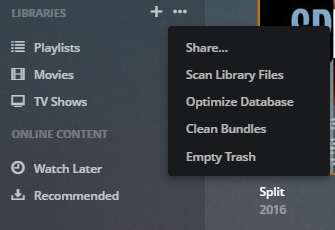
when hovering over any of your libraries on the Plex start page, the
...menu will appear next to the “Libraries” header -
click it and you’ll see the following options
-
the menu you’re looking for is now called “Scan Library Files”
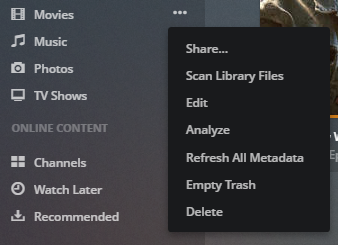
if you want to do the same for a single library, the menu looks slightly different, the relevant options are the same:
I dont mean to be dense, but it isnt really working for me like youve indicated.
The UI has changed, thanks for clearing that up for me, however when I click on “Scan Library Files” the resultant action doesnt load subtitles for movies that dont have them, in fact the action takes all of about 30 seconds and results in, well I dont know what it changes. Do I have to be on my home PC where PLEX is resident? Im trying this on another PC at my dads.
Enable Opensubtitles.org in settings -> server -> agents -> movies -> Plex movie.
You’ll need a free login. Create it on their web site, then click on the gear to enter it into Plex.
Then do a “refresh all metadata.”
The subtitles should start downloading immediately, but will take awhile if you’ve a large library. You’ll see the “Finished processing for …” message as they’re downloaded for each movie. The subtitles will show up as “external.”


Thank you, very helpful
