Phenomenal writeup! I’ve learned so much more about PlexAmp now. I’m much more impressed with it now than when it was new and I first tried it out. So glad to see the continuous drive to kick ass over and over again.
Has anyone found a way to rate recently played songs vs just the one currently playing?
I’ve done this in Pandora for years where I can listen for a while and then go back and thumbs up/down several in a row. Often I’m working on something where it’s not practical to provide rating during the playback, but would love to do so for a batch of songs, directly from the player.
I tried this in the “Back to” menu, but hitting anything in there would just result in the track playing again, which wasn’t the behavior I was hoping for. Hopefully I’m just missing something obvious here.
Being able to consistently rate tracks no matter where you’re clicking on them from would be a very nice improvement. Youre not allowed to rate songs when you hold down on a track in certain parts of the app, but then other parts you are. Consistency would be nice so the app behaves how you expect it to no matter where you are.
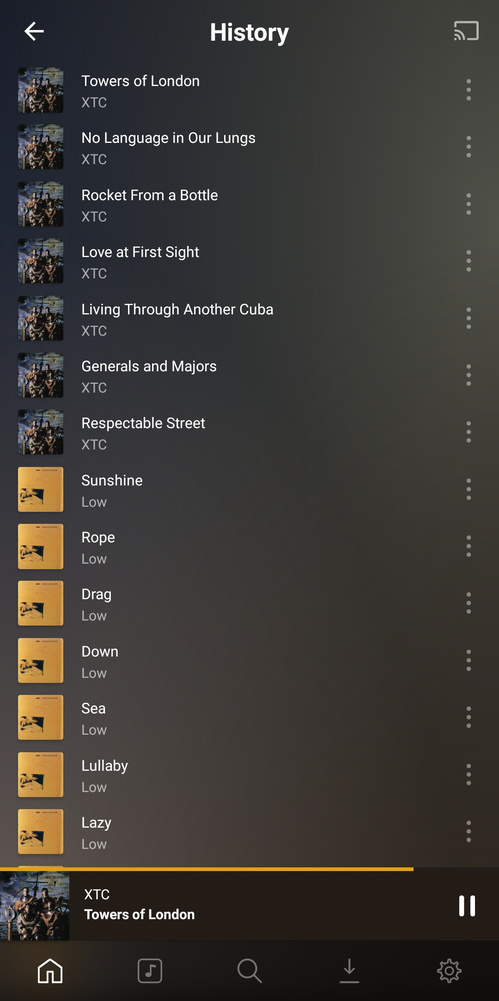
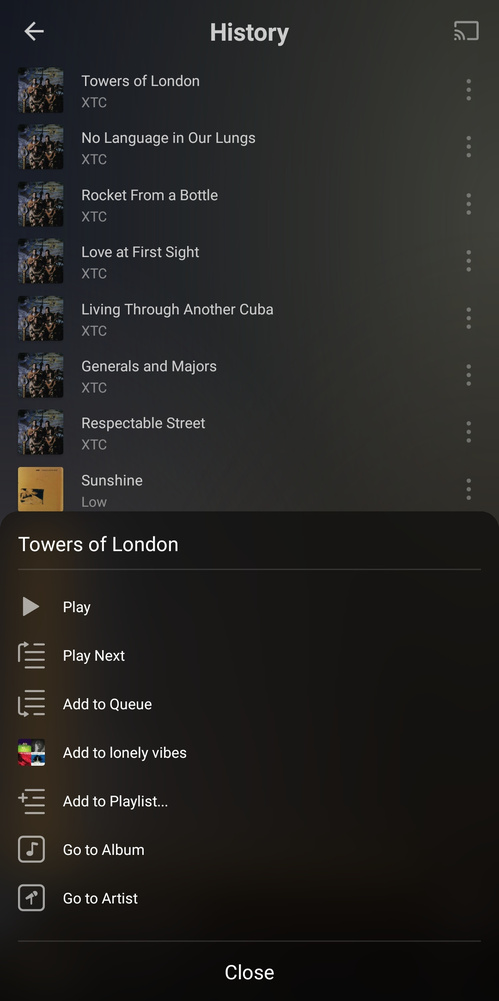
For instance, when holding down on a track in the history section, it pops up without a way to easily rate a song (this isn’t the only place it doesn’t allow you to rate songs, but just a single example):
With the latest version 3.2.1 [How to] access music (stations) by genres?
I was able to go to Music and select Latin and have it shuffle all my Latin music. Now it does not let me and just takes me to all the Latin Music I have which I can then select. Now the only way that I can access it is under Recent Plays now as there is still the “Latin Radio”
I’m sure I am missing something simple…
Home > Style Radio > tap on a radio to play it (same with mood, genre).
Under library > genre you’re just browsing your library by genre.
Thank you for the reply Elan. That is where I used to be able to find it but has since vanished from mine.
Here you can see that at one time I was able to select “Latin Radio” as it shows under Recent Plays:

Under “Stations”, “Genres Radio” no longer shows:

And under “Style Radio” “Latin Radio” is gone but there is still a “Latin Pop Radio”:

Genre radio is only available if you set “Genres” = “Embedded Tags” in the properties of your music library.
It will then replace the ‘Styles Radio’.
Thank you! That fixed it! It must have changed/reset during one of the many resent updates of the PMS on the Shield TV. I now have it back.

Okay, sorry for posting here if this is the wrong place, but I can’t seem to figure out what to search for to answer my question… And it doesn’t look like I can make my own topic.
Does Plexamp support downloading TIDAL playlists? If so, how do I do it?
Thanks!
not entirely sure… my sub ended so i can’t test, but try this…
change source to Tidal, then browse playlists and attempt download… otherwise a more knowledgeable user will have to answer…
No, you cannot download Tidal content through Plexamp (or any Plex client).
Is there a way to make the windows program remember the position and size of the app window from the last time it was open?
Every time I open it the window put itself in the top left corner and is very small. Like most(?) people I have my desktop icons on the left side and I also prefer to lengthen the Plexamp window so that I can see “up next”.
It is a first world problem, no doubt about that, but is there a way to fix this problem?
I have alot of duplicates in my library and sometimes it just puts my FLAC and MP3 songs together in the same album.
Say what?
My Plexamp (on Windows 10) is remembering its window size, position, and shape inbetween sessions.
I assume you have some “helpful” software running in the background which is resetting/clearing up some usage data of Windows.
Maybe, but nothing that I have downloaded or actively activated. My windows install is pretty new so it’s more or less fresh.
I did a test with five other programs and windows remembered the location for four of them, the fifth behaved just like Plexamp. (It was Putty if anyone cares.)
So it doesn’t really seem like a Windows problem, but it does seem a bit strange that you don’t have the same problem so I don’t know, maybe it is.
Plexamp version: 3.2.1
Windows version: Whatever was the most recent one week ago.
mine also remembers… quick googlefu… finds this article
https://answers.microsoft.com/en-us/windows/forum/windows_10-start-winpc/how-do-i-get-windows-10-to-remember-window-size/c1df553f-15f5-4994-8ce0-c3bb13d5d7a2
which says to, right click taskbar > cascade windows… stretch/resize/move window to desired location… right click title bar, close… reopen… should open in last location and size.
Thanks for the reply but I found out what was the problem.
Apparently windows moves the program back to it’s original place everytime I leave Plexamp (or any other program) hanging a bit outside the screen, if you know what I mean.
I don’t like seeing my background shining bright between Plexamp and the edge of my screen so I’ve always put the windows ever so slightly to much to the right.
If I leave a pixel or two between the program and the edge of my screen it remembers the position. I guess it’s a way to protect the user from “losing” a window, makes sense.
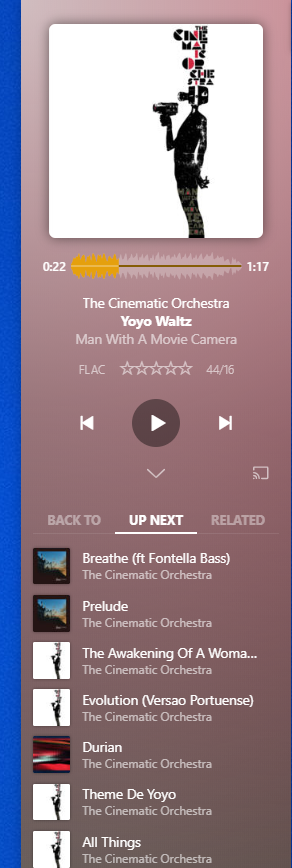
I don’t know if I make sense but here’s an example. That very thin blue line (which is my background) on the right needs to be there.
Unfortunatly it won’t even run on Manjaro. I installed via AUR / Pacman and when I click “Plexamp” in the “start menu” nothing happens. I tried the CLI way and it says it’s not found. RIP.
Will we get an exclusive mode anytime soon on windows?
Two things I’m trying to figure out:
-
In older versions of the Windows version of Plexamp, I could change “Always On Top” behavior by right clicking the system tray icon, but now I have to click through a bunch of menus to do so. I was wondering if there’s a similar way to quickly toggle “Always On Top” on and off, since right now I usually just end up leaving it off. I know there’s some third party programs that can do this but it was nice having it built in.
-
In the Android version of Plexamp, I can’t figure out how to turn the visualizer on and off. Tapping the album art makes it go grey for a second, and a long tap lets me change the visualizer, but neither of these seems to actually turn it on. I feel like there’s something simple I’m missing, but I don’t know what it is.
