Both of those requirements are met.
When you say you only track the most popular few hundred releases, do you mean across all of Tidal or specific to my library?
Both of those requirements are met.
When you say you only track the most popular few hundred releases, do you mean across all of Tidal or specific to my library?
across TIDAL.
Ah, that’s unfortunate and probably the culprit. Any way to adjust this on the server side?
It does not appear in the web client. External content is included (and works as expected on radio stations).
add more popular/mainstream music? 
(there’s no other way to tweak in terms of what results the server gets from TIDAL)
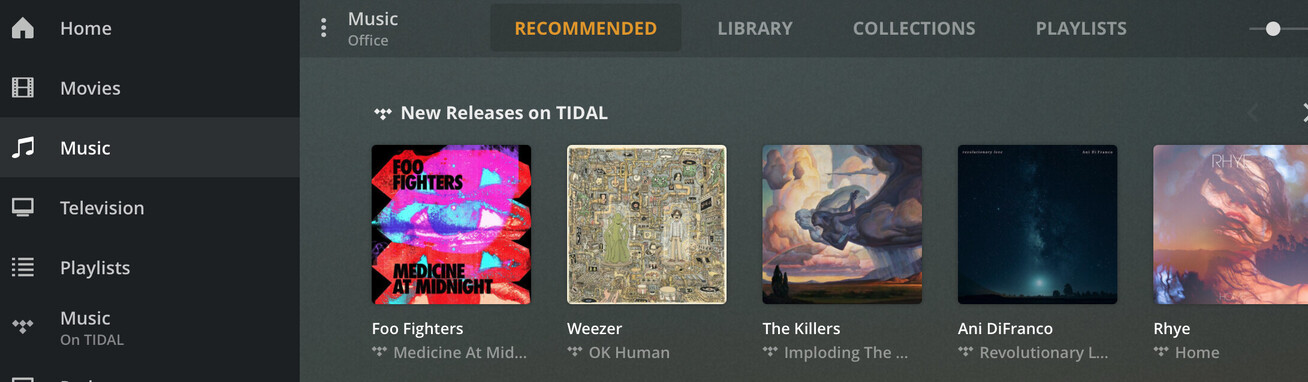
Is there a cutoff for how many albums or something else that determines whether the section appears? I’ve got some mainstream stuff (Ice Cube, Cannibal Corpse, the Foo Fighters, and Korpiklaani all have new albums showing up on the equivalent playlists in my Spotify and Deezer accounts right now). Foo Fighters at least is definitely mainstream enough, based on your screenshot.
I also just searched all of my Plex logs for “Refreshed releases list with” and didn’t find anything, so I suspect there might still be a missing piece to making this show up.
it should show up after a server restart (or every X hours) IIRC so is it possible you just don’t have it in the log ranges you’re looking at?
only other thing i can think of is that the server owner has to have a TIDAL account for this to work.
Boo. I’m the owner and just rebooted this morning for unrelated Windows reasons, so maybe 6 hours before I searched the logs (which go back at a few days).
do you see TIDAL recommendations on your artist/album pages?
ok, that’s good, it means TIDAL is hooked up properly.
restart your server, and then browse your music library and see if the hub is there. if not, please upload your media server log.
Before doing this, I went through and deleted/re-added the Foo Fighters albums I had because I couldn’t get them to play. There’s another thread about Tidal stuff not playing that we’ve communicated in. Short version is that sometimes when I add Tidal albums via Plexamp, a invalid, non-playing version of the album gets added some reason. Anyway, deleted Foo Fighter albums from the library and re-added via the web client, then rebooted the server, and the section showed up with just Medicine at Midnight:

So now that it’s working some, I guess I’ll keep an eye on whether it works for some of the more popular artists. I still think it would be cool to see this as a hidden preference (I have a beefy server and listen to a lot of unpopular music) or perhaps automatically grab a larger list of albums in a case like this where there’s only one new release found to recommend.
Thanks for helping!
@elan Random question for ya. Is there any plan to have an option to display multiple libraries at the same time? It would be lovely to see my files interweaved with tidal releases for sections like “recently added”. If that’s just not possible it would be lovely to have a more convenient place to switch libraries instead of digging through the settings. Cheers and thanks for an amazing app. Keep up the good work!
Plexamp is great, especially the playlist and station builders but how can I remove artists from playlists and the Mix Builder station? Thanks
Not at this point. Merging things like Recently Added from multiple different places could result in unpleasant jank, and the main focus was intended to be on a single library at a time.
Agreed that we could probably find a nice way to add a shortcut for switching libraries easier than diving into settings.
Autoplay doesn’t seem to work as I would expect it to. Does it only go to next or previous album and not similar tracks? If Autoplay could work like Roon Radio and we could get a headless Pi client, I would be 100% sold on Plexamp.
Swipe the autoplay card left or right for other options.
I’m not sure I follow. I pick a song, it plays and then it ends. I can swipe and see recommended songs and add them, but they don’t just add and continuously play.
Please go back to the first post on this page.
Scroll down until you see this picture

(you do need a couple of tracks in the queue for AutoPlay to kick in)