How to raise quality on external network ?

Hi,

So I have my main computer with all files on it and I use my laptop to watch everything from my main. When i’m on the same network everything works fine but when I switch to an other network (basically external network) I can’t get better than SD to 1Mbps even if got around 15Mbps upload on my main and 60Mbps download on my laptop via wifi. It worked well a couple days ago but since today i cant get better than that

you should check the following two areas:

  1. On your server – Settings > Server > Remote Access:
  • Internet Upload speed
  • Limit remote stream rate

Do you have a bandwidth limit set on your server? During playback you should be able to change settings to increase quality.

I finally got it, it was my port forwarding who did reset idk how but everything was still green somehow

@tom80H said:
you should check the following two areas:

  1. On your server – Settings > Server > Remote Access:
  • Internet Upload speed
  • Limit remote stream rate

I don’t have the option to setup my upload speed ? Just have the all green message with my ports

The other two settings are fine

@BigWheel said:
Do you have a bandwidth limit set on your server? During playback you should be able to change settings to increase quality.

Yeah that was my problem, I could only change through like 360p 1Mbps, 0.7Mbps etc … nothing higher even with a very capable network speeds

@“victor130294@gmail.com” said:
I don’t have the option to setup my upload speed ? Just have the all green message with my ports

you’ll need to click “Show Advanced Settings” on the top of those settings.

@“victor130294@gmail.com” said:
Yeah that was my problem, I could only change through like 360p 1Mbps, 0.7Mbps etc … nothing higher even with a very capable network speeds

That’s fishy…

ok so just FYI. If your remote access was enabled but not working correctly because of port forwarding then that means the server was working in indirect/relay mode for remote access which has a bandwidth limit. more info here https://support.plex.tv/articles/216766168-accessing-a-server-through-relay/

@tom80H said:

@“victor130294@gmail.com” said:
I don’t have the option to setup my upload speed ? Just have the all green message with my ports

you’ll need to click “Show Advanced Settings” on the top of those settings.

When I do click on that it brings me the bottom half with ports and IPs

@“victor130294@gmail.com” said:
Yeah that was my problem, I could only change through like 360p 1Mbps, 0.7Mbps etc … nothing higher even with a very capable network speeds

That’s fishy…

Yeah it was weird probably this is was the issue >>>
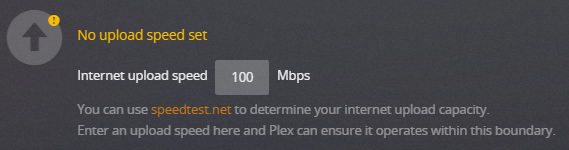
@BigWheel said:
ok so just FYI. If your remote access was enabled but not working correctly because of port forwarding then that means the server was working in indirect/relay mode for remote access which has a bandwidth limit. more info here https://support.plex.tv/articles/216766168-accessing-a-server-through-relay/

Thanks for your help guys :slight_smile:
