Since the Nvidia Shield update no longer supports legacy agency, how do I scan in TV Shows? It used to be so easy but not now since Plex has not shown us how.
Nothing has changed in years.
https://support.plex.tv/articles/naming-and-organizing-your-tv-show-files/
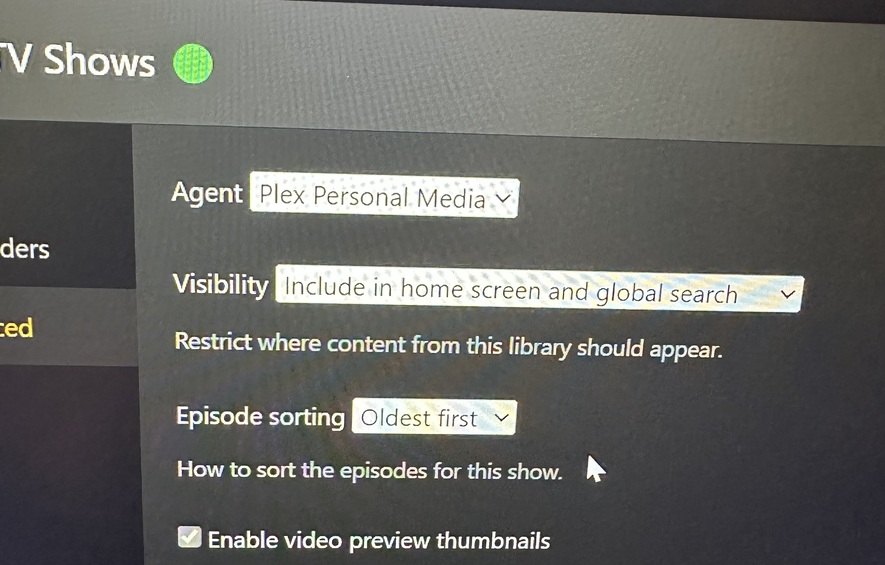

You need to use “Plex Series”.
The new agent doesn’t have global options. Instead, you can give each library its own separate agent options on the Advanced tab of the library properties.
Which means that the “Agents” section in the server settings is obsolete. And since the Shield doesn’t have the legacy agents anymore, the menu item is empty or is removed completely.
https://support.plex.tv/articles/advanced-setting-plex-tv-series-agent/
I don’t see how to set this up. From my pictures above or settings screen, how would I do it?
For a TV Show library, set Agent = Plex Series.
There is no scanner setting on the Nvidia Shield. It is no longer needed and was removed.
I tried that for two days. Nothing….
There is only one scanner for TV so there is no option to choose from.
I did just try just to make sure scanner not broken and it scanned in a couple test files I have set up fine
However for some reason the “Recommended” tab for the library did not show any Recently Added row or anything but the “Library Tab” did. Once I pinned the library to the home screen it appeared and after removing it stayed. So there does seem to be some sort of issue with new TV libraries on the Recommended tab.
If you are not getting anything and your files are named appropriately then we would need to see your server logs which you can get from the troubleshooting section of server settings.
Yep it was the naming of the files. Thanks!
