How to add new videos copied to the Video folder on my Windows computer automatically to my PLEX Roku channel?
After copying a new video to the Video folder, I can play with the navigation on the Roku forever, but find no way to see the new video!
If I go back to my computer, I can right-click on the task icon for the Plex server and click Update Libraries. This makes my video appear on the Roku.
But why is there no Update Libraries option on the Roku itself, such as by clicking the * button on the remote control?
Seems a problem that could easily be solved, but I don’t know how. The instructions for using the PLEX channel and the Plex server seem to be missing, or just non-intuitive.
Looking forward to a simple solution. Otherwise, Plex works very well except that sometimes for a video that has partially been played, there will be a VERY long pause after asking it to play before it starts playing on the Roku.
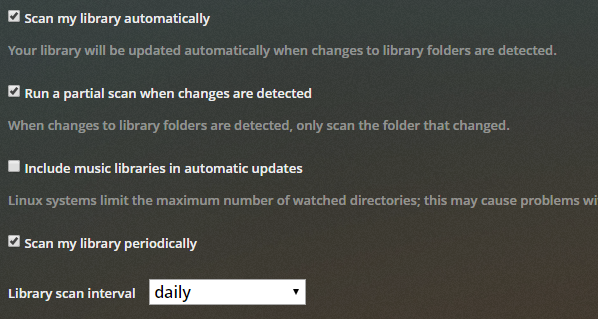
Check Plex Media Server -> Settings -> Library. Select boxes to auto scan when changes are detected. You can also set Plex to scan at a desired interval.
Note that if your media is hosted on a NAS, additions will not be automatically recognized. This is a limitation of storing media on a NAS, not a Plex limitation.
As @FordGuy61 pointed out, making sure to check those settings will optimize the experience.
With that said, the Roku does have an option to scan library. You can initiate a scan by focusing the source in the menu bar on the left, selecting the options on the left (vertical ellipsis), and selecting “Scan Library Files”. This option is available to the Admin user, and will tell the Plex Media Server to scan the files in the background. It may take a few minutes before the content updates.
I checked these options and after I added a new video file to the Video folder I still could not see it in Roku. Did you test your instructions? They do not work.
These instructions do not seem to work. To the left of Home on Roku was a three-dot option, but it just led to several options starting with “Home” that don’t make any sense. There was no way to refresh the library.
Plex seems to have some very poorly designed areas. How difficult can it be to add new files to its known list of files? Why can’t it just scan the folder every time it displays the current files, at least as an option? I’m a software engineer and this just looks like poor design and complacency with poor design. I’ll be happy to learn if I’m wrong, but added files should be shown without intervention by the user, and this should happen by default, too. For one thing, Windows has a way to monitor a folder and its subfolders for any significant change, so polling isn’t even needed!
I started my server again this morning and the new video showed up. I don’t remember whether I clicked the “Update Libraries” context menu item on the server last night or not. But I’ll assume you are right and I thank you for the help. I will post again in this thread later today after I try testing this option for real with another new file.