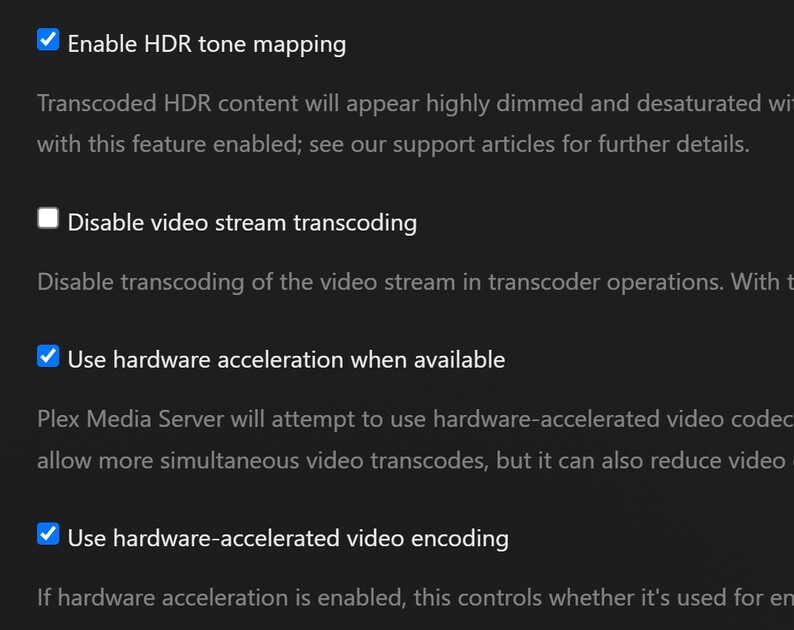
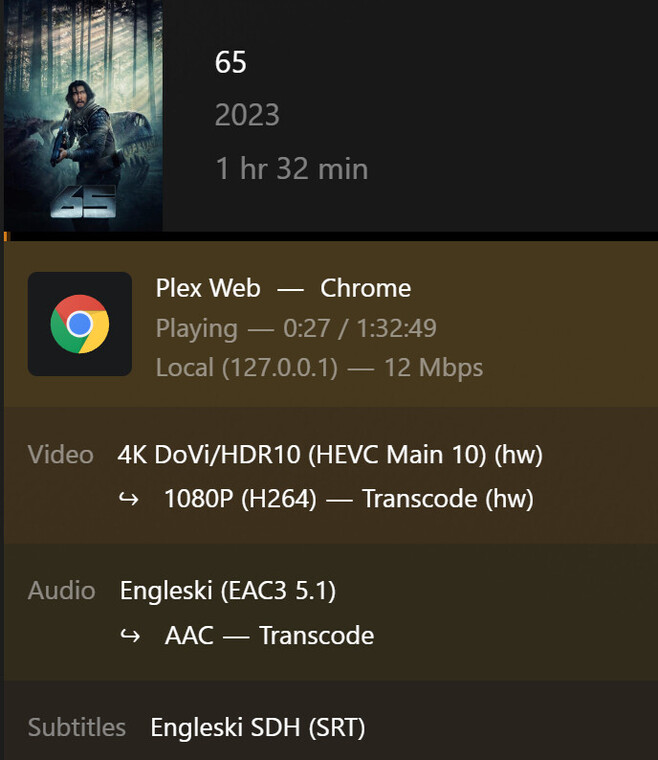
I am trying to transcode a 4K Dovi profile 8 with HDR fallback to a Plex web client or Windows app into 1080p @ 10-12 Mbit.
When doing so the Plex transcoder is using half of my 8 core Ryzen 5800 cpu, and very little of the nVidia 1050, resulting in choppy playback and taxing the computer a lot. MOst of the GPU usage in the screenshot is from the windows desktop manager, so basically at most 15% is being used by Plex Transcoder and sometimes even 0%.
I tried to browse the logs to figure something out, and it seems that nvenc and nvdec is used, but the performance is absent and the CPU is being abused. It also says (hw) in the Dashboard:
Can somebody help me figure out how to make it work normally?
I paid the subscription just to be able to do this…
I wanted to put this GPU into a small enclosure with a weaker cpu to have it act as the Plex Server without having to have my computer always on… but even on this beastly CPU is not enough
Additional info:
Windows 11 fully updated
Files on a NAS (using samba 1.0 if it matters?)
All attachments: file info, usage, logs. fileinfo.txt (1.1 KB)
You can install the 64-bit version on top of the 32-bit version. The installer will uninstall the 32-bit version first. This affects only the PMS program (c:\program files.…). The Plex Data Folder and media are not touched.
DoVi Profile 5 does not have a HDR10 compatibility layer. It is DoVi only.
Plex Media Server cannot transcode & tonemap DoVi video. It does not have a license from Dolby to do so.
When you direct play DoVi P5 media on a compatible display, such as an LG TV, it works.
When you try to play DoVi P5 media on an incompatible display, such as a Samsung TV, it fails, and Plex should display a “color space not supported” message.
Playback will also fail if Plex need to transcode the video due to bandwidth limitations or any other reason.
There are some Plex clients, such as Plex Desktop for Windows, that will direct play a DoVi P5 video, even when using a non-DoVi display. However, the video is not tonemapped. When this happens, it will be easily recognizable since the colors are way off - usually a lot of pinks and greens.
My understanding is Jellyfin has a “reverse engineered” way to transcode DoVi video.
Plex cannot use that method. It has a different business structure and different business constraints.
In order to transcode/tonemap DoVi video, Plex would have to acquire a license from Dolby.
Speculation on my part: It is doubtful Dolby would ever grant such a license, at least for DoVi Profile 5 video, since there is no legal way for people to obtain DoVi P5 movies and shows (it is used by the streaming services, not for movies/shows sold on Blu-ray discs).
My understanding is that reverse engineering is not an illegal act.
In fact this is what was happening in the early days of the MS office XML format by other office suites.
In the end the EU forced MS to open the specification so now it is not needed any more.
However nothing was stopping them before the EU stepped in.
Also since from what I see the Plex transcoder is a fork of ffmpeg, Plex could easily adopt a similar approach to Jellyfin, not by copying the code, but by using the same methods and writing it from scratch.
So the real issue here is that Plex is afraid from Dolby suing, even if they would not win in the end?
If that is so, I’m quite disappointed that I paid the subscription
Let’s hope Jellyfin does the battle against Dolby for Plex
Somebody needs to win in court and make a precedent for this to happen…
To paraphrase Dr. McCoy, “Dammit marino823, I’m an engineer, not a lawyer.”
Even straightforward licensing involves lawyers. So does using and mixing commercial product, reverse engineered product, and products using GNU GPL and similar licenses.
Plex says they need a license. As I’m not an intellectual property lawyer and try to stay far, far away from such things, I’ll defer to them.
Right legal stuff is complex.
I have some legal background, but I’m not into it for decades already.
However since there is no actual content copying or alteration involved, just decoding metadata which is regarded as a file format, I’m pretty sure that Dolby would lose at least in the EU.
Nevertheless thanks for the talk,
I spent too much of your time already.