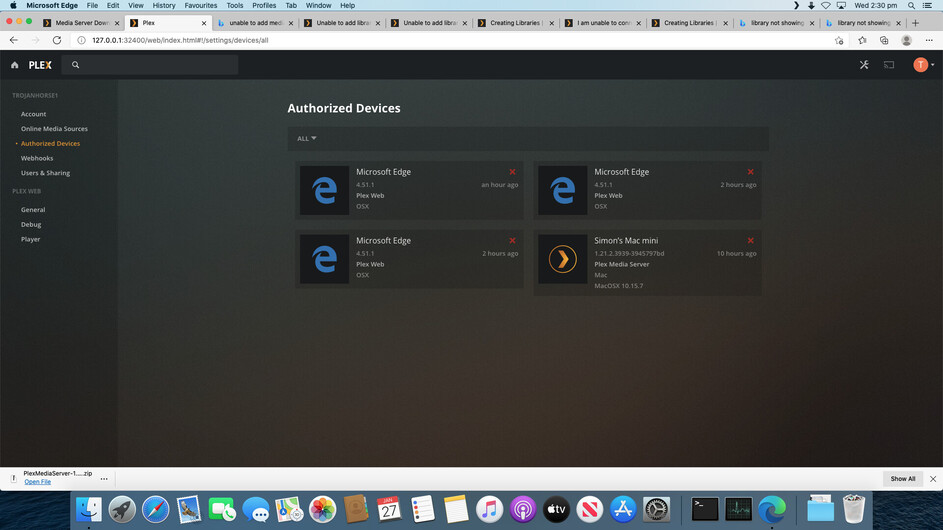
Server Version#: 1.21.2.3939-3945797bd
Player Version#: not installed as of yet
Hi everyone in the Plex Forum. I will apologise in advance if this is the wrong place to post this help request, but I didn’t know where else to post it.
Please can someone assist me. I am going round in circles and I am getting very dizzy.
My Mac server crashed the other day so I had to do a rebuild. Everything has gone great until I tried to connect my media libraries to Plex. I downloaded the Plex media server and tried to set it up but a very long story short, I couldn’t do it and I got so frustrated I thought I would try and set it up a fresh so I deleted all instances from Authorized devices, I signed out of everything in Plex, downloaded the server software again and I thought I would start again.
If you click the link in Creating Libraries | Plex Support, it says * Ensure that the correct Plex Media Server is selected within the settings menu*. I think this is the problem, but I cant find anything in the settings section that mentions Plex Media Server (although I am supposedly running it)
Please can someone help me. I am sure this is a simple fix that is staring at me in plain sight but for the life of me I can’t see it.
Let me know if you require any more information from me as I am happy to assist in any way
I tried the start the other day from scratch but it didn’t seem to work.
Today I downloaded the latest version of Plex Server to see if that would do anything.
Having said that, by some sheer freak, the other day when I was trying to set it up, it did go to the usual Server settings screen and it said the server was unclaimed. I tried to reclaim it, Plex said it couldn’t find it, so I deleted instances in Authorized Devices and turned my server off. I am looking at it again today but I am no further forward.
Clear the cache/app data in your browser. I’ve never used Edge so not sure where that would be. Might want to use a Safari or Chrome just for this initial set up.
Restart your computer.
Start up Plex Media Server again from the Applications folder. if it does not open on it’s own in browser, use the menu bar to open it up. The URL should be the 127.0.0.1:32400/web… one
it should now go through the initial set up wizard like you just installed it for the very first time.