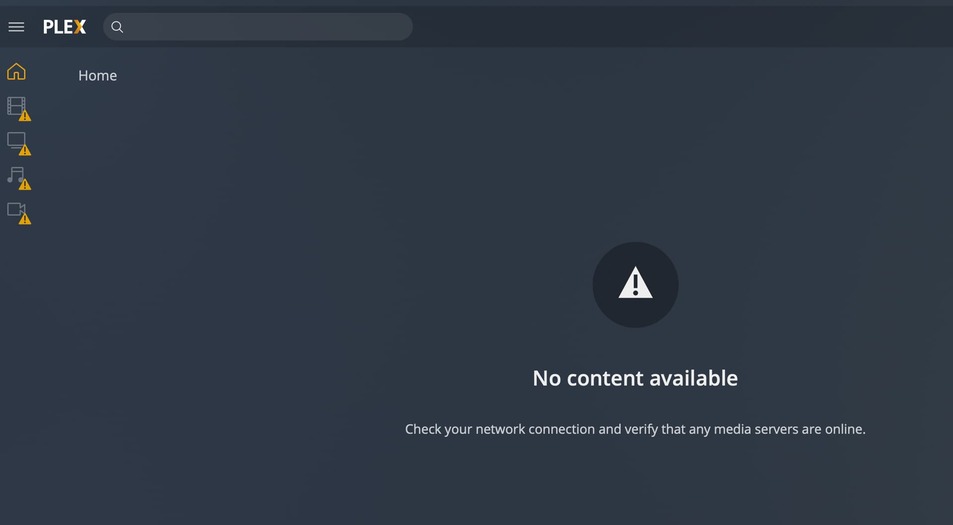
Looking at your account. probably not cert issue
You already did? I don’t see them. Can you send again.
Looking at your account. probably not cert issue
You already did? I don’t see them. Can you send again.
Did you find something in my account?
Yes, I already did a few weeks ago. Sent you these again a few moments ago.
@robkahh You mentioned you changed DNS on your office computer. But I meant to change it on your home network your server is at.
This is line is how PMS tests DNSrebinding which is failing. What ISP do you have at home where your server is?
Aug 18, 2021 10:10:02.450 [0x7f41f5e2bb38] ERROR - getaddrinfo(192-168-178-50.abcdefghijklmnopqrstuvwxyz012345.plex.direct) failed: -2
I actually get the same error and changed the dns server configuration of the pms server to point to Google and cloudflare. But this did not solve the issue. Before that it was pointing to an internal pihole server.
Mixed content prevention is generally the CORS settings on your browser.
Do I have to change it in my Fritzbox or my NAS?
And why doesn’t it work anymore? I didn’t change anything.
doesn’t mean your ISP didn’t.
either
This is different issue, I would start your own Discussion
I believe I am having the same issue. I can access plex through remote and local device apps and localhost/local ip’s. I am not able to access my plex server through app.plex.tv/desktop/. I tried the DNS flush and even manually set dns to google’s DNS, rebooting after each one.
@BigWheel i am sending you my logs now. This is not critical it’s probably been this way for months. Enjoy your weekend.
@UneasiestSnail I don’t see anything apparent to be wrong with your cert. Do you see a line like this in your Plex Media Server.log ?
CERT: Error acquiring new certificate: Failed to upload CSR: 429, <?xml version="1.0" encoding="UTF-8"?>
Hi. I believe I’m having the same issue, @BigWheel.
My case is that I can access my PMS on my home network devices: PC via browser (app.plex.tv and local IP) and Windows app; SHIELD; and TV. I can also use it on the Android phone app, both home and away.
However, when I attempt to access it via app.plex.tv on a browser on a device outside my home network, I get the “unable to connect to *** securely” error.
Do I need a cert refresh, please? If not, any advice on alternative solutions would be really helpful. I’ll PM you my server logs in a sec. Thanks in advance for your help.
Same issue, can access from iOS, LG smart TV, and even the old Plex media player, but not via any browser on my laptop.
I also get a certificate error trying to access Plex fórums from my laptop.
If it’s a certificates issue, please reset mines too.
@ictiosapiens i reset it but if you are having an issue with forum login as well then i would expect a browser issue. I would clear cache/cookie for any plex.tv urls. making sure third party cookies are accepted, and try different browsers in laptop to see if get same thing.
I am having a similar issue but not quite the same. All the people on mine can access it via web browsers when on remote access but any apps on phones or tablets or TVs fails to work. The message is “ please verify that the server is running and has a network connection” The apps on TVs on the same internet network all work no problem. Tried a bunch of things and nothing works. Really frustrating. I am currently remote and can login with safari browser but the Plex app gives me the same old message.
@jp992751 you probably need to reboot your server computer when you get home.
I’m having the same issue as well. Can you please try restarting my cert as well? Thanks!
Logs: Logs.zip (21.2 KB)
I’ve got this issue too. Working fine from anywhere on iphone and roku, but just get this in a browser:
I’m not sure how the logs work, is this it?
Oct 19, 2021 09:08:43.958 [0x70000c211000] Debug — Completed: [127.0.0.1:62768] 200 GET /player/proxy/poll?deviceClass=pc&protocolVersion=3&protocolCapabilities=timeline%2Cplayback%2Cnavigation%2Cmirror%2Cplayqueues&timeout=1 (4 live) GZIP 20001ms 5 bytes (pipelined: 136)
Oct 19, 2021 09:08:43.962 [0x70000c39a000] Debug — Request: [127.0.0.1:62768 (Loopback)] GET /player/proxy/poll?deviceClass=pc&protocolVersion=3&protocolCapabilities=timeline%2Cplayback%2Cnavigation%2Cmirror%2Cplayqueues&timeout=1 (4 live) GZIP Signed-in Token (fangrock)
Oct 19, 2021 09:08:43.963 [0x70000c39a000] Debug — Content-Length is -1 (of total: -1).
Oct 19, 2021 09:09:03.964 [0x70000c294000] Debug — Completed: [127.0.0.1:62768] 200 GET /player/proxy/poll?deviceClass=pc&protocolVersion=3&protocolCapabilities=timeline%2Cplayback%2Cnavigation%2Cmirror%2Cplayqueues&timeout=1 (4 live) GZIP 20000ms 5 bytes (pipelined: 137)
Oct 19, 2021 09:09:03.968 [0x70000c39a000] Debug — Request: [127.0.0.1:62768 (Loopback)] GET /player/proxy/poll?deviceClass=pc&protocolVersion=3&protocolCapabilities=timeline%2Cplayback%2Cnavigation%2Cmirror%2Cplayqueues&timeout=1 (4 live) GZIP Signed-in Token (fangrock)
Oct 19, 2021 09:09:03.969 [0x70000c39a000] Debug — Content-Length is -1 (of total: -1).
My PMS just developed this remote access issue after months/years of no issues. I recently updated the pms build after months of no updates. I see many certificate errors/alerts/unknown/etc. in the pms logs. Could you please reset my certs? Thank you!
@a-fleury is remote access enabled on your server? have you restarted it recently?
@fangrock that bit of logs is not related to secure connections. info here on how to find the server logs manually on your computer
@cctigerfan I don’t see anything wrong with your cert. have you tried just restarting your computer the server is installed on.
Thanks @BigWheel - here are my logs:
Plex Media Server Logs_2021-10-21_08-55-02.zip (3.9 MB)