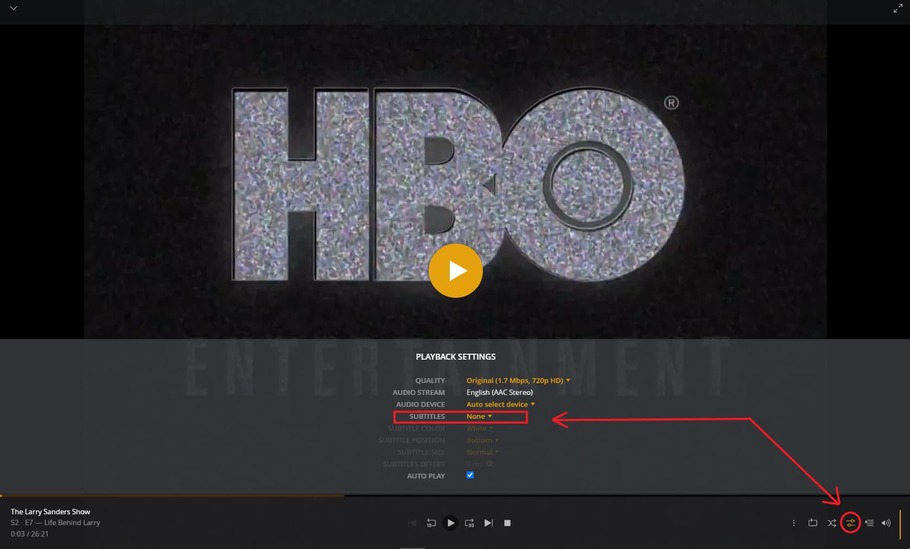
Server Version#: 1.29.0.6244
Player Version#: 1.55.0.3278-c6164b3c
I can’t figure out how to disable closed captions in the Plex Media Player. Is it possible?
Server Version#: 1.29.0.6244
Player Version#: 1.55.0.3278-c6164b3c
I can’t figure out how to disable closed captions in the Plex Media Player. Is it possible?
If these are true closed captions, then they are disabled just like other soft subtiltes.
Can you confirm that these are not “burned” into the video picture? (play the original file with a regular desktop video player)
Does this item have several “versions” hidden under its poster? (inspect the Plex Media Info)
Hi. I did confirm with VLC that “closed captions” can be disabled in VLC. In Plex they don’t show up under subtitles though and I can’t find a way to disable them.
This is gonna sound odd, but after playing with the audio settings for the player and setting the audio device manually the closed captions have disappeared. This is the only change I have made and now closed captions are gone. I got a new soundbar.
Oh and just the one version.
Is it now fixed just for the one video or can’t you reproduce it anymore in general?
(I’m trying to find out if it has to do with the track selector in general)
Another idea:
Could you show me your selections in this dialog?
https://app.plex.tv/desktop/#!/settings/account
Sorry, I don’t know of other files I have that use closed captions so I can’t find one to try out.
And I don’t know what settings you’re showing (my guess is the web player is different from the Windows player), but my selections under Languages are:
But I am certain that the files I watched that showed closed captions do not have any separate subtitle files.
Go to setting (little wrench) –> Account
Plex Web and Plex for Windows has the same settings
Depending on what you have selected there, Plex could be automatically selecting the closed captions for some of your videos
You should be able to see any closed captions or embedded subtitles in VLC under the subtitles tab or on the prepay page here.
or while you play the video here