I can’t load my movies to the Plex media server
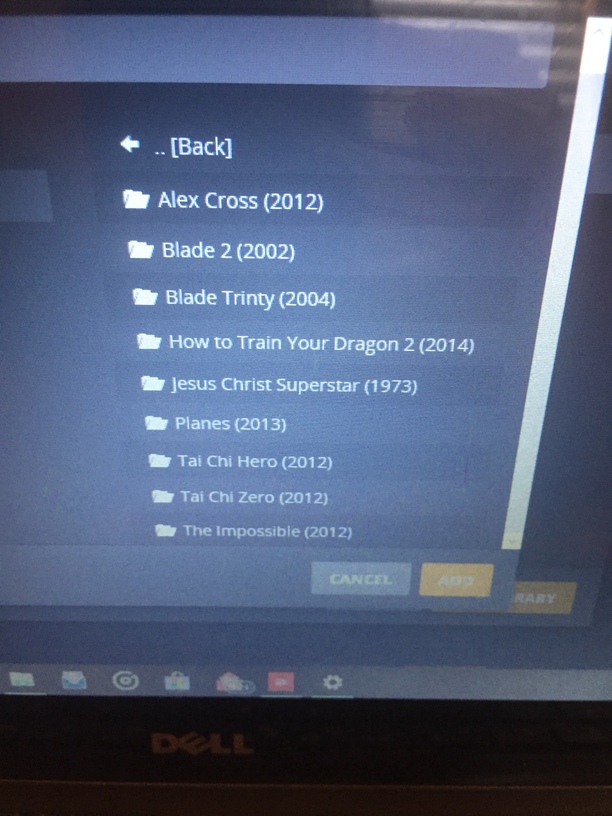
The picture shows how they are now
@Cooltwou_gmx_com
They should be in a folder called Movies (Or anything else really).
Then point Plex to THAT folder.
It will scan all your existing movies folders one level below that.
I do that it says it’s unable to load my content in the movies folder
Ahh. sorry.
I have seen it occasionally where a library doesn’t load, but usually it’s a temporary thing.
Is your server running on Windows? …or?
It’s on Windows 10 on my Laptop
I use windows 10 as a PMS too with no issues. Provide a screenshot of the updated library after changing from the original one.
I did provide the screenshot & that’s the way it is now & don’t have one the way it was before
Each movie shouldn’t be in its own folder. They should all be in 1 folder like c:/Movies, having all movies stored in 1 folder like @Xhaka mentioned.
To clarify. Each movie can be in its own folder, but do not load each folder path into plex.
More here.
https://support.plex.tv/articles/200381023-naming-movie-files/
Folder Nesting@Xhaka comment was to say that you should load the parent folder that holds all your movies in.
I did before I put each movie in a folder & it said couldn’t load content & said the same thing after I put each one in a folder & said the same thing again when I went to rename the folders so I have no idea what the problem is
@Cooltwou_gmx_com
The screenshot you posted above. What is the parent folder. i.g. if you clicked “..[Back]”
This topic was automatically closed 90 days after the last reply. New replies are no longer allowed.
