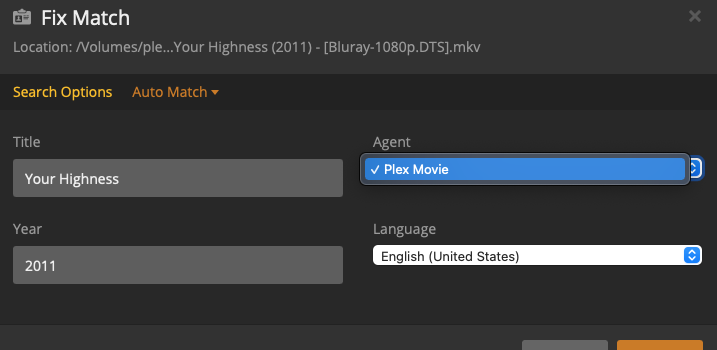
Server Version#: 1.21.4.4054
If the Plex agent doesn’t pull up the correct metadata; I no longer have the option to switch to another agent unless I change the agent for the entire library.
In the past it was pretty easy, just do a manual search with another agent. Now that’s no longer possible. In particular for categories that don’t fit neatly into movies or tv shows this is problematic.
Thanks for the response.
I read your note, re: tagging with TMDB/IMDB agent by listing the ID tag.
My questions is more aimed at; what if I want to use another agent outside of TMDB? For example for some I use a filebot agent to tag that utilizes my local metadata. As I mentioned, files that dont fit neatly into a tv or movie bucket; having the flexibility to use multiple sources or if all else fails, use my own was handy.
Previously I would use the plex agent and if that didnt work, id look at TMDB. And lastly if that didnt work, I would use my own metadata to tag it.
I’m more asking about the ability to choose as opposed to a specific agent. Hopefully that makes sense.
You cannot use other agents when the library agent is set to Plex Movie, everything will be matched with the Plex Movie agent.
You should probably be using an “Other Videos” library for these files
In the next PMS update it will be possible to use TMDB ids in the search title field as well as fixing a bug where “Unmatch” wouldn’t work correctly, so in this case your fall backs would be:
Search by Title and Year.
If that doesn’t return results you expect you can locate the movie on IMDB or TMDB and put the ID in the “Title” field when searching (for IMDB use the format tt12345678 and TMDB will use tmdb-123456789)
If the titles simply don’t exist on either site you should ask if it really belongs in a movie library and not a “Other Videos” library as mentioned before. If you think it’s a legitimate movie consider contributing to TMDB and adding the movie there.
If it’s some fan film or home made movie that you would like to live in your main movies folder and it hasn’t been incorrectly matched then it will already be using local metadata you provided (just refresh metadata when you make changes). If it matched to something incorrectly you should use the “Unmatch” option (this currently doesn’t work correctly but is fixed in the next beta release).