Server Version#: Version 1.32.4.7195 on Windows 11 Pro
Player Version#: App on Android phone up to date
Why bother purchasing a Lifetime when my Galaxy phone PLEX app needed new credentials !!! THAT should be MY choice on Security WTH ! Now all my devices tablets, Firesticks and Smart TV’s are going to be doing this at the worst TIME Once I activated I can see on my server and who to KICK off NOT YOU. And this was My Phone for PETE SAKE. or is there another setting I didn’t read about ? Was reading how you snoop what I do on my Server but don’t share it ! LOL Don’t want anything I do look over by you what I am watching.
 wwhattttt?
My Galaxy phone Plex app has been working for a while and today traveling wanted to play music and the app need re-activaded credentials needed reNewed
PlexAmp wouldn’t have done that because it’s specifically meant for Music and doesn’t need to be tokenized frequently or at all after the first login. I highly suggest you use PlexAmp for Music and other audio.
Sorry my music is thousands of music videos dont use Amp yet. So no it did not work ! Last night i used my laptop in this forum … Today i am now on my tablet GUESS WHAT ! While logging in with email & password PLEX Made be burn another authenticate stored password !!! Plex is a monster smashing everything that should work easy like changing devices to chat !!!
Not sure what you are experiencing, but I have a plex pass, and I only reset my password when I want to. So I am not sure why you say you are having to reset your password. Occasionally I do need to log back info a device, at most 1-2 times a year.
I am not changing passwords . Plex is making you use the 3rd option of authenticating You. When you use Google gmail when you login into with another device it sends alert to your phone. But after it never does it again. Plex is shutting you out until you prove its you again. So now it has happened twice Using Plex app on Phone and now using my tablet this morning.
It seems you are confused by two different things:
-
https://support.plex.tv/articles/two-factor-authentication/
You activated this. When you did, it gave you a few “recovery codes” which you should not use except if anything else doesn’t work. Regularly, you would install an authenticator app onto your smart phone or tablet, which is compatible with the TOTP protocol. Details in the linked article. -
https://support.plex.tv/articles/use-federated-authentication-to-sign-in/
It doesn’t look like you have currently linked a Google account to your Plex account. So I am not sure what you mean when you mention Google mail.
Gmail was example how you change devices how it reacts.
This morning logging in to Plex forum it wasnt satisfied with just my email & password it made me use one of my stored authenticator codes.
And yesterday used my cell phone to play plex for music videos and it also made me burn another authenticator code. Its making me worried running around having to do this with other family devices ?
I am sure that it did not explicitly request one of the recovery codes. It would have accepted the code from an authenticator app – which is what you are supposed to use by default.
The valid time of login sessions are limited. Intentionally.
Install an authenticator app onto your phone. Feed it with the “text code” (or a photo of the QR code) which were shown to you when you activated 2FA.
Now you can always open the authenticator app and get a new code whenever you need it.
If you think that 2FA is too much of a hassle, you can disable it again. But then your Plex account can be taken over more easily, by guessing or stealing your password.
How to disable 2FA is also explained in the linked article.
If you have used almost all of your recovery codes, you can always get a new set on your account page https://app.plex.tv/desktop/#!/settings/account
by clicking on “Edit” under Two-Factor Authentication
The VERY thing you’re bishing about (2FA) 2-Factor Authentication is actually a bare minimum that ALL INTERNET companies must follow (or at least should) to PROTECT and SECURE their user’s account.
There’s not a day or week here on the forums that someone reports of their account being hacked or possibly tampered with and it often is because PASSWORDS are breakable. 2FA that’s tied with an Apple or Google account along with your phone, something that’s often PHYSICALLY with you, actually help deter nefarious activities by others.
As Otto has pointed out, PLEX Inc. has upgraded and expanded their security OPTIONS (which means you can indeed OPT in or out) and it’s important that YOU, the user, understand what available tools you have been given to help protect your account.

 My case in point Literally posted 5 min after responding to your post.
2FA is a PITA, and I dont use it.
HOWEVER I do practice text book infosec. All of my accounts have unique random 20+ character passwords, and that are changed regularly.
I have never had a core account hacked. I have had a specific site get compromised and that that information leak.
But as posted above, I think you should review your 2FA setup and make sure you are using a proper authenticator.
Thank you after my Holiday meltDOWN with all hell breaking lose !
I didn’t know after having my Working Apps needed to use Google Authenticator which didn’t realize on my phone. I was using my saved codes with logging into my e-mail. Look at it this way Netflix, Amazon, and Peacock on all my other equipment after being setUp for years never needed that crap ! So now looking to go back to the way it was and REMOVE Authenticator.
After moving my drives to a new Server I built with Windows 11 Pro and all my users needing updating because sometimes it gave the option of both servers pick one and most never showed the option crap shoot. Deleted them and re-adding them.
Even my self I tried using PLEX channels got the Server Can’t handle it error My server worked fine streaming my Movies or TV shows and Live TV from my cable provider at another location. But Plex channels didn’t work. Photo of my provider working and photo showing Plex Channels not working.
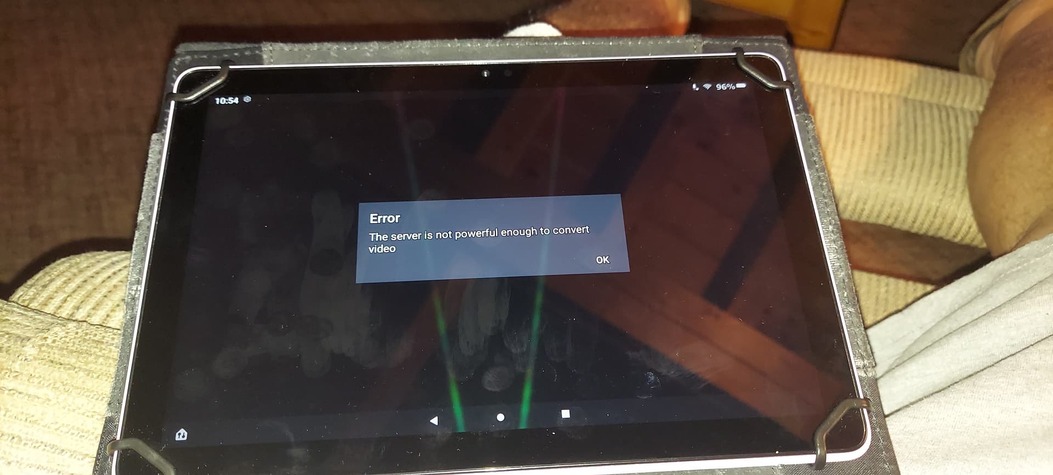


Is it easy to remove the whole thing from my setup ?
I had my chain jerked around because I was using Windows 7 which is not supported but should still work… Got a lot of RIGeromoe My network needed a better Video card, Comcast might be blocking get a VPN etc etc . PLEX shut down anything that used PLEX on 7 behind the scenes . Just like they Shut down a LOT of Smart TV support leaving us holding the BAG $$$$$$$ Still running my setup with 7 since they are the only one that can unencrypt channels on Comcast using cable cards with WMC. I had a dupe machine moved all the drives over to Windows 11 Pro ! Funny same equipment everything works.
